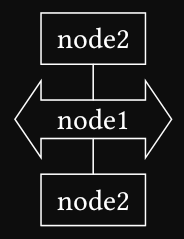
I don’t know if the south/north have to be exactly on the shape border. Without them it works as expected.
#import "@preview/fletcher:0.5.8": *

#let arrow(node, extrude, fit: 0.5) = {
  let (w, h) = node.size
  let x = w / 2 * 1.5
  let y = h / 2 * 1.5

  let φ = calc.atan2(w / 1pt, h / 1pt)
  let x = w / 2 * (1 + fit) + extrude / calc.sin(φ)
  let y = h / 2 * (1 + fit) + extrude / calc.cos(φ)

  let a-width = h / 4 * (1 + fit)
  let a-len = w / 3 * (1 + fit)
  let obj = draw.line(
    (-x, 0pt),
    (-a-len, -y),
    (-a-len, -a-width),
    (+a-len, -a-width),
    (+a-len, -y),
    (+x, 0pt),
    (+x, 0pt),
    (+a-len, +y),
    (+a-len, +a-width),
    (-a-len, +a-width),
    (-a-len, +y),
    (-x, 0pt),
    close: true,
  )
  draw.group(obj)
}

#diagram(node-stroke: 0.5pt, spacing: 1em, {
  node((0, -1))[node2]
  edge()
  node((0, 0), shape: arrow)[node1]
  edge()
  node((0, 1))[node2]
})