A slightly better version, that pass both the heading and the content to a single function:
#let is-heading(it) = {
  it.func() == heading
}

/// A show rule that wrap everything between two headings of the same level
///
/// Usage: ```
/// #show: wrapp-section.with(
///   depth: 1, // optional
///   wrapper: (heading: none, section: none) => {
///    rect[
///      heading: #box[#rect[#heading]]
///
///      section: #box[#rect[#section]]
///    ]
///  }
/// )
/// ```
///
/// Note: `#set` rules (like `#set text(lang: "fr")`) must be declared before calling `#show: wrapp-section`
#let wrapp-section(
  body,
  depth: 1,
  wrapper: none,
) = {
  // The heading of the current section
  let heading = none
  // The content of the current section
  let section = ()

  for it in body.children {
    let x = it.func();

    if (is-heading(it) and it.fields().at("depth") < depth) {
      if heading != none {
        // Complete the last section
        wrapper(heading: heading, section: section.join())
        heading = none
        section = ()
      }
      it
    } else if is-heading(it) and it.fields().at("depth") == depth {
      if heading != none {
        // Complete the last section
        wrapper(heading: heading, section: section.join())
        heading = none
        section = ()
      }

      heading = it
    } else if heading != none {
      // Continue the current section
      section.push(it)
    } else {
      it // if not in any section (before the first heading of the appropriate depth)
    }
  }

  // Complete the last section
  if heading != none {
    wrapper(heading: heading, section: section.join())
  }
}
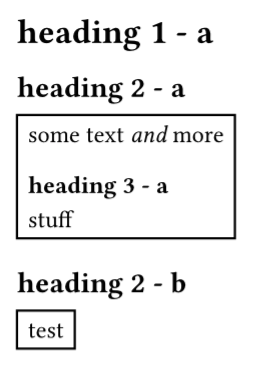
The same example as above:
#set text(lang: "en")

#show: wrapp-section.with(
  depth: 2,
  wrapper: (heading: none, section: none) => {
    heading
    rect(section)
  }
)


= heading 1 - a

== heading 2 - a

some
text _and_
more

=== heading 3 - a

stuff

== heading 2 - b
test
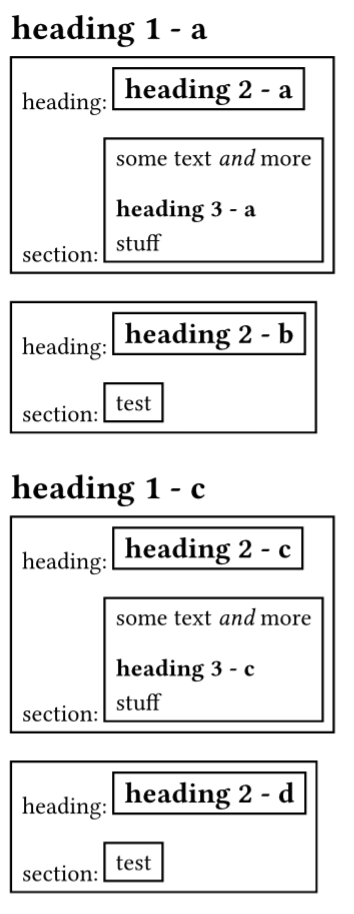
And a more interesting example that demonstrate how manipulate both the heading and the content of the section level you want to format:
#set text(lang: "en")

#show: wrapp-section.with(
  depth: 2,
  wrapper: (heading: none, section: none) => {
    rect[
      heading: #box[#rect[#heading]]

      section: #box[#rect[#section]]
    ]
  }
)


= heading 1 - a

== heading 2 - a

some
text _and_
more

=== heading 3 - a

stuff

== heading 2 - b
test


= heading 1 - c

== heading 2 - c

some
text _and_
more

=== heading 3 - c

stuff

== heading 2 - d
test