Oh, noo… When I tested it, turns out that I do need context because of the heading/reference numbering suffix issue (with callback function for complex/custom numbering). GitHub · Where software is built
#let in-heading = state("in-heading", false)
#set heading(numbering: (..n) => context {
  if in-heading.get() { numbering("I.", ..n) } else { numbering("I", ..n) }
})
#show heading: it => in-heading.update(true) + it + in-heading.update(false)

= Heading <a>
@a
Is what I would say a few moments ago, but in reality, you don’t need this check/context IF you manually handle 1 of 2 use cases, i.e., in-heading numbering. Then reference can use built-for-reference heading.numbering and it’s all good. Also, this might fix this, though it’s only for body, but should also help with numbering. Contextual content doesn't appear in PDF document title and bookmarks/outline · Issue #3424 · typst/typst · GitHub
Is what I would say a few moments ago, but then you might use outline and it all crumbles as it uses built-for-reference numbering. You can’t use in-outline because it again will require context. You can probably also manually handle this 3rd use case. But you’ll end up with a big heading and outline entry show rules just so you can override the heading numbering. A better way would be to only override a very specific ref, plus you don’t have to write a destructive show rule (Option to hide last dot in refs to heading that had custom numbering. · Issue #6032 · typst/typst · GitHub):
#set heading(numbering: numbly("{1:I}.", "{2:1})"))
#show ref.where(form: "normal", supplement: auto): it => {
  if (
    it.element == none
      or it.element.func() != heading
      or it.element.numbering == none
      or it.element.supplement != [Section]
  ) { return it }
  show regex("[\\w.)]+[.)]"): it => it.text.slice(0, -1)
  it
}
Is what I would say a few moments ago, b… oh, wait.
This is kind of very closely related issue, but not exactly what I was asking about. Thankfully, they can work together, so I can use the above heading.numbering + ref combo if the numbering is complex, and it should be super robust.
The outlined: true doesn’t make much sense, especially since non-outlined outline is already unnumbered. Anyway, this is not a concern for me. And the duplicates. Even though with How to apply titlecase to headings in Document Outline? - #3 by Andrew, now there are actually duplicates, but both copies already have synced numbering, so this side effect is not a problem in this case.
#set heading(numbering: "I.1.")
#let special-heading-name = "very special"
#show: doc => context {
  let is-special = it => (
    lower(it.body.at("text", default: "")) == special-heading-name
  )
  let special-heading = query(heading.where(level: 1))
    .filter(is-special)
    .first(default: none)
  if special-heading == none { return doc }
  let rest-of-the-headings = query(
    selector(heading).after(special-heading.location()),
  )
  show selector.or(..rest-of-the-headings.map(it => heading.where(
    level: it.level,
    body: it.body,
  ))): set heading(numbering: none)
  doc
}

#outline()

= Heading
= Another
== 2nd level
= And another one
= Very special
= Last
#bibliography(bytes(""))
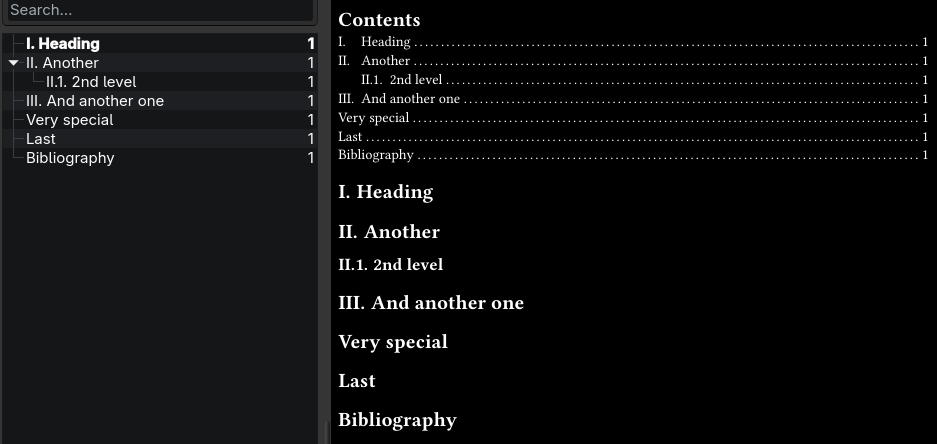
This is a very nice, proper-like solution, yet it’s hacky because you need to utilize not only the everything show rule, but also use context on top of it, where you query potentially a ton of elements. So the performance is a concern. But so far it seems not much of a problem. Moreover, it allows to remove whatever else code was there because of the numbering issue. And since it’s an isolated show rule that is not destructive, it’s pretty damn robust, considering the use case. It’s irreversible, but for a template function that’s usually the point anyway. But still, a native solution should exist.