Here’s a demo of layout + measure which can sometimes be used to measure size of a part of the document and adapt size of things - like the length of the line. I think it works well in this case. In this case though I would prefer to use block border because it’s a simpler solution. But there are other examples where one has to use layout/measure.
This takes the code from the first post and adapts it to use layout/measure
#set page(height: 8cm, width: 8cm, margin: 1em)

/// Call with content to be laid out and a function that will draw the line and the content
/// the function receives a (width, height) dictionary from layout as its only argument
#let size-my-line(content, line-func) = {
  layout(layout-size => {
    let laid-out-size = measure(content, ..layout-size)
    line-func(laid-out-size)
  })
}

#box(
    width: 4cm,
    inset: (left: 1.4em, bottom: 1.4em, rest: 1em),
    radius: 0.4em,
    fill: blue.lighten(85%)
    )[
      #let the-text = lorem(15)
      #size-my-line(the-text, size => {
        place(
          horizon + left,
          dx: -0.4em,
          line(
            angle: 90deg,
            length: size.height,
            )
          )
        the-text
        // alternate way (with slightly different spacing by default)
        /*stack(dir: ltr, spacing: 0.4em)[
          #line(angle: 90deg, length: size.height)
        ][#the-text]*/
      })
    ]
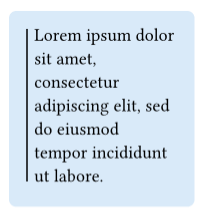
And yes - this solution is still not something that measures the box itself. It just measures the text we want to layout inside the current layout context - remember that’s a box with fixed width 4cm. The layout computation produces a real height as a product of the context with fixed width. Then we size the line according to the text.
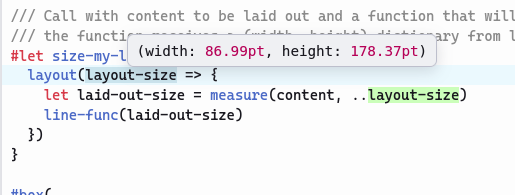
Typst app hover picture: this is the input to the layout, the space available. Note how all the page height minus margin is available more or less.