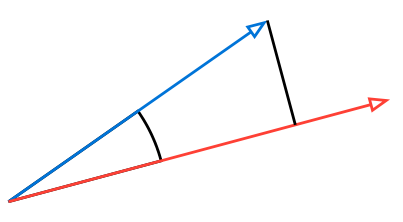
You can use the rotate function in combination with intersections.
#import "@preview/cetz:0.4.1"

#cetz.canvas({
  import cetz.draw: *
  scale(4)

  let rotation = 15deg
  let theta = 20deg

  rotate(rotation)
  arc(
    (),
    start: 0deg,
    stop: theta,
    radius: 5mm,
    mode: "PIE",
    anchor: "origin",
  )
  let (o, a, b) = ((0, 0), (theta, 1cm), (0deg, 1.25cm))
  line(o, a, mark: (end: ">"), name: "v1", stroke: blue)
  line(o, b, mark: (end: ">"), name: "v2", stroke: red)

  hide({
    line(
      a,
      (
        // Calculate the x coordinate of `a` from polar coordinates
        a.at(1) * calc.cos(a.at(0)),
        -1,
      ),
      name: "perpendicular line",
    )
  })

  intersections("x", "perpendicular line", "v2")
  line(a, "x.0")
})