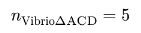
In math mode, normally you use "..." to add text, and it is typically desired to have spaces around the text:
$ 2 "if" x > 0 $
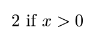
You can avoid the spaces by omitting the spaces in the source code:
$ 2"if"x > 0 $
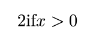
Similarly in your example you can write the following (I think the upright is useless here anyway since the argument is not math but text):
$ n_("Vibrio"Delta"ACD")=5 $
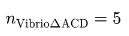
But probably the “ABC” should be math, not text (i.e. it should use the math font). So I guess the right solution is:
$ n_("Vibrio"Delta upright(A C D))=5 $