Hi everyone,
I wanted to share a slightly unusual use of Typst that I’ve been working on for the last few months.
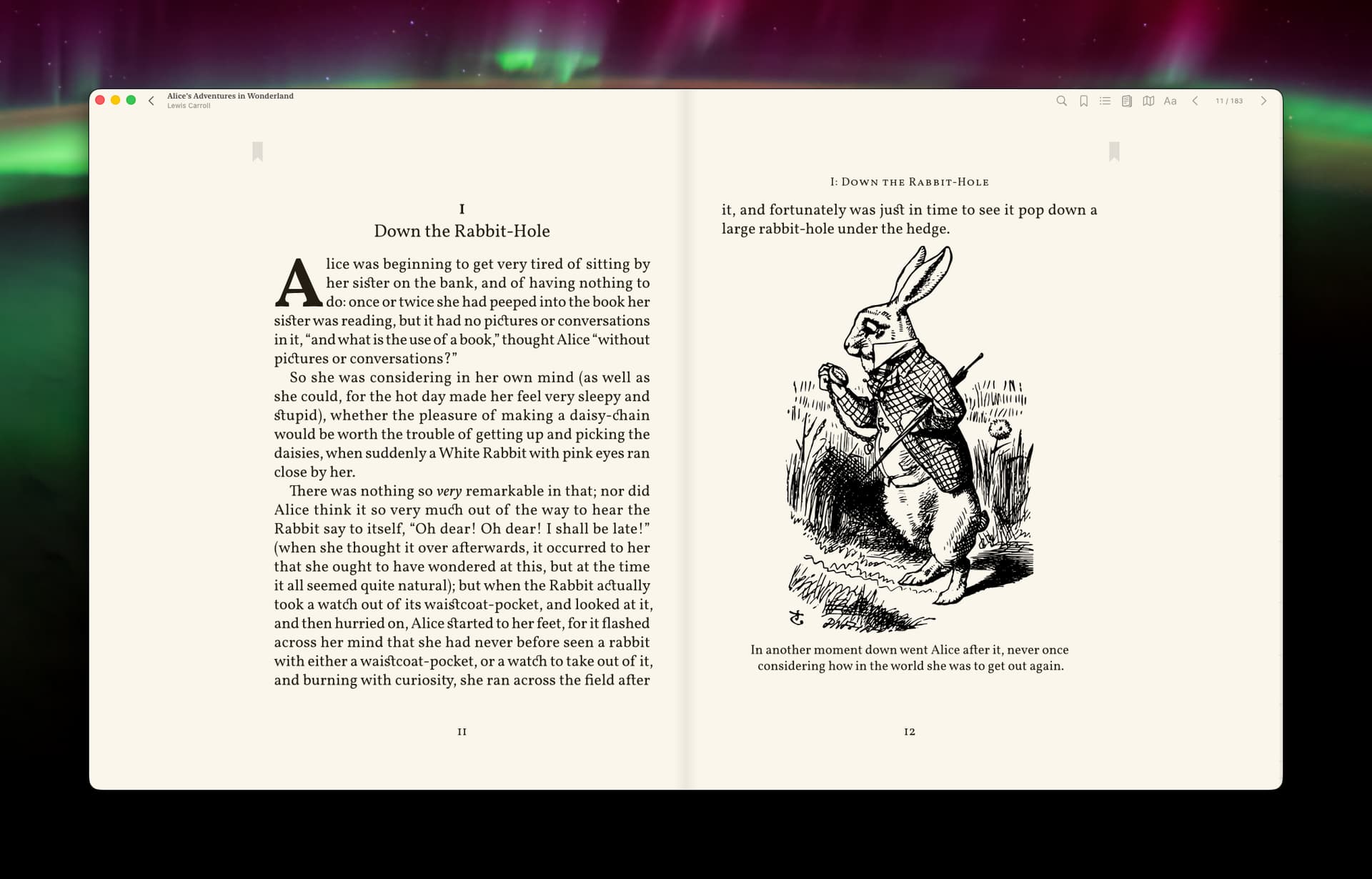
It’s called Bovary: https://getbovary.com . It’s an app for Mac, iPhone and iPad.
The idea started from a personal frustration: ebooks are, rationally, the perfect way to read — portable, searchable, syncable — but I never really enjoyed reading them. For me, the problem was not the screen itself, but the lack of proper typesetting. Most ebook readers give you a font picker, font size, margins, line spacing, maybe a theme, and call that typography.
I wanted to try a different approach: use Typst as the actual page-composition engine for EPUBs.
How it works
The current pipeline is roughly:
EPUB
→ parse HTML / CSS / metadata
→ normalize the source
→ apply heuristics
→ generate Typst source
→ render pages
→ extract bitmap + text map
→ display pages in the app with an interactive layer
The rendered bitmap is used as the visual page. The text map lets the app keep the page interactive: text selection, annotations, marginalia, highlights, quote extraction, and so on.
So Typst is not used here to produce a static PDF, but as a live-ish rendering/composition engine behind a Mac / iPad / iPhone reader.
Editions instead of settings
One of the main product decisions was to avoid endless user settings.
Instead of giving the user a hundred controls — font, size, margins, line spacing, paragraph spacing, themes, etc. — Bovary uses what I call Editions.
An Edition is a complete typographic system:
- typeface
- measure
- margins
- leading
- paragraph rhythm
- hierarchy
- chapter openings
- page atmosphere
Right now there are 9 editions: 6 for prose and 3 for more technical books.
Some are more traditional, some more modern. A few are inspired by French publishing houses I love, especially Gallimard.
Why Typst
Typst made the core idea possible: turning messy EPUB sources into composed reading pages without having to build a full layout engine from scratch.
For each book, Bovary generates Typst source from the normalized EPUB content, renders the resulting pages, then uses the output together with a text map to keep the page interactive inside the app.
Bovary is now nearing beta stage. The main work at this point is testing hundreds of different EPUBs from many sources, seeing where the heuristics break, and then fixing them.
A few open questions
I’d be very curious to hear thoughts from the Typst community, especially around:
- whether this is a sane use of Typst long-term
- better ways to structure generated Typst source
- performance considerations when rendering many pages
- handling technical books, code blocks, tables, footnotes, and images
- whether there are Typst features I may be underusing or abusing
- how others would approach the bitmap + text map problem
I’m not posting this as a finished product announcement — more as a showcase of an unusual Typst use case, and to see if people here find the approach interesting.
Happy to share more technical details if useful.