I would like to use thumb indices as described here:
But, this solution does not follow the numbering style (e.g. unnumbered chapters or letters in the appendix). I found that:
thumb indices in unnumbered chapters can be hidden by adding if heading.numbering == none {return}
#counter(heading.where(level: 1)).display(heading.numbering) shows the current chapter number in the correct style,
So I hoped I could just add .display(heading.numbering) in the correct place in of the solution offered in the link, and wherever I insert it I get an error. Am I just doing something wrong or is there something fundamentally hard I’m missing here?
It would be nice if #number.display(heading.numbering) could be used inside the block, but apparently ‘Type integer has no method display’ and there is not a very simple way around that Number formatting · Issue #3269 · typst/typst · GitHub
It would be nice to have the code that you are working with, or a specific place in the code from the other thread where you are trying to make a change.
In the mean time, maybe this is enough information for you.
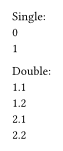
Instead of trying to apply a .display() method to an integer value (there is no such method) a new numbering can be created with the display style and the integer value:
Single:\
#for x in range(2) {
  numbering("1", x)
  linebreak()
}

Double:\
#for i in range(2) {
  for j in range(2) {
    numbering("1.1", i + 1, j + 1)
    linebreak()
  }
}
The source of the integer value(s) would be number in your case.
Great, thanks! That was as straightforward as I hoped
This is the way I intend to use it; you’ll see the changes compared to the link I included earlier are minimal:
#{
  set align(center)
  text(weight: "bold", size: 25pt)[Title]
}

#set page(numbering: "i", )
#counter(page).update(1)
#outline()

#let thumb-index(height: 1cm, width: 1cm) = context{
  let total-headings = counter(heading.where(level: 1)).final().first()
  let previous-headings = query(selector(heading).before(here()))
  let next-headings = query(selector(heading).after(here()))
  let number = none
  if heading.numbering == none {return}
  if previous-headings.len() == 0 and next-headings.len() == 0 {
    // if there are no headings in the document, return none
    return
  }
  if next-headings.len() == 0{
    // if there are no more headings after, the numbering continues indefinitely
    number = counter(heading).at(previous-headings.last().location()).first()
  } else if previous-headings.len() == 0 {
    // if there are no previous headings, use the first heading found
    number = counter(heading).at(next-headings.first().location()).first()
  } else {
    let current-page = here().page()
    let next-heading-page = next-headings.first().location().page()
    if next-heading-page == current-page {
      // if the next heading is on the current page, use the next heading's number
      number = counter(heading).at(next-headings.first().location()).first()
    } else {
      // otherwise (general case) use the previous heading's number
      number = counter(heading).at(previous-headings.last().location()).first()
    }
  }
  // vertical offset for the thumb markers
  let offset = (number - 1 - (total-headings - 1) / 2) * height

  place(
    horizon + right,
    dy: offset,
    block(width: width, height: height, fill: gray)[
      #set align(center)
      #text(fill: white, weight: "bold", size: 25pt)[#numbering(heading.numbering.at(0), number)]
    ]
  )
}


#set page(
  background: thumb-index(height: 2cm)
)

= Front matter
== Section
#pagebreak()

= One more chapter
== Section

#pagebreak()
#set heading(numbering: "1.1")
#set page(numbering: "1", )
#counter(page).update(1)

= Main matter
== Section
#pagebreak()

= One more chapter
== Section
#pagebreak()

#counter(heading).update(0)
#set heading(numbering: "A.1)")

= Appendix
== Section
#pagebreak()

= One more chapter
== Section
#pagebreak()

#set heading(numbering: none)

== Back matter
== Section
#pagebreak()

= One more chapter
== Section
#pagebreak()
 and there is not a very simple way around that Number formatting · Issue #3269 · typst/typst · GitHub