Apply style to specific figures when rendering Markdown using Cmarker

I have a large Markdown project which I’m rendering in Typst. There are a lot of tables in the Markdown file that I like to be figures and have some tags for each for custom styling. In my research I found out that Cmarker does pass the html classes down to the typst renderer. Here is an example:

#let wide-table = "
<figure class=\"wide\">

| Column 1 | Column 2 |
| -------- | -------- |
| Text 1   | Text 2   | 
<figcaption>Example Caption</figcaption>
</figure>
"

#let normal-table = "
<figure class=\"normal\">

| Column 1 | Column 2 |
| -------- | -------- |
| Text 1   | Text 2   | 
<figcaption>Example Caption</figcaption>
</figure>
"

#import "@preview/cmarker:0.1.8"

#cmarker.render(wide-table + normal-table, show-source: true)

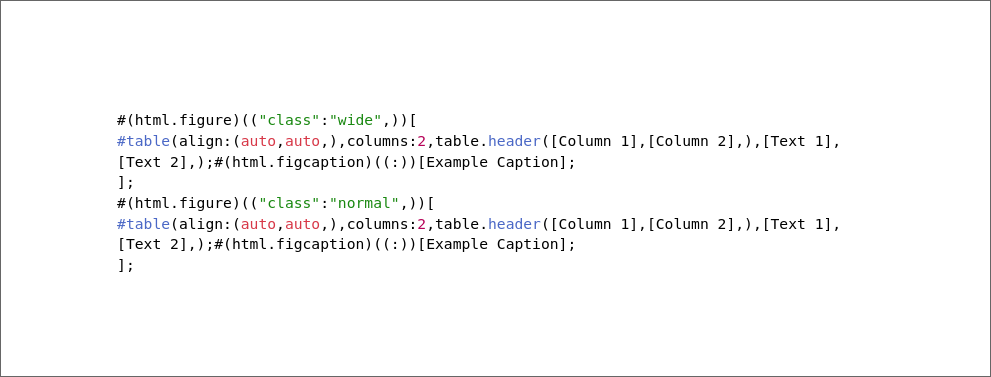
This, with the show-source option on, produces this:


The issue is I don’t know how to query and style it. Here is what I tried: Using #show figure but the class is not present in the fields when converted to native figure (I think). Using #show html.figure tells me “only element functions can be used as selectors”. There’s also html.elem which is an element function but it’s a different thing from html.figure.

Regular expressions can be used with the match method of string to extract the class:

#import "@preview/cmarker:0.1.8"

#let get-class(markdown-table) = {
  let table-raw = cmarker.render(markdown-table, show-source: true)
  let pattern = `"class":\W(\w*)\W`.text
  let matches = table-raw.text.match(regex(pattern))
  assert(matches.captures.len() == 1, message: "Number of matches must be 1")

  matches.captures.first()
}

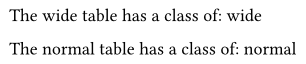
The wide table has a class of: #get-class(wide-table)

The normal table has a class of: #get-class(normal-table)

image

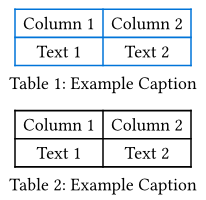
Once the class is known you can apply a style this way:

#let style-table(markdown-table, class) = {
  set table(
    stroke: if class == "wide" {blue} else {1pt}
  )

  cmarker.render(markdown-table)
}

#style-table(wide-table, get-class(wide-table))

#style-table(normal-table, get-class(normal-table))

Full Code
#let wide-table = "
<figure class=\"wide\">

| Column 1 | Column 2 |
| -------- | -------- |
| Text 1   | Text 2   | 
<figcaption>Example Caption</figcaption>
</figure>
"

#let normal-table = "
<figure class=\"normal\">

| Column 1 | Column 2 |
| -------- | -------- |
| Text 1   | Text 2   | 
<figcaption>Example Caption</figcaption>
</figure>
"

#import "@preview/cmarker:0.1.8"

#let get-class(markdown-table) = {
  let table-raw = cmarker.render(markdown-table, show-source: true)
  let pattern = `"class":\W(\w*)\W`.text
  let matches = table-raw.text.match(regex(pattern))
  assert(matches.captures.len() == 1, message: "Number of matches must be 1")

  matches.captures.first()
}

The wide table has a class of: #get-class(wide-table)

The normal table has a class of: #get-class(normal-table)

#pagebreak()
#let style-table(markdown-table, class) = {
  set table(
    stroke: if class == "wide" {blue} else {1pt}
  )

  cmarker.render(markdown-table)
}

#style-table(wide-table, get-class(wide-table))

#style-table(normal-table, get-class(normal-table))

This makes sense, but there’s one issue. All the tables are packed in a single markdown file with no way to separate them, and as you have put it “Number of matches must be 1”.

Tables can be split with (another) function:

#let split-markdown-tables(markdown-tables) = {
  let tables-text = markdown-tables

  let regex-options = `(?s)`.text//Allow . to match newlines
  let pattern-start = `<figure`.text
  let pattern-middle = `.*?`.text
  let pattern-end = `</figure>`.text
  
  let individual-tables = tables-text.matches(
    regex(regex-options + pattern-start + pattern-middle + pattern-end)
  )
  
  individual-tables.map(match => "\n" + match.text + "\n")
}
Full Code
#let wide-table = "
<figure class=\"wide\">

| Column 1 | Column 2 |
| -------- | -------- |
| Text 1   | Text 2   | 
<figcaption>Example Caption</figcaption>
</figure>
"

#let normal-table = "
<figure class=\"normal\">

| Column 1 | Column 2 |
| -------- | -------- |
| Text 1   | Text 2   | 
<figcaption>Example Caption</figcaption>
</figure>
"

#let all-tables = wide-table + normal-table

#import "@preview/cmarker:0.1.8"

#let split-markdown-tables(markdown-tables) = {
  let tables-text = markdown-tables

  let regex-options = `(?s)`.text//Allow . to match newlines
  let pattern-start = `<figure`.text
  let pattern-middle = `.*?`.text
  let pattern-end = `</figure>`.text
  
  let individual-tables = tables-text.matches(
    regex(regex-options + pattern-start + pattern-middle + pattern-end)
  )
  
  individual-tables.map(match => "\n" + match.text + "\n")
}
#let get-class(markdown-table) = {
  let table-raw = cmarker.render(markdown-table, show-source: true)
  let pattern = `"class":\W(\w*)\W`.text
  let matches = table-raw.text.match(regex(pattern))
  assert(matches.captures.len() == 1, message: "Number of matches must be 1")

  matches.captures.first()
}
#let style-table(markdown-table, class) = {
  set table(
    stroke: if class == "wide" {blue} else {1pt}
  )

  cmarker.render(markdown-table)
}

*All together:*\
#for found-table in split-markdown-tables(all-tables) {
  let table-class = get-class(found-table)

  style-table(found-table, table-class)
}

Note the use of (?s) to match across more than one line of text. Typst’s regex spec comes from Rusts spec (linked to on Typst’s regex page).

Even ignoring the fact that this solution doesn’t account for elements other than tables (like texts, headers, blockquotes, etc) but surely there has to be a way less convoluted way to mark a table for styling?