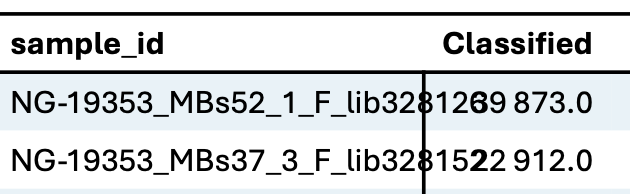
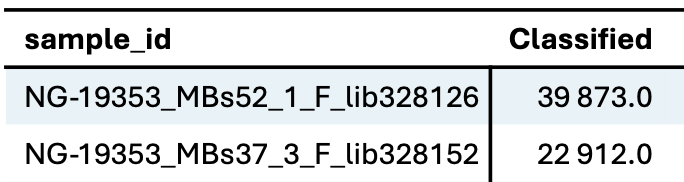
I’m working on a function to generate tables from CSV files in Typst. In some cases, the CSV may contain many columns, and some of those columns might have values that are too long, causing them to overflow into adjacent columns and resulting in a messy layout.
To handle this, I currently adjust the font size manually or rotate the table to fit better. However, I’m exploring whether this process could be automated.
Here’s the idea:
- If column values overlap, reduce the font size incrementally (e.g., by 0.1 pt).
- If the font size drops below 8 pt, rotate the table 90 degrees.
- After rotation, reset the font size to 9 pt and continue reducing again if needed.
Has anyone tried something similar, or do you have suggestions on how to implement this kind of adaptive layout logic in Typst?
Here’s my code:
#import "@preview/zero:0.5.0": format-table, set-num, set-round
#let qc_table(title, file: "table_1.tsv", precision: 1, fsize: 9pt, rot: false) = {
  set-round(precision: precision)
  set-num(math: false)
  let data = csv(file, delimiter: "\t")
  let clen = data.at(0).len()
  let formats = (auto,) * clen
  let angle = if rot { -90deg } else { 0deg }

  show table.cell.where(y: 0): strong
  show table.cell: set text(size: fsize)
  show table: format-table(..formats)
  set table(
    fill: (_, y) => if calc.odd(y) { rgb("#a2d0e043") },
    stroke: none, //0.6pt + black,
  )

  [
    #pagebreak()

    == #title

    #figure(
      rotate(
        angle,
        reflow: true,
        table(
          table.hline(y: 0),
          table.hline(y: 1),
          table.vline(x: 1, start: 1),
          columns: clen,
          align: (left,) + (right,) * (clen - 1),
          ..data.flatten(),
        ),
      ),
      caption: [_QC metrics table._],
    )
  ]
}