A new major release of Callisto is out with improvements to notebook rendering, support for executing Typst raw blocks, and much better documentation.
Main changes for notebook rendering
-
Markdown cells with embedded images (cell attachments) are now rendered correctly (thanks @th1j5 !)
-
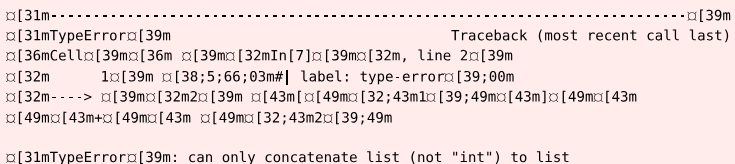
ANSI escape sequences are also rendered now, so instead of
you see
-
Templates have been replaced with a new theming system based on handlers that is easier to use and more flexible.
-
There’s a new built-in theme called “neat” that shows pretty code blocks without
In [1],Out [1]in the margin of code cells. -
LaTeX command defintions (
\newcommand) now work across Markdown cells. -
Internal links to headings in a notebook now work correctly.

Export and execution
Callisto can now export raw elements from Typst to make a valid Jupyter notebook. This can be used for example to attach to the PDF file an executable version of all code blocks, but the main use case is code execution.
The idea is to retrieve the exported notebook from the command line with typst eval and execute it with standard Jupyter tools such as jupyter-nbconvert. Typst will automatically see when the notebook file changes after execution, and include execution results in the document.
For example here’s a document with two Python code blocks:
#import "@preview/callisto:0.3.0"

#let (output, execute, evaluate,
    stage-notebook) = callisto.config(
  nb: path("export.ipynb"),
  kernel: "python3",
  theme: "neat",
)
#show raw.where(lang: "py-x"): it => {
  set text(1em/0.8)
  execute(it)
}
#stage-notebook()

Here is a plot of $y = x^2$ :

```py-x
import matplotlib.pyplot as plt
plt.rcParams['figure.figsize'] = (3, 2)
x = [1, 2, 3, 4]
y = [1, 4, 9, 16]
plt.plot(x, y);
```

The plot uses #evaluate(`len(x)`) data points.

Here is how to expand $(a+b)^2$ with SymPy:

```py-x
#| output: false
import sympy as sp
a, b = sp.symbols('a b')
sp.expand((a+b)**2)
```<sympy-calc>

The result is: #output(<sympy-calc>)
Here we only execute raw blocks that have a “py-x” language tag so normal Python blocks are unaffected. The execute function registers the block for export and tries to render the complete cell (source and output) from the notebook file.
We have chosen the name export.ipynb for our notebook. We can create this file with a typst eval call, and execute it with jupyter-nbconvert:
typst eval --root=../.. --input callisto-export=true --in doc.typ \
  'query(<notebook>).first().value' > export.ipynb

jupyter-nbconvert --to notebook --execute --inplace export.ipynb
The Typst preview now shows the execution results in the document:
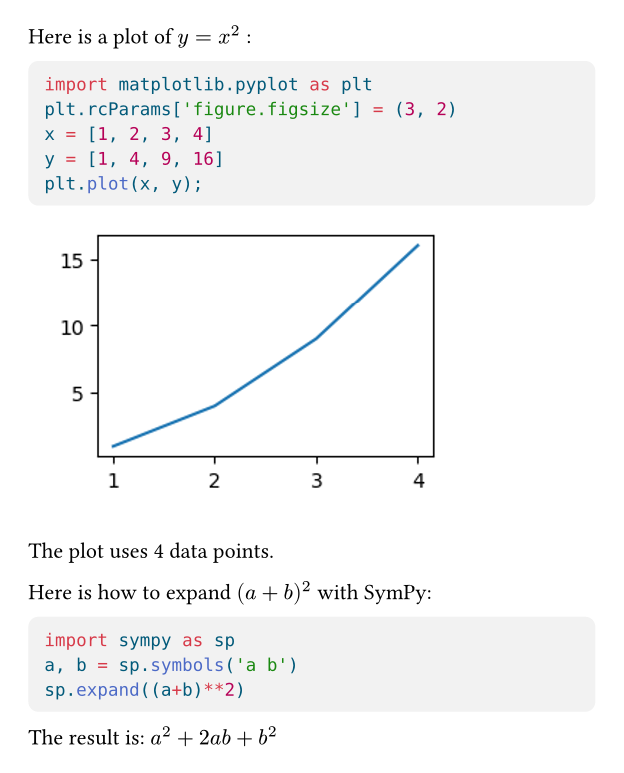
(In practice I put the commands in a Makefile/justfile, also with a watch target to export and execute when doc.typ changes.)
Documentation
There are now three tutorials that are meant to be read in order:
And most importantly there is finally a real, comprehensive reference manual that documents all functions and available settings and shows additional examples.