Hi terasa,
I can think of two ways to do it, both of which are awkward.
1 - Add extra columns
If you break your table up into more columns you can get the centering at the cost of a lot of cells that have a colspan.
#import table: cell, header

#table(
  columns: (auto, auto, auto, auto, 1fr),
  header[C1][C2][C3][C4][C5],
  [1], cell(colspan: 2)[tiny cell], cell(colspan: 2)[much, much longer cell],
  [2], cell(stroke: (right: none), none), cell(colspan: 2, stroke: (x: none), align: center)[No data], cell(colspan: 1, stroke: (left: none), none),
  [3], cell(colspan: 2)[tiny cell], cell(colspan: 2)[much, much longer cell],
)
Some functions can be used to make entering this less annoying. Note the use of the spread operator (..) on row 2. This is because centered() returns an array of values but table() expects multiple pieces of content or code, but not arrays.
#import table: cell, header

#let dbl(body) = cell(colspan: 2, body)
#let centered(body) = (
  cell(stroke: (right: none), none),
  cell(colspan: 2, stroke: (x: none), align: center, body),
  cell(colspan: 1, stroke: (left: none), none)
)
#table(
  columns: (auto, auto, auto, auto, 1fr),
  header[C1][C2][C3][C4][C5],
  [1], dbl[tiny cell], dbl[much, much longer cell],
  [2], ..centered[No data],
  [3], dbl[tiny cell], dbl[much, much longer cell],
)
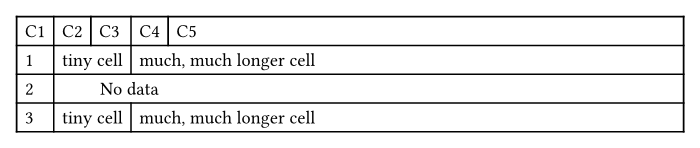
Both of these code snippets produce this result:
The header row is just to demonstrate which columns are being spanned.
2 - Calculate the correct position
It would be possible to get the widths of the two columns where “no data” is, then use that information (and the width of “no data”) to calculate the spacing. I can’t think of a simple way to do this, and if you want it to be fairly robust then it gets even more complicated.