Hi,
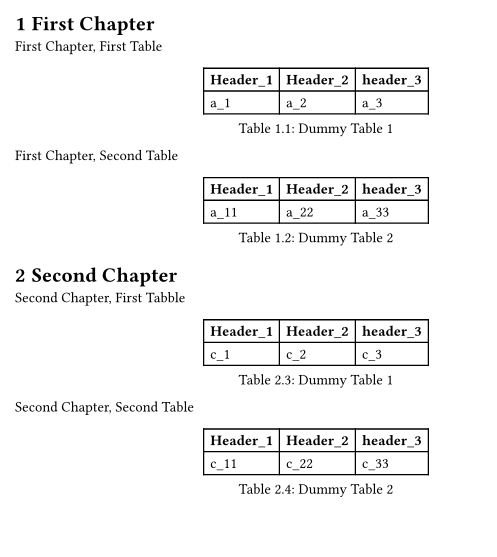
I am using headcount package. The output is as follows:
Chapter 1
The counter in the caption of the first table is: 1.1
The counter in the caption of the second table is: 1.2
Chapter 2
The counter in the caption of the first table is: 2.3
The counter in the caption of the second table is: 2.4
As you can see, the counter in the second chapter is not correct, it must be:
Chapter 2
The counter in the caption of the first table is: 2.1
The counter in the caption of the second table is: 2.2
My typ code is:
#import "@preview/headcount:0.1.0": *

#set heading(numbering: "1.1")
#set figure(numbering: dependent-numbering("1.1"))
#show heading: reset-counter(counter(figure.where(kind: image)))

= First Chapter
First Chapter, First Table
#figure(
  table(
    columns: 3,
    align: (left, left),
    [*Header_1*], [*Header_2*], [*header_3*],
    [a_1], [a_2], [a_3],
   ),
  caption: [Dummy Table 1]
)

First Chapter, Second Table
#figure(
  table(
    columns: 3,
    align: (left, left),
    [*Header_1*], [*Header_2*], [*header_3*],
    [a_11], [a_22], [a_33],
   ),
  caption: [Dummy Table 2]
)

= Second Chapter
Second Chapter, First Tabble
#figure(
  table(
    columns: 3,
    align: (left, left),
    [*Header_1*], [*Header_2*], [*header_3*],
    [c_1], [c_2], [c_3],
   ),
  caption: [Dummy Table 1]
)

Second Chapter, Second Table
#figure(
  table(
    columns: 3,
    align: (left, left),
    [*Header_1*], [*Header_2*], [*header_3*],
    [c_11], [c_22], [c_33],
   ),
  caption: [Dummy Table 2]
)
The pdf output is: