hi all ---- I am wondering if I can separate pdf pages from a multiple page PDF file ??
thank you,
=Francis=
Hi. Do you use web app? Well, the same applies to the CLI.
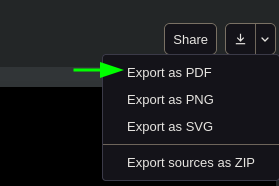
In the top right corner there is yet another export button, however (annoyingly) it’s the only one that provides an ability to set a range of exported pages (at least for PDF).
If you mean input image, then in the dev version of compiler you can specify image.page for PDF images.
There is also no info on this in Web App – Typst Documentation.
ok thanx i’ll look into web app… mucho gracias !!
=fb=
Did you use CLI? typst compile --help shows the description for --page flag.
well I went to the web app page, then uploaded a multi-page pdf file to split, but the file didn’t really show up – hence was not able to split or separate any pages or do anything unfortunately… I guess I don’t really know how to use CLI … i’ll have to try to learn this ??
The feature was added in July, hence latest release don’t have it. The CLI must be compiled from source with cargo or nix, etc. The web app has a development version in project settings that includes this feature.
The CLI is basically typts compile --pages 5-8 file.typ. But this is for outputting PDF, which exists since 0.12.0.
Any plam for generating individual files? for example, page-5.pdf, page-6.pdf, etc?
I don’t think so, but it does feel like a missing feature. Output file name pattern only applies to SVG and PNG now.
for page in $(seq 1 3); do typc --pages $page a.typ page-$page.pdf; done
If you don’t mind, could you elaborate on how this is related to Typst? Is it a pdf from a Typst document (because it doesn’t sound like it)?
If you need to split a random pdf file I would recommend using preview (macOS) or pdfarranger (any system) for that.
This is useful for workflows where you need to isolate individual figures generated with CeTZ or similar packages.
A major use case is converting complex Typst files to LaTeX for paper submissions. While narrative text is usually simple to convert, Typst figures have a much more complex syntax that is hard to translate. In this scenario, exporting the generated figures individually allows conversion tools to simply include each figure page as a PDF in the output LaTeX file, rather than trying to translate the figure code itself.
Generating multiple single-page PDF files doesn’t help much though? (You can generate a single multi-page file and import specific pages from LaTeX)
Exporting certain pages from a PDF should be useful then.
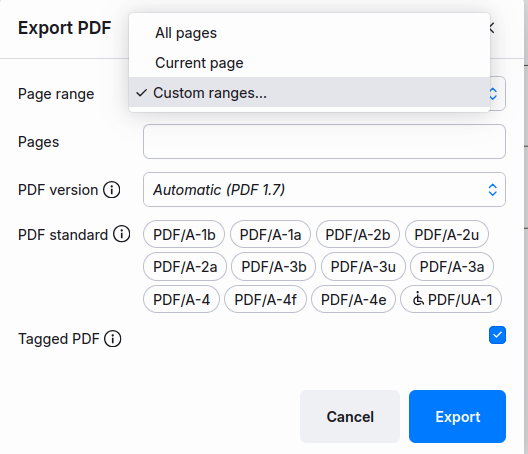
This is a webapp illustration, but it’s also an option in the typst compiler locally. From typst you only get one PDF with the requested page ranges, but a second tool could split it into pages.
For further automation, typst query could help you find out which pages to export.