Can I place an object on top of an object which follows it?

I have a raw block. The first few lines are short, so I have some free space in the top right of the block. I wanted to place a little note there. But if I put the note first, and use place to push it down, it hides behind the raw block (which would be fine if my raw didn’t have a background colour, but it does). Putting the note after the raw block and pushing it up would work, but this block is long enough to go onto the next page, so that doesn’t work either. Is there any way to control the z-axis to push the placed note atop the raw block?

Example: Typst
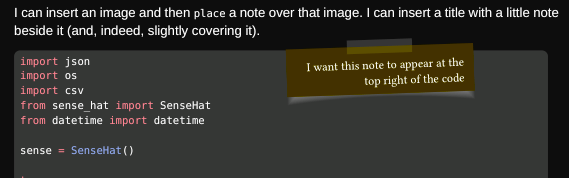
A tough one, I don’t think any raw show rule can crack this, but raw.line actually works surprisingly well.

#let place-at-the-start-of-the-code-block(body, doc) = {
  show raw.line.where(number: 1): it => {
    body
    it
  }
  doc
}

So with a scoped rule you can easily do this:

#block({
  show: place-at-the-start-of-the-code-block.with(
    place(right, dx: -2cm, dy: -0.3cm, codenote),
  )
  raw(read("code/carecentre.py"), lang: "py", block: true)
})

3 Likes

That’s very clever and I love it. Thank you.

1 Like