Can Typst detect the current column?

I have a two-column layout. I’d like to insert symbols in the appropriate margin (left or right) at certain points in the text. Ideally I could do this automatically. Automatically adding symbols is straightforward, but I’m not sure of the best way to automatically determine the appropriate margin to place them in.

Currently I’m using

  set text(blue)
  underline(overline[*#words*])
  place(left, dy: -1.5em, dx: -1.5cm, block(image("Handout.png", width: 1cm)))
}

to insert the images whenever I tag a keyword.

I think I could use location and then run calculations vs. page size to work out whether it’s the left or right column, and place it appropriately, but if there’s a more elegant way that would be great.

1 Like

Hi, welcome to the Typst forum! The idea you suggest is the only way I know of to do this. Note that you can get the current location with the here function.

1 Like

Hi Sijo! Thanks for your helpful suggestion. I did think this had solved it, but I’ve run into some further complications, which I think are probably an artefact of how here works.

I’m currently using this code:

// this adds the handout icon in the appropriate margin
// handouticon is a small image, defined elsewhere
#let hd(words) = {
  set text(blue)
  underline(overline[*#words*])
  context {
  //are we less than halfway across the page?
    if here().position().x.abs < page.width * 50% {
      //if so, stick it in the left column and fiddle the exact position a bit
    place(left, dy: -1.5em, dx: -1.5cm, block(image(handouticon, width: 1cm)))  
    } else {
      //otherwise, use the right column and fiddle the exact position a bit
      place(right, dy: -1.5em, dx: 1.5cm, block(image(handouticon, width: 1cm)))
    }
  }
}

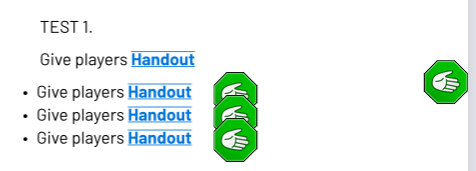
This does put the handout icon in the correct margin. However, the position varies slightly. For example:

Give players #hd[Handout] 
- Give players #hd[Handout] 

The first line leaves the handout icon significantly below the triggering text. For the remaining lines, the icon appears immediately after the text, not in the margin.

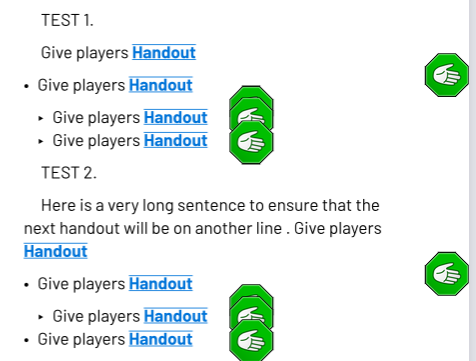
Worse, if you try changing the bullet list, any combination of indents produces a different set of positions for all the icons! For example,

Give players #hd[Handout] 
- Give players #hd[Handout] 
 - Give players #hd[Handout] 
 - Give players #hd[Handout] 

is different from

Give players #hd[Handout] 
- Give players #hd[Handout] 
 - Give players #hd[Handout] 
- Give players #hd[Handout] 

#here seems to behave oddly (to me) which seems a likely source for this behaviour. For example:

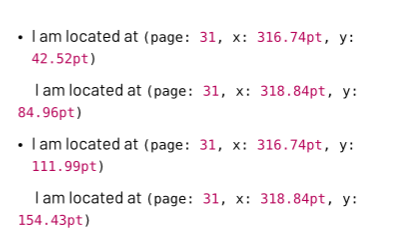
- #context [I am located at #here().position()]

#context [I am located at #here().position()]

- #context [I am located at #here().position()]

#context [I am located at #here().position()]

Gives the following:

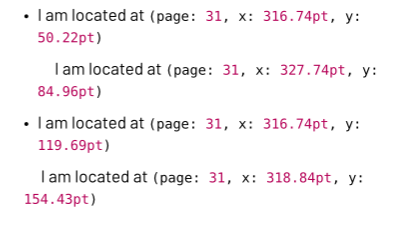
But introducing a single space in the second line changes the Y values for the first and third lines, even though they do not move.

- #context [I am located at #here().position()]

 #context [I am located at #here().position()]

- #context [I am located at #here().position()]

#context [I am located at #here().position()]

(adding a space to the fourth line changes the Y value for the third line, but not for the first)

Can anyone tell me what, exactly, #here is checking the position of? This might help clarify the problem. Is it the upper leftmost pixel of some element, or the exact midpoint? Does it matter whether there’s a parent element (which might explain the behaviour of the bullet lists)?
The context is acquired where the context block starts, so here() should refer to the position where the whole #context [I am located at #here().position()] is about to be placed.

In some cases this can be a bit tricky. In this case the extra space on line 2 means that it’s indented, and then line 2 is suddenly part of the body of the first list item. There’s also a double newline before it, so line 2 forms the second paragraph in the first list item, and it has an indent to mark that it’s a paragraph (this setting is not part of the code you shared, so we can only infer this).

That adding one space changes the y coordinates for line 1 and 3 is a bit confusing, I don’t have a good explanation. We keep in mind, again that the single space changed the whole list. With no space: 1 list item, one paragraph, 1 list item. With a space: 2 list items.

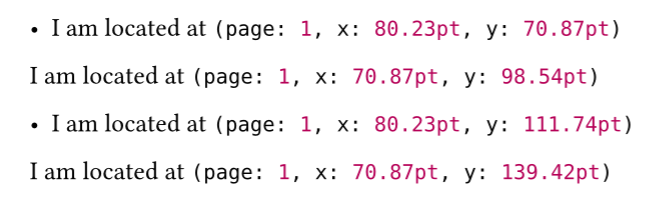
It looks like the effect of here() in the first position at the start of a line, i.e the y: 42.52pt (70.87pt below) is where the first line would be placed if there was no text in the list item. Preceding the context with just an empty box removes that effect.

Reproducible version of your code - (not depending on other style).

#let showhere() = {
  //box()
  context {
    //box(place(dx: -0.5pt, dy: -0.5pt, circle(radius: 1pt)))
    [I am located at #here().position()]
  }
}

- #showhere()

#showhere()
 
- #showhere()

#showhere()

Thanks. Unfortunately working out what that position is is confusing me.

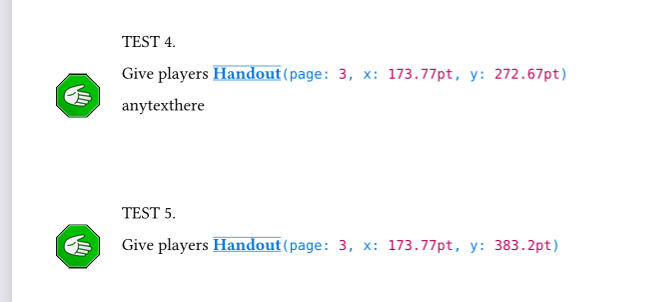
For example, here’s another test. I’ve moved this over to a new doc without indents to try and simplify things.

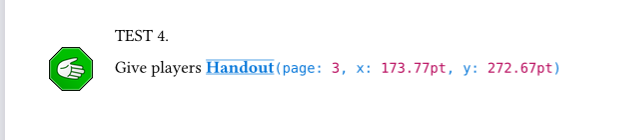
TEST 4. 

Give players #hd2[Handout] 

anytexthere

\
\
\

TEST 5. 

Give players #hd2[Handout] 

So the position of the image changes depending on whether there’s a line of text immediately after it. But if I delete the text after Test 4, the position of the image changes, but the coordinates for #here don’t.

Perhaps this is something to do with place interpreting its scope differently? If there are “hidden” levels of scope going on, and place is assigning the icon to the left position of a block of paragraphs or a bullet list, that might explain some of this.

Aargh. Sometimes Typst’s blurring of spacing-for-readability and spacing-as-code doesn’t help matters… case in point, it was not at all obvious to me that that was the mechanical effect of the newlines.

Then I’m happy I mentioned in detail. About the placement, make a complete minimal reproducible example and then other people can help with it.

I very much appreciate your help with this.

I hope this will fit the bill? I’ve simplified it and swapped out the image for a simple rect. I’ve also put the icon before the text because this seems to make a significant and useful difference.

#let icon = {rect[]}

#let hd3(words) = {
  context {
  //are we less than halfway across the page?
    if here().position().x.abs < page.width * 50% {
  //if so, stick it in the left column and fiddle the exact position a bit
    place(left, icon)  
    } else {
      //otherwise, use the right column and fiddle the exact position a bit
      place(right, icon)
    }
  }; [#words]
}

#page(columns: 2)[

#hd3[hello]
#hd3[hello]
\
- #hd3[hello]
\
- #hd3[hello]
- #hd3[hello]
\


#colbreak()
#hd3[hello]
#hd3[hello]
\
- #hd3[hello]
\
- #hd3[hello here is some text to be longer]
- #hd3[hello]
\
]

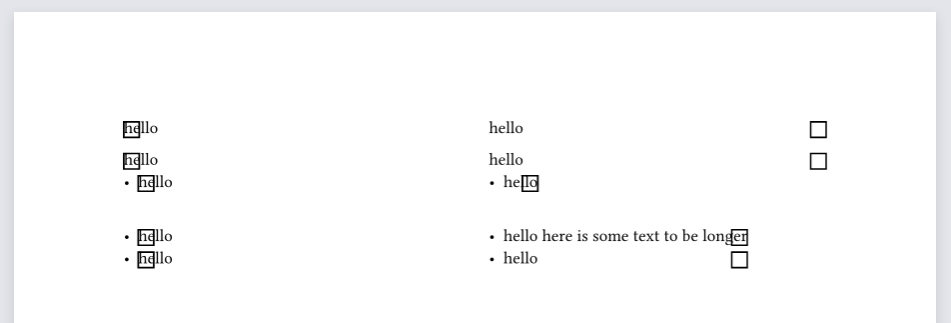
What I get now:

This is working better; the rects are now at least aligned vertically with the text.

My impression is that they are being placed at the boundary of the column, in the case of the paragraph text. For the bullet lists, a stretchable boundary seems to be created to fit the text within that list, and the rect gets assigned to the outermost position so far. I don’t know why these behave differently.

Possibly relevant: the spacing between the paragraphs with the icon is slightly larger than if I remove the icon. I don’t know why.

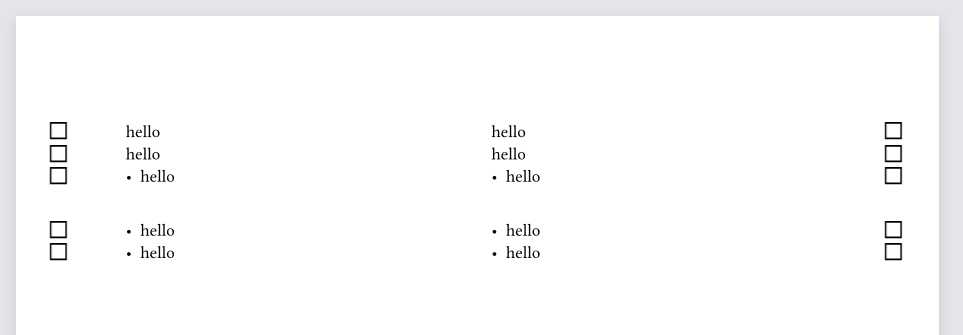
What I would like to get (a mockup):

Ideally, every icon appears vertically aligned with the midpoint of the text line where it is called, and in either the left or right margin according to its column. There is no difference in behaviour between paragraphs, bullet points, etc. as to where the icon appears on either axis.

1 Like

Okay, some more progress.

#set page(margin: 2cm, columns: 2)

#let icon = {rect[]}

#let hd(words) = {
  set text(blue)
  underline(overline[*#words*])
}

#let hdi(words) = {
  context {
  //are we less than halfway across the page?
    if here().position().x.abs < page.width * 50% {
  //if so, stick it in the left column and fiddle the exact position a bit
    //place(left, icon)  
    box(place(top + left, scope: "parent", float: true, icon, dx: -1cm))
    } else {
      //otherwise, use the right column and fiddle the exact position a bit
      //place(right, icon)
      box(place(top + right, scope: "parent", float: true, icon, dx: 1cm))
    }
  }
}

#hdi[] Give them a nice #hd[Handout] 

#hdi[] Give them a nice #hd[Handout] 

#hdi[] Give them a nice #hd[Handout] 

- #hdi[] Give them a nice #hd[Handout] 

#colbreak()


#hdi[] Give them a nice #hd[Handout] 

#hdi[] Give them a nice #hd[Handout] 

#hdi[] Give them a nice #hd[Handout] 

- #hdi[] Give them a nice #hd[Handout] 

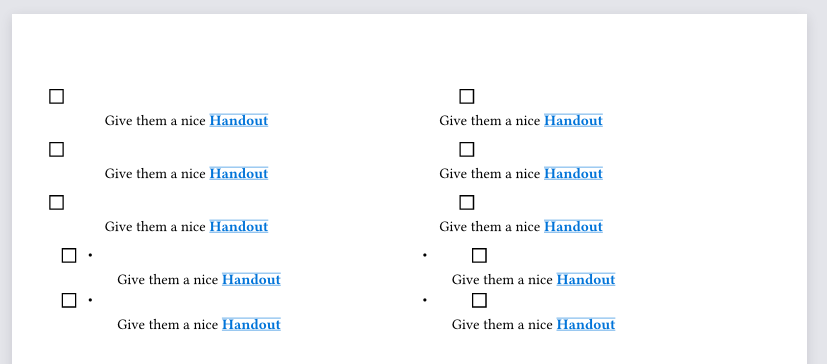
It appears that if the icon-placing code is the first thing in the line, it gets slightly better results. So I’ve separated this into two different effects, #hdi to add the icon and #hd to mark up the text itself.

This looks like progress to me?

Remaining issues that I know about:

  • placing the icon shifts the text down in the spot where it would be if I hadn’t floated it. I’ve seen comments about using a box, possibly with sym.wj, but I couldn’t get this to work.
  • I have no idea what’s going on in the right column. What is it placing the icon to the right of? It’s towards the left of the column and the page.
  • It makes no difference whether I include scope: "parent", or not, and I haven’t seen a way to identify the parent of the current element? I think this is scoped to the current column.

I like Typst a lot but I am feeling like I’m banging my head against a brick wall quite often… any help is appreciated.

Further progress!

#let hdi() = {
  context {
  //are we less than halfway across the page?
    if here().position().x.abs < page.width * 50% {
  //if so, stick it in the left column and fiddle the exact position a bit
    //place(left, icon)  
    let myhoz = here().position().x.abs
    let myvert = here().position().y.abs
    place(top + left, icon, dy: myvert -2cm, dx: -myhoz+1cm)
    } else {
      //otherwise, use the right column and fiddle the exact position a bit
      //place(right, icon)
      //box(fill: luma(99), place(top + right, scope: "parent", float: true, icon, dx: 1cm))
      let myhoz = here().position().x.abs
      let myvert = here().position().y.abs
      place(top + right, icon, dy: myvert -2cm, dx: +1cm)
    }
  }
}

hdi() Give them a nice #hd[Handout] 

#hdi() Give them a nice extremely lengthy and still in the correct place #hd[Handout] 

#hdi() Give them a nice #hd[Handout] 

#context{here().position()}


- #context{here().position()}

- #hdi() Give them a nice bullet-point #hd[Handout] 
- #context{here().position()}

#colbreak()


#hdi() Give them a nice #hd[Handout] 

#hdi() Give them a nice extremely lengthy and still in the correct place #hd[Handout] 

#hdi() Give them a nice #hd[Handout] 

#context{here().position()}


- #context{here().position()}

- #hdi() Give them a nice #hd[Handout] 
- #context{here().position()}

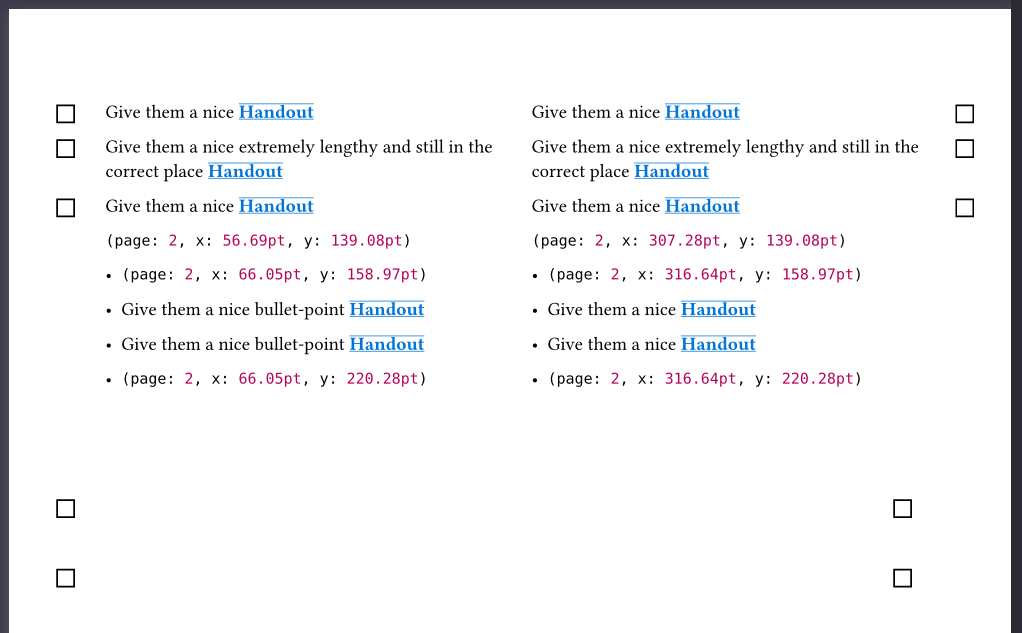
For paragraphs, this successfully places the icon next to the text that calls it, at the correct vertical position.

With bullet lists, it doesn’t.

Presumably this is because the bullet element has its own top/left/right points and those are being used. Is there a way to force it to use the ones for the page instead? scope: parent does not appear to do that (possibly because the parent is the bullet list, rather than the page, but I can’t tell).

1 Like

By George, I think we’ve got it.

let hdi() = {
  context {
  //are we less than halfway across the page?
    let iconshift = (page.margin - iconwidth) / 2
    let icondown = (par.leading / 2)
    if here().position().x.abs < page.width * 50% {
  //if so, stick it in the left column
    //get the exact position of this context whatsit
    let myhoz = here().position().x.abs
    let myvert = here().position().y.abs
    // put the icon at the top left of the current page and then adjust it according to the margin width and where we're starting out
    place(top + left, image(handouticon, width: 1cm), dy: myvert -2cm + icondown, dx: -myhoz + iconshift)
    } else {
      //otherwise, use the right column
      let myhoz = here().position().x.abs
      let myvert = here().position().y.abs
    // put the icon at the top right of the current page and then adjust it according to the margin width and where we're starting out
    place(top + right, image(handouticon, width: 1cm), dy: myvert -2cm + icondown, dx: page.margin - iconshift)
    }
  } + "\u{2022}"
  // add this to fake being a bullet-point item, then write the actual text line that this is attached to
}

This doesn’t even attempt to break out of whatever unspecified set of nested parents we might be in, it just works out the relative position where this will be in the centre of the margin and plonks it down. It feels nasty and hacky but you know what, I’ll take it.

I feel like at some point it might be worth someone making an official, nicer way of doing this, but maybe I’m overestimating how many people want to put things in the margins.

(Not to toot my own horn too much, but here’s a suggestion using my marginalia package:)

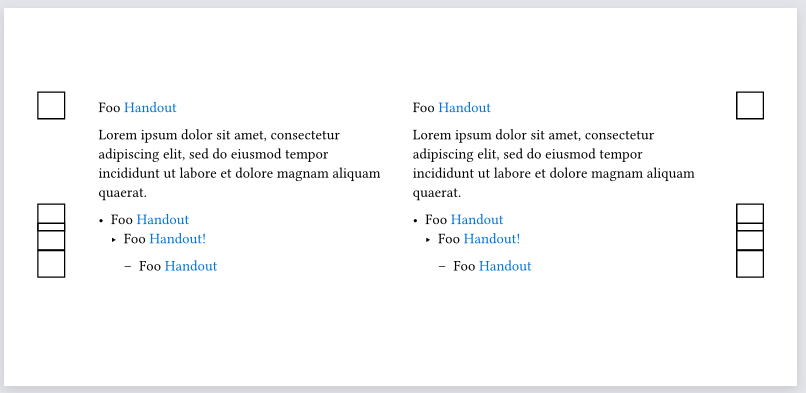
To detect what column you’re in, cmparing the current x coordinate with the page width seems unavoidable. However, for the actual placing-something-in-the-margin-relatice-to-the-current-line, you can use marginalia:

#import "@preview/marginalia:0.3.0" as marginalia: note

#show: marginalia.setup.with(
  // customize margin width here
)
#set page(columns: 2, height: 10cm)

#let hd(t) = context {
  text(fill: blue, t)
  let side = if here().position().x < (page.width / 2) { "left" } else { "right" }
  note(side: side, shift: "ignore", counter: none, alignment: "bottom", dy: 5pt, align(center, rect(width: 20pt, height: 20pt)))
}
Rest of code for example below
Foo #hd[Handout]

#lorem(20)

- Foo #hd[Handout]
  - Foo #hd[Handout!]
    
   - Foo #hd[Handout]

   
Foo #hd[Handout]

#lorem(20)

- Foo #hd[Handout]
  - Foo #hd[Handout!]
    
   - Foo #hd[Handout]

This hd function should work no matter where it is nested, and always place the image/rect in the nearest margin.

  • Replace rect(width: 20pt, height: 20pt) in the above code with something that draws your image, and dy: 5pt with something appropriate (here, dy is how far below the text baseline your image is supposed to go)
  • Replace text(fill: blue, t) however you want to style the (blue) text
1 Like

Ahhhh this seems, after tinkering for a bit (everything seems to be working OK after I integrated both this and the ideas you suggested in the other thread) to be exactly what I needed the whole time. Thank you!

I did come across Marginalia briefly but couldn’t quite see how to use it, so the example code was really helpful.

One remaining oddity - it doesn’t seem to be picking up the margin settings

#show: marginalia.setup.with(
  book: true,
  inner: ( far: 5mm, width: 5mm, sep: 5mm ),
  outer: ( far: 5mm, width: 5mm, sep: 5mm ),
  // customize margin width here
)

The numbers in there make no difference to what happens, I’ve tried various extremes. Have I missed something?

(I can move this to a new thread if it’s non-trivial)

Changing the numbers here should have an effect, that is if you increase them it should increase the margin.[1] However, there is nothing forcing the inage to fit inside the margin area, so a fixed width image inside an align(center,..) will be in the middle of the margin as long as far and sep are equal.

You can check where marginalia thinks the margin column is by using

#show: marginalia.show-frame

  1. If really nothing happens, that is a bug (unless you manually change the marfins using set page() later ↩︎

Thanks! That revealed my mistake - I needed to shift the marginalia definition into the body of the #let project = { …

The frame showing feature is really helpful.