(Not to toot my own horn too much, but here’s a suggestion using my marginalia package:)
To detect what column you’re in, cmparing the current x coordinate with the page width seems unavoidable. However, for the actual placing-something-in-the-margin-relatice-to-the-current-line, you can use marginalia:
#import "@preview/marginalia:0.3.0" as marginalia: note

#show: marginalia.setup.with(
  // customize margin width here
)
#set page(columns: 2, height: 10cm)

#let hd(t) = context {
  text(fill: blue, t)
  let side = if here().position().x < (page.width / 2) { "left" } else { "right" }
  note(side: side, shift: "ignore", counter: none, alignment: "bottom", dy: 5pt, align(center, rect(width: 20pt, height: 20pt)))
}
Rest of code for example below
Foo #hd[Handout]

#lorem(20)

- Foo #hd[Handout]
  - Foo #hd[Handout!]

   - Foo #hd[Handout]


Foo #hd[Handout]

#lorem(20)

- Foo #hd[Handout]
  - Foo #hd[Handout!]

   - Foo #hd[Handout]
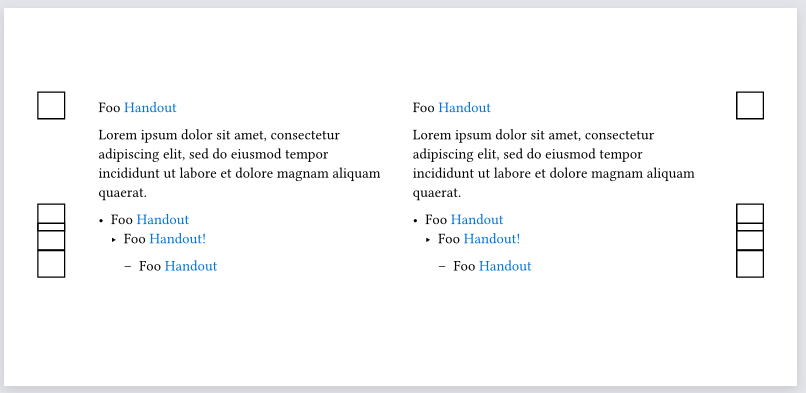
This hd function should work no matter where it is nested, and always place the image/rect in the nearest margin.
- Replace
rect(width: 20pt, height: 20pt)in the above code with something that draws your image, anddy: 5ptwith something appropriate (here,dyis how far below the text baseline your image is supposed to go) - Replace
text(fill: blue, t)however you want to style the (blue) text