Further progress!
#let hdi() = {
  context {
  //are we less than halfway across the page?
    if here().position().x.abs < page.width * 50% {
  //if so, stick it in the left column and fiddle the exact position a bit
    //place(left, icon)
    let myhoz = here().position().x.abs
    let myvert = here().position().y.abs
    place(top + left, icon, dy: myvert -2cm, dx: -myhoz+1cm)
    } else {
      //otherwise, use the right column and fiddle the exact position a bit
      //place(right, icon)
      //box(fill: luma(99), place(top + right, scope: "parent", float: true, icon, dx: 1cm))
      let myhoz = here().position().x.abs
      let myvert = here().position().y.abs
      place(top + right, icon, dy: myvert -2cm, dx: +1cm)
    }
  }
}

hdi() Give them a nice #hd[Handout]

#hdi() Give them a nice extremely lengthy and still in the correct place #hd[Handout]

#hdi() Give them a nice #hd[Handout]

#context{here().position()}


- #context{here().position()}

- #hdi() Give them a nice bullet-point #hd[Handout]
- #hdi() Give them a nice bullet-point #hd[Handout]
- #context{here().position()}

#colbreak()


#hdi() Give them a nice #hd[Handout]

#hdi() Give them a nice extremely lengthy and still in the correct place #hd[Handout]

#hdi() Give them a nice #hd[Handout]

#context{here().position()}


- #context{here().position()}

- #hdi() Give them a nice #hd[Handout]
- #hdi() Give them a nice #hd[Handout]
- #context{here().position()}
For paragraphs, this successfully places the icon next to the text that calls it, at the correct vertical position.
With bullet lists, it doesn’t.
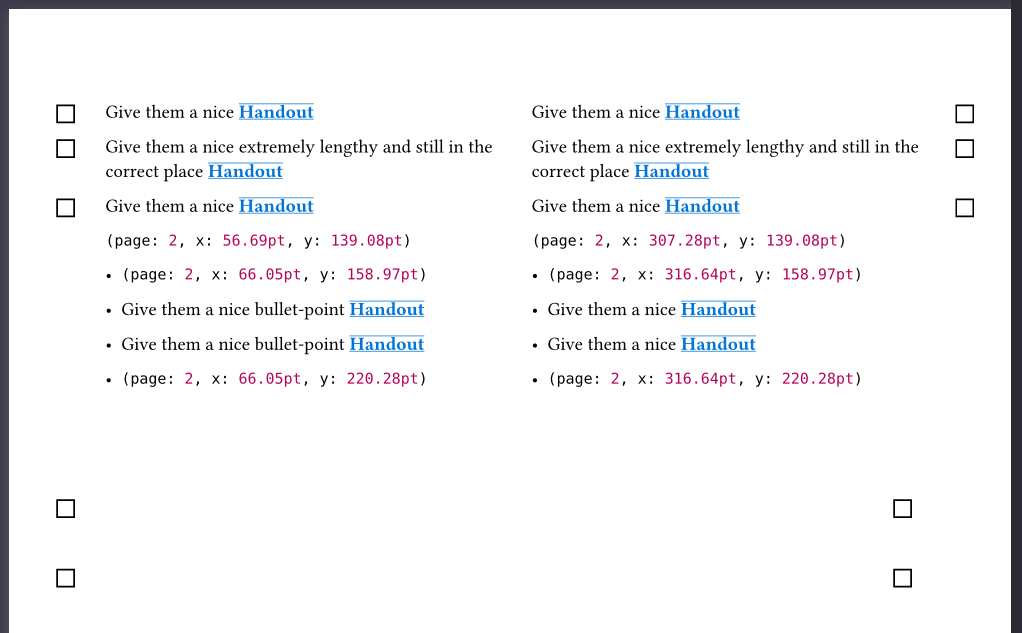
Presumably this is because the bullet element has its own top/left/right points and those are being used. Is there a way to force it to use the ones for the page instead? scope: parent does not appear to do that (possibly because the parent is the bullet list, rather than the page, but I can’t tell).