Don’t know if it’s a bug in typst or my system or something else, but I can’t set font color when font is set to “Source Code Pro”.
Minimal Working Example
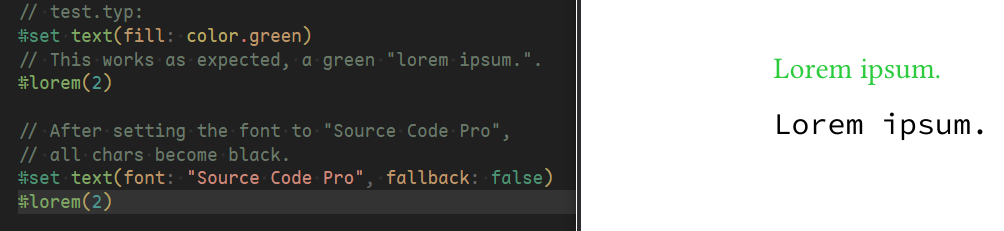
// test.typ:
#set text(fill: color.green)
// This works as expected, a green "lorem ipsum.".
#lorem(2)

// After setting the font to "Source Code Pro",
// all chars become black.
#set text(font: "Source Code Pro")
#lorem(2)
More Info
In my case, other fonts all work fine, ONLY Source Code Pro has this problem.
Putting a SourceCodePro-Regular.otf in the folder, and using command like typst c test.typ --font-path ./ would temporarily solve this problem.
I tried re-installing typst and Source Code Pro and find:
typst c test.typ can still produce test.pdf even with Source Code Pro uninstalled (I make sure that my system has rebooted and other programs can’t find the font Source Code Pro at the moment.)!?!?
typst0.13.1 doesn’t have this problem. 0.14.0~0.14.2 all have this problem.
All color display correctly in tinymist(typst’s language server)'s preview frame.
How could I make Source Code Pro work in typst again?
Thanks in advance!!
I don’t really know how to debug this, but I think it would be helpful if you tell us how (from which source) you installed the non-working font. I know variable fonts aren’t supported by Typst and fonts from Google Fonts are sometimes half broken or only a subset of the features are included.
Maybe your operating system can be helpful.? (I don’t think that should make a difference.)
This is probably due to font fallback. There should be a warning about the missing font but it still compiles, try:
from github release: 0.13.1~0.14.2 (not “installed”, I download and call ./typst.exe directly in the cli)
After uninstalling the font, I tried this line of code, still no warning or error when compiling, and the font in pdf looks just like Source Code Pro (and "Source Code Pro" still appears as an auto-complete option if I type font: " in vscode!?).
Btw, I remember I once clicked Install for All Users (although there’s only 1 user in my computer) when installing the font. When uninstalling it, I just delete the file in C:\Windows\Fonts. Maybe this is an incomplete uninstallation and typst or tinymist could use some kind of “font cache”? (but in Word or PowerPoint I can’t find Source Code Pro)
I tried compiling typst myself and found this “no color for Source Code Pro” problem first appears in commit 96dd67e (“Switch PDF backend to krilla”), I’m not good at coding so … Maybe it has something to do with this commit or krilla?
To confirm that Typst is still finding Source Code Pro on your system you can run typst fonts. Maybe there’s a copy in %LOCALAPPDATA%\Microsoft\Windows\Fonts?
When compiling the Typst document, you can specify a folder containing fonts you want to use with --font-path, and you can tell Typst to ignore the system fonts with --ignore-system-fonts.
I just tried to compile your example with Typst 0.14.2 and this version of Source Code Pro and the text is colored as expected in the PDF…
When I’m using Source Code Pro, there are some SourceCodePro-xx.otf files in %LOCALAPPDATA%\Microsoft\Windows\Fonts. After uninstalling Source Code Pro, it never appears in %LOCALAPPDATA%\Microsoft\Windows\Fonts. typst fonts always show Source Code Pro whether this font is installed or not.
When compiling test.typ with --ignore-system-fonts, it gives warning: unknown font family and compile the file as expected.
I’m guessing Typst somehow uses a broken version of Source Code Pro somewhere in my system, I’m using --font-path as a workaround now.
After uninstalling Source Code Pro, I can still find them in the Tinymist Font View, and they link to C:\Windows\Fonts\SourceCodePro-xx.otf.
I can’t find them using Windows File Explorer, but they still exist in the ls, so I rm SourceCodePro-* and delete them, then install the latest version of Source Code Pro, now PROBLEM SOLVED!
So after I delete the font in C:\Windows\Fonts, Windows didn’t remove the font files on disk for some reason (and installing the latest version won’t upgrade it), Windows just made other programs (including File Explorer) unable to find it, then Typst could still use the font (which is not in latest version and can’t be colored).
 !
!