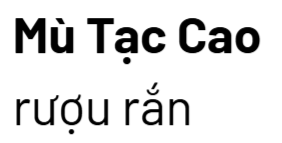
I’ve written something with the Barlow font, which specifically notes it supports Vietnamese diacritics. In the browser compiler, this looks fine.
Compiling it to PDF results in the font apparently falling back to Times New Roman or similar for certain accented characters. Acute and grave accents are fine, but the underdots and hooks fail.
It doesn’t matter whether I use precomposed characters or a simple character with a combining diacritic, the result is the same. Similarly it doesn’t matter what I use to view the PDF, so it doesn’t appear to be an issue with the PDF reader.
I’m trying to work out what is causing this and whether I can fix it. Any ideas? I would guess the compiler is where the issue happens.
A possibly-related issue is that selecting the PDF text for the above reveals a duplicated letter and a space: rượu rắắ n
These are not in the original Typst code.
rượu rắn
I can work around this by changing font, but it’d be nice to know what’s happening to help avoid future issues and maybe discover a fix, since the issue does not seem to be the font itself.
Without further information, this seems like a font issue. Are you using the web app or compiling locally? Which version of the font are you using (if you’re compiling locally you can check the installation path with typst fonts --variants).
It could also be that something in your template is causing the issue. Does it also occur on a fresh document?
Good call! That seems to have done the trick. Presumably there was a missing font version that the diacritics and/or compiler expected and that caused the issue.
I may do further checking with other fonts if time permits, but for now this solves the problem I had and explains the discrepancy between display and compiled output.