Is it possible to give a table different-style first header, continuing header, continuing footer and final footer, as done by the LaTeX package longtable?
I find solutions that would work to make the first header different, e.g., https://forum.typst.app/t/page-x-of-y-as-part-of-a-table-header/6685, but how can a footer know whether it is the last?
There’s an example of continuation header and footer here (taken from here), I hope that makes it clear how it can be done. We compare the current counter value to the final value to know if we’re on the final footer:
// This is an example of a table
// with continuation headers and footers
//
// See also these links:
// - https://discord.com/channels/1054443721975922748/1221887107350396999
// - https://github.com/typst/typst/issues/735
//

#let table-counter = counter("_table_continuation")

/// This style rule needs to be applied so that we have separate counters per table
#let table-continuation-style(body) = {
  show table: it => table-counter.step() + it
  body
}

#let headcounter() = counter("_table_continuation_header:" + str(table-counter.get().first()))
#let footcounter() = counter("_table_continuation_footer:" + str(table-counter.get().first()))

#let continuation-header(first, cont, inset: auto, ..args) = {
  let cellargs = args.named()
  if inset != auto { cellargs += (inset: inset) }
  table.header(table.cell(..cellargs, context {
    let counter = headcounter()
    counter.step()
    let current = 1 + counter.get().first()
    if current == 1 {
      first
    } else {
      cont
    }
  }))
}

#let continuation-footer(cont, inset: 0pt, last: none, ..args) = {
  // Need to make the cell "invisible" / take no space when not used, so inset is 0pt by default
  let cellargs = args.named()
  if inset != auto { cellargs += (inset: inset) }
  table.footer(table.cell(..cellargs, context {
    let counter = footcounter()
    counter.step()
    let current = 1 + counter.get().first()
    let final = counter.final().first()
    if current < final {
      cont
    } else {
      last
    }
  }))
}


// BEGIN Example Document
#set page(margin: 1cm, width: 10cm, height: 6cm)
#set document(date: none)

#show: table-continuation-style

#show math.equation: set block(breakable: true)

#table(
  stroke: 0.2pt,
  continuation-header([Example], [Example (cont'd)]),
  {
  $
    [ sqrt(2)(cos pi/8 + i sin pi/8)]^12: \
    [ sqrt(2)(cos pi/8 + i sin pi/8)]^12 = \
    // just filler here
    = [ sqrt(2)(cos pi/8 + i sin pi/8)]^12 \
    = [ sqrt(2)(cos pi/8 + i sin pi/8)]^12 \
    = [ sqrt(2)(cos pi/8 + i sin pi/8)]^12 \
  $
  },
  continuation-footer[#align(right, box(inset: 5pt)[continued $->$])]
)

// for layout convergence there is a pagebreak separating the two examples.
// Yes, conditionally inserting a footer can cause convergence problems. As a
// last resort it can also be avoided by making sure the continuation footer
// always has the same size, even in the last (empty) instance.
#pagebreak()
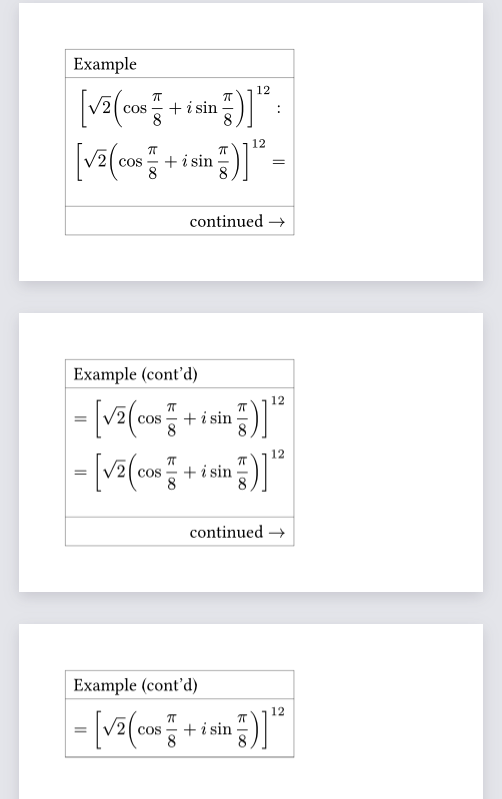
Note the convergence comment in the end of the code - in my experience it’s a bit fragile to layout convergence problems. If the two cases of footer are the same size, it should not be a problem.
@bluss already gave the solution, but I had the idea to wrap a second table around the first table. It doesn’t work because both headers appear at the top and both footers at the bottom. Possibly this could be made to work but I don’t see it having any improvements over the existing answer.
Code and output if you're interested
#set page(height: 4cm)
#set page(width: auto)

#table(
  columns: 1,
  row-gutter: 0mm,
  stroke: red,

  [Outer header],
  table.cell(
    inset: 0mm,
    table(
      columns: 1,
      stroke: 0.5pt + blue,

      table.header("Inner Header"),
      ..range(6).map(str),
      table.footer("Inner Footer")
    )
  ),
  [Outer footer]
)
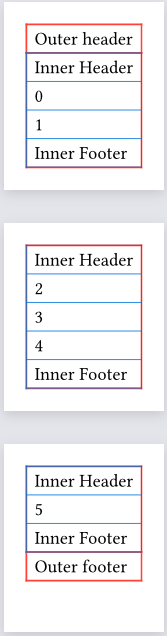
Oops, I am sorry, does this only work for a one-column header / footer?
For a footer I think that may be acceptable, but a table header usually has multiple columns…
Other that that it is quite awesome and I hope I can realise what I was trying here in LaTeX (that is, hiding the inner header/footer in a two-page document) 
And of course I hope this issue will be solved…
Here’s how you could adapt bluss’ approach to multiple columns:
#let zip-longest(..arrs) = {
  let arrs = arrs.pos()
  let len = calc.max(..arrs.map(array.len))
  array.zip(..arrs.map(arr => arr + (len - arr.len()) * (none,)))
}

#let continuation-header(first, cont, inset: auto, ..args) = {
  if type(first) != array { first = (first,) }
  if type(cont) != array { cont = (cont,) }
  let headers = zip-longest(first, cont)

  let cellargs = args.named()
  if inset != auto { cellargs += (inset: inset) }
  table.header(..headers.map(((first, cont)) => {
    table.cell(..cellargs, context {
      let counter = headcounter()
      counter.step()
      let current = 1 + counter.get().first()
      if current <= headers.len() {
        first
      } else {
        cont
      }
    })
  }))
}

#let continuation-footer(cont, inset: 0pt, last: none, ..args) = {
  if type(cont) != array { cont = (cont,) }
  if type(last) != array { last = (last,) }
  let footers = zip-longest(cont, last)
  // Need to make the cell "invisible" / take no space when not used, so inset is 0pt by default
  let cellargs = args.named()
  if inset != auto { cellargs += (inset: inset) }
  table.footer(..footers.map(((cont, last)) => {
    table.cell(..cellargs, context {
      let counter = footcounter()
      counter.step()
      let current = 1 + counter.get().first()
      let final = counter.final().first()
      if current <= final - footers.len() {
        cont
      } else {
        last
      }
    })
  }))
}
and this would be called like
  continuation-header(
    ([Example], [...]),
    ([Example (cont'd)], [!!!]),
  ),
as written, this is a bit limited. you can’t set different cell attributes for the different columns; another way of passing the arguments could fix this. I’d probably use arguments to encapsulate both named and positional arguments, to be called like:
  continuation-header(
    arguments[Example][Example (cont'd)],
    arguments(fill: red)[...][!!!],
  ),
one limitation is that you can’t change the cell atributes between regular and repeated; that’s not really avoidable with this approach, because you only know inside the cell what it is.
and here is gezepi’s approach adapted; you can’t easily use auto-sized columns, but otherwise it’s not too bad:
#set page(height: 4cm)
#set page(width: 5cm)

#table(
  columns: (1fr, 8mm),
  row-gutter: 0mm,
  stroke: red,

  [Outer header], [...],
  table.cell(
    inset: 0mm,
    colspan: 2,
    table(
      columns: (1fr, 8mm),
      stroke: 0.5pt + blue,

      table.header("Inner Header", [...]),
      ..range(6).map(str),
      table.footer("Inner Footer", [...])
    )
  ),
  [Outer footer], [...],
)
Oh nice! It’s a pity I don’t understand the syntax very well yet. In the suggestion by @bluss I have no clue how the footer finds out whether or not it’s the last. Also I hoped I could adept that code as @ensko did, but didn’t work in all kinds of ways and I had no clue what is going on. Is there maybe a debugger for typst, or maybe some way to get messages to the terminal which give me an idea of what is going on?
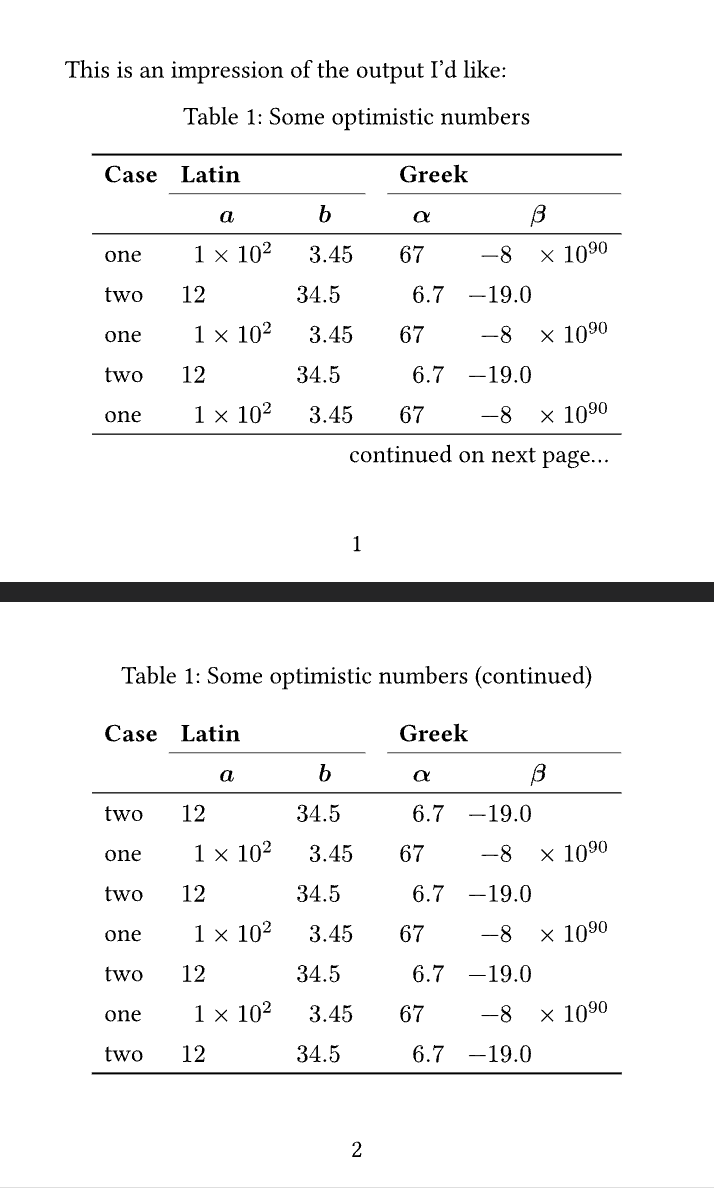
What I would like in the end is something like below, which works nicely in LaTeX with longtable, because the headers and footers can take all kinds of contents (including variable number of rows, rules, no contents at all). Is there a fundamental reason why this does not work in typst, or the way tables are currently implemented?
What I’d like ideally is:
topruleandbottomruleonly at the start and end of the table, not at page breaks (to emphasise that the does not end there)- a note ‘continued on the next page…’ before a page break
- repeat the caption plus ‘(continued)’ after a page break, then repeat the header without
toprule
#import "@preview/zero:0.6.0": format-table
#import "@preview/booktabs:0.0.4": *

#show: booktabs-default-table-style
#show figure.where(kind: table): set figure.caption(position: top)

#set page(numbering: "1")
#set page(margin: 1cm, width: 11cm, height: 9cm)

This is an impression of the output I'd like:

#align(center)[
  Table 1: Some optimistic numbers
  #show table: format-table(
    none, auto, auto,
    none, auto, auto)
  #show table.cell.where(y: 0).or(table.cell.where(y: 1)): strong
  #table(
    columns: 6,
    align: (left, center, center, center, center, center),
    toprule(),
    [Case],
    cmidrule(start: 1, end:3), // how can I leave a little space between both lines without needing the extra empty column?
    cmidrule(start: 4, end:6),
    table.cell(colspan: 2, [Latin], align: left),
    [],
    table.cell(colspan: 2, [Greek], align: left),
    [], $a$, $b$, [], $α$, $β$,
    midrule(),
    [one], [1e2], [3.45], [], [67], [-8e90],
    [two], [12], [34.5], [], [6.7], [-19.0],
    [one], [1e2], [3.45], [], [67], [-8e90],
    [two], [12], [34.5], [], [6.7], [-19.0],
    [one], [1e2], [3.45], [], [67], [-8e90],
    midrule(),
    table.cell(colspan: 6, [continued on next page...], align: right),
  )
]

#align(center)[
  Table 1: Some optimistic numbers (continued)
  #show table: format-table(
    none, auto, auto,
    none, auto, auto)
  #show table.cell.where(y: 0).or(table.cell.where(y: 1)): strong
  #table(
    columns: 6,
    align: (left, center, center, center, center, center),
    [Case],
    cmidrule(start: 1, end:3), // how can I leave a little space between both lines without needing the extra empty column?
    cmidrule(start: 4, end:6),
    table.cell(colspan: 2, [Latin], align: left),
    [],
    table.cell(colspan: 2, [Greek], align: left),
    [], $a$, $b$, [], $α$, $β$,
    midrule(),
    [two], [12], [34.5], [], [6.7], [-19.0],
    [one], [1e2], [3.45], [], [67], [-8e90],
    [two], [12], [34.5], [], [6.7], [-19.0],
    [one], [1e2], [3.45], [], [67], [-8e90],
    [two], [12], [34.5], [], [6.7], [-19.0],
    [one], [1e2], [3.45], [], [67], [-8e90],
    [two], [12], [34.5], [], [6.7], [-19.0],
    bottomrule(),
  )
]
The code uses a counter, which is increased every time a header/footer cell is generated. If the counter is 1 (or <= the number of columns in my adaptation), then it’s the first occurrence of the header; otherwise a repetition. Same for footer, just checking whether the counter is big enough yet. That’s the basic idea.
Have a look at Tips on debugging Typst code, including the dark magic and debugging in general for some advice there. Tl;dr: the equivalent of printing debug outputs is hovering over a variable/expression. For the variables inside the header code in particular, you will see multiple values, since there are multiple header cells, each displayed multiple times.
I’m about to go to bed, but I want to leave you with some reading in case you’re interested in some background. There is a fundamental difference between how Typst and TeX do things in this regard, you can read a bit about it here: TeX and Typst: Layout Models | Laurenz's Blog. One thing that Typst makes possible is breakable grid rows; other things may be more complex in its model and without re-reading the article in detail, repeated headers may be among them.
Another thing is that advanced table features are just in general not really there yet, we can admit that. Ideally, we could write something like show table.header.where(repeated: true) or something like that, but table.header does not support show rules at all yet. I can’t tell if this would be particularly hard to implement, or if it’s just a matter of doing it, but that would be the kind of ergonomics Typst would want to offer.
That’s all I can just write about. I’ll see if I can have a look at actually solving the rest of your problems tomorrow or at least next week.
But how does it know what ‘big enough’ is? In LaTeX I would use the aux file to know it in a followig run, and I can imagine other approaches, but I don’t recognise it in the code…
Certainly not too long  I’m new to typst so that’s a great tip! I’ll go over it again, but for now I don’t see the values when hovering. My label view in VS Code is also empty, so I think my document is not recognised as the ‘current workspace’, could that be?
Thanks! I’ve worked with LaTeX for a long time so I shouldn’t expect that typst is equally clear to me in a few days. So far I’m impressed!
There are two things involved. Under the hood, Typst does multiple compilations, called “iterations”. What LaTeX would put in aux files, Typst keeps in memory. Basically compilation is looped until no more aux files (state, contextual information) have changed, but at most five times, to not go infinite. If that’s not enough—read here: Typst's dreaded "Layout did not converge" warning
The second thing is how these iterations/the counters are used in the snippet above:
context {  // (1)
  let counter = footcounter()
  counter.step()  // (2)
  let current = 1 + counter.get().first()  // (3)
  let final = counter.final().first()  // (4)
  if current <= final - footers.len() {
    cont
  } else {
    last
  }
}
This code is in a context (1), which means that it can access information that may change from iteration to iteration. For example, accessing counter.final() (4) in the first iteration will just give you zero—you don’t see this, not even when hovering. In the second iteration (or maybe later; thinking this through is a bit intricate), the counter will have registered the step()s (2) and thus (4) will have the correct value. counter.get() (3) will also return the correct value: the number of step()s that preceded it in the document.
In short: “big enough” is determined by looking at the final counter value, which we know from a previous iteration.
Two more interesting things here: the counter itself is determined in a contextual way:
/// This style rule needs to be applied so that we have separate counters per table
#let table-continuation-style(body) = {
  show table: it => table-counter.step() + it
  body
}

#let headcounter() = counter("_table_continuation_header:" + str(table-counter.get().first()))
#let footcounter() = counter("_table_continuation_footer:" + str(table-counter.get().first()))
this code makes sure that each table has its own counter. Naively we could try resetting counters for every table, but then we couldn’t use final() for our footers.
And finally counter updates inside context are not visible when reading the counter, which is why (3) has that 1 +.
Could be, you’d have to ask a separate question about that if you can’t figure that out. It’s hard to speculate with the info we got. Definitely open the preview when debugging, to make sure the correct file is being compiled.
Thanks again, that’s a lot to take in
On second thought VS Code did show the values of the variables, but in a very different layout than the screenshot in the link you mentioned.
I still find it hard to wrap my head around what bits of the code refer to the current iteration and which refer to the previous one, but I guess that requires more reading and playing with typst on my part.