I’m quite new to typst and I’m looking for the “APPROXIMATELY EQUAL TO OR THE IMAGE OF” symbol
≒ (U+2252)
which in LaTeX seems to be \fallingdotseq.
Is it given a name in typst? or does one need to use the unicode number to produce this?
I’m quite new to typst and I’m looking for the “APPROXIMATELY EQUAL TO OR THE IMAGE OF” symbol
≒ (U+2252)
which in LaTeX seems to be \fallingdotseq.
Is it given a name in typst? or does one need to use the unicode number to produce this?
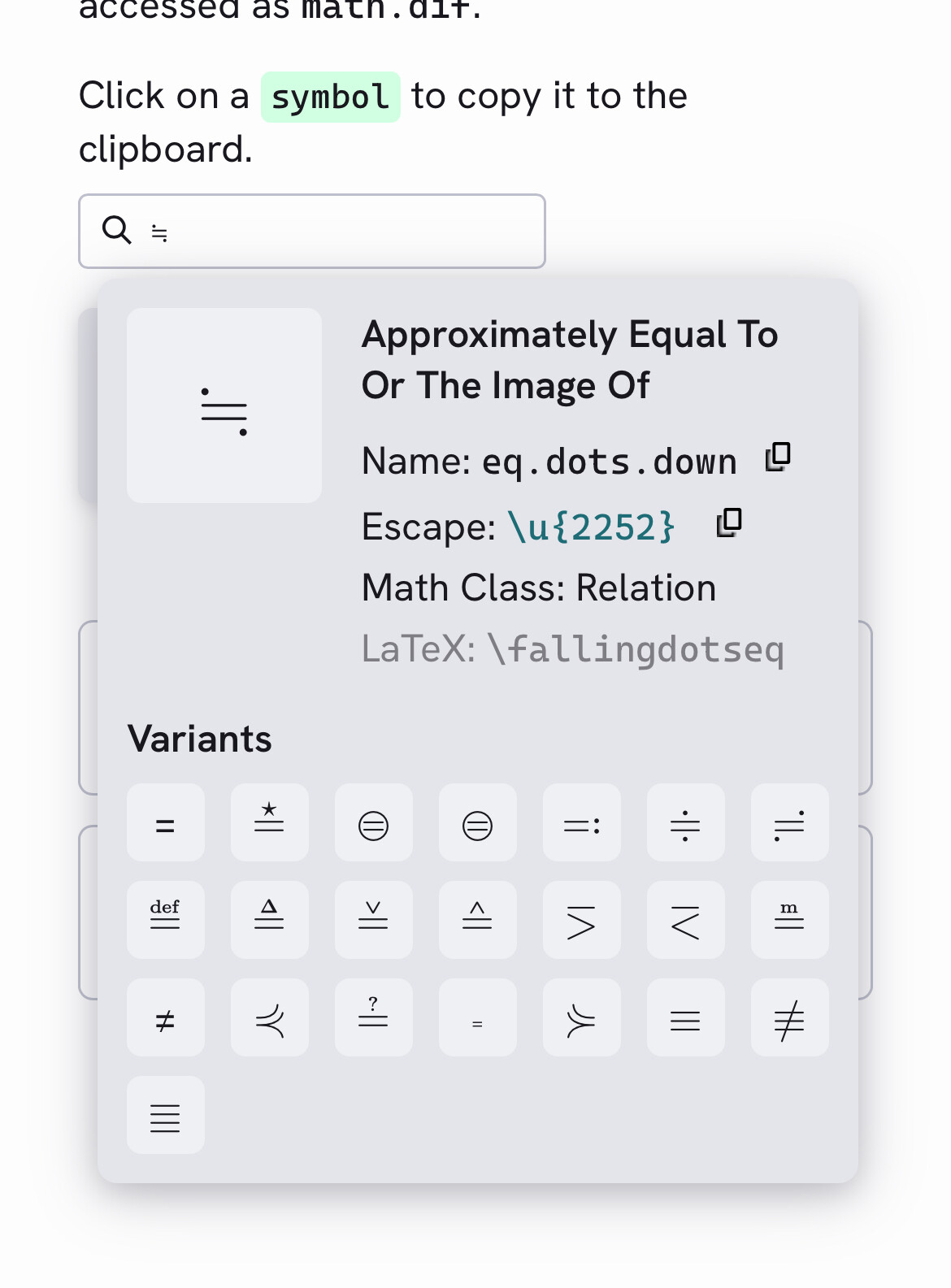
General Symbols – Typst Documentation and searching by eq: it’s named as eq.dots.down.
What the, I double checked with https://detypify.quarticcat.com/, but it wasn’t able to find it. neat.
Even if it didn’t have a name, since Typst fully supports unicode input, you could just insert ≒ instead of \u{2252}, too. This is of course harder to type (you’d copy/paste, more likely) but is more readable in the source code.
Btw, if you’re very used to fallingdotseq, you could let fallingdotseq = sym.eq.dots.down, or if it didn’t have a name, let fallingdotseq = "≒".
Thank you all who responded!
I wonder whether typst has a notion of operators. LaTeX adjusts spacings and line-breaking decisions around operators taking the natures of the symbols into account . . . That was the reason why I asked for the proper ways. If there are no such considerations . . . or if typst is so smart as to detect the nature of each symbol . . . all methods (\u{2252}, ≒, eq.dots.down) would be equivalent.
Thanks! That page at least suggests that there is some special handling of “operators”. But, the page discusses only how to turn a “word” into a math operator, such as sin and log and doesn’t touch upon how typst handles, e.g., = and + in a = b + c.
So, I still wonder whether \u{2252}, ≒, and eq.dots.down are equivalent or not and whether typst recognizes ≒ as a binary operator similar to = or not.
. . . Or perhaps typst doesn’t treat operators differently from other symbols . . .
There is special handling for mathematical symbols, the Class Function – Typst Documentation has a list of classes.
Typst converts the symbol name to unicode so all three representations are equivalent. Then the Unicode math class (or for a few symbols a class specified by Typst) of the symbol gets applied.
Thanks!! I’ve begun to understand. I suspect that the symbol ≒ is already given the “relative” attribute . . . or class . . . or something along the lines, somewhere in the typst code.
But the math.class() function in the above documentation defines a new operator love as an example. To use this functionality, then, would typst have code like
#let ≒ = math.class("relative", ≒) //Likely incorrect.
to make the unicode symbol an operator? I doubt it. Perhaps there is a different function(ality) to give an attribute to a unicode symbol . . .
By the way, is there a typst command line (REPL)? It would be nice if one can examine or test variables, functions, and symbols.
In most cases Typst takes these classes directly from Unicode. You can see here the class assigned to each character. The class for “≒” is “relation”, the same as for a regular “=” sign.
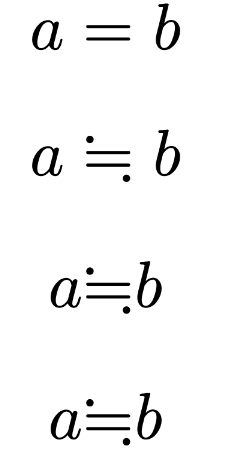
You can indeed override this when you define a custom operator. With #let you can only define operators with valid variable names like myeq (these names cannot contain ≒). However you can use a show rule to replace a particular symbol with something else:
$ a = b $
$ a ≒ b $

// Define a custom operator with normal class.
// You can replace "≒" with sym.eq.dots.down
#let myeq = math.class("normal", "≒")

$ a myeq b $

// Show rule to automatically replace ≒ with custom operator
#show sym.eq.dots.down: math.class("normal", "≒")
$ a ≒ b $
Its math class is default to relation, so that’s redundant.
No REPL is available at present, but the dev version of typst supports typst eval sym.xyz. You could create an issue if want REPL.
I see! So, in the typst language, names of variables(?) can’t contain unicode symbols and you (re)define the behavior of the name to alter the behavior of the symbol.
Coming from LaTeX, I’m finding it refreshing to see that these things are accessible to the user if they are reasonably familiar with programming languages. This is exactly what I’ve wanted for a long time.
The image you show looks wonderful. How does one get the search(?) or console(?) you show?
Oh, just go to General Symbols – Typst Documentation and click a symbol.
Ah! Thank you! I’ve visited the page several times, but I haven’t realized that the symbols are clickable! Stupid of me.
By the way, Japanese people (and perhaps Chinese, too) have the distinct advantage of being familiar with inputting symbols that are not on the keyboard! We type one of the the “readings” of the symbol we want and “convert” it to the symbol itself. (Usually there are many symbols associated with a single “reading”, so we select the one from the list.) —This is how the Japanese and Chinese IMEs work. Now, you invoke the IME and type a Japanese word which means “equality”, then you get a list that would include these symbols: ≒, ≠, . . . In that way I include math symbols like ∂ and greek letters like δ in my messages everywhere.
In that regard, I hope somebody would produce an international IME that produces unicode symbols from “readings”. It’s basically a search engine integrated into your OS.
Since it’s all done by few people and priorities are in other places, a lot of tiny things are not very intuitive/natural. Including the sym page, where the hover is not very noticeable and cursor does not change state to cursor: pointer. With Dark Reader, however, the hover effect is very noticeable.
So it’s just some design inconsistencies, not you. Hopefully they will be addressed eventually.