Is there a way to have the main text in a single-column layout while keeping the footnotes in double-column, similar to what the LaTeX package dblfnote does?
This isn’t possible even with hacks due to Content in a `place` function is cut off at the bottom of the page · Issue #6325 · typst/typst · GitHub and Footnotes are lost with `place(float: true, scope: "parent")` · Issue #5765 · typst/typst · GitHub, but you might be able to do something wacky with meander – Typst Universe, though the end of the page detection is probably still an issue. There is also Balancing the contents of multiple columns to the same vertical space · Issue #466 · typst/typst · GitHub.
One more or less reliable way of doing it is probably using page footer, though I have no idea how to properly manage the separator position.
#set footnote.entry(clearance: 1em)
// #show footnote.entry: none
// #show footnote.entry: it => v(-0.4em)
#show footnote.entry: it => {
  layout(size => context v(-measure(it, ..size).height))
  v(0.3em)
}

#set page(footer-descent: 0%, footer: context {
  // place(rect(width: 100%, height: 100%))
  let footnotes = query(footnote).filter(x => {
    x.location().page() == here().page()
  })
  set text(0.85em)
  set block(below: footnote.entry.gap)
  show: columns.with(2)
  for chunk in footnotes.chunks(calc.max(1, int(footnotes.len() / 2))) {
    for x in chunk {
      show: block
      h(footnote.entry.indent)
      let n = super(numbering(
        x.numbering,
        ..counter(footnote).at(x.location()),
      ))
      link(x.location(), n)
      h(0.05em)
      x.body
    }
    colbreak()
  }
})
#set par(justify: true)

#lorem(50) #footnote[Text 1]

#lorem(50) #footnote[Text 2]

#lorem(50) #footnote[Text 2] #lorem(50) #footnote[Text 2]

#lorem(700) #footnote[another one]
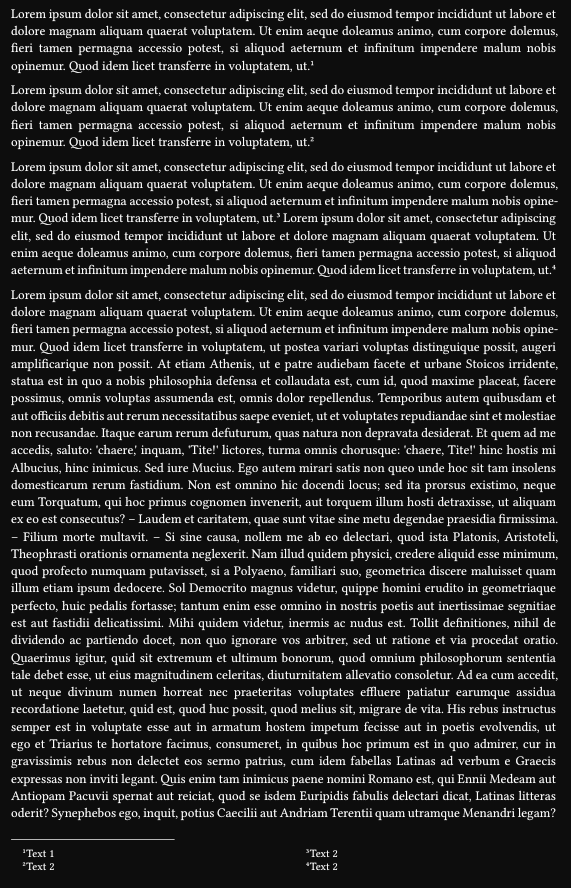
I once submitted Multi-column footnotes - Snippyst.
Multi-column footnotes
A basic implementation for multi-column foonotes. A very hacky temporary workaround.
This show rule will be hard to override. If you are a template author, do not use it!
#set page(height: auto, width: 240pt)

// Note: Footnote entry properties must be uniform across each page run (a page run is a sequence of pages without an explicit pagebreak in between). For this reason, set and show rules for footnote entries should be defined before any page content, typically at the very start of the document.
// https://typst.app/docs/reference/model/footnote/
#pagebreak(weak: true)

#show footnote.entry: it => {
  let n-columns = 3

  let (n,) = counter(footnote).at(it.note.location())
  let body = {
    // show: block.with(stroke: green)
    numbering("①", n)
    it.note.body
  }

  let x = calc.rem(n - 1, n-columns)
  if x == 0 {
    place(body)
  } else {
    move(dx: 100% * x / n-columns, dy: -par.spacing / 2 * x, place(body))
  }
}


Customized #footnote[Hello]
listing #footnote[World!]
My footnote listing #footnote[It's down here]
has red text! #footnote[It's down there.]
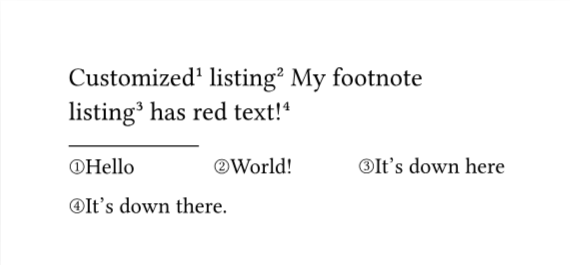
Note that my arrangement (horizontal/vertical) of footenote entries differs from Andrew’s.
1 Like