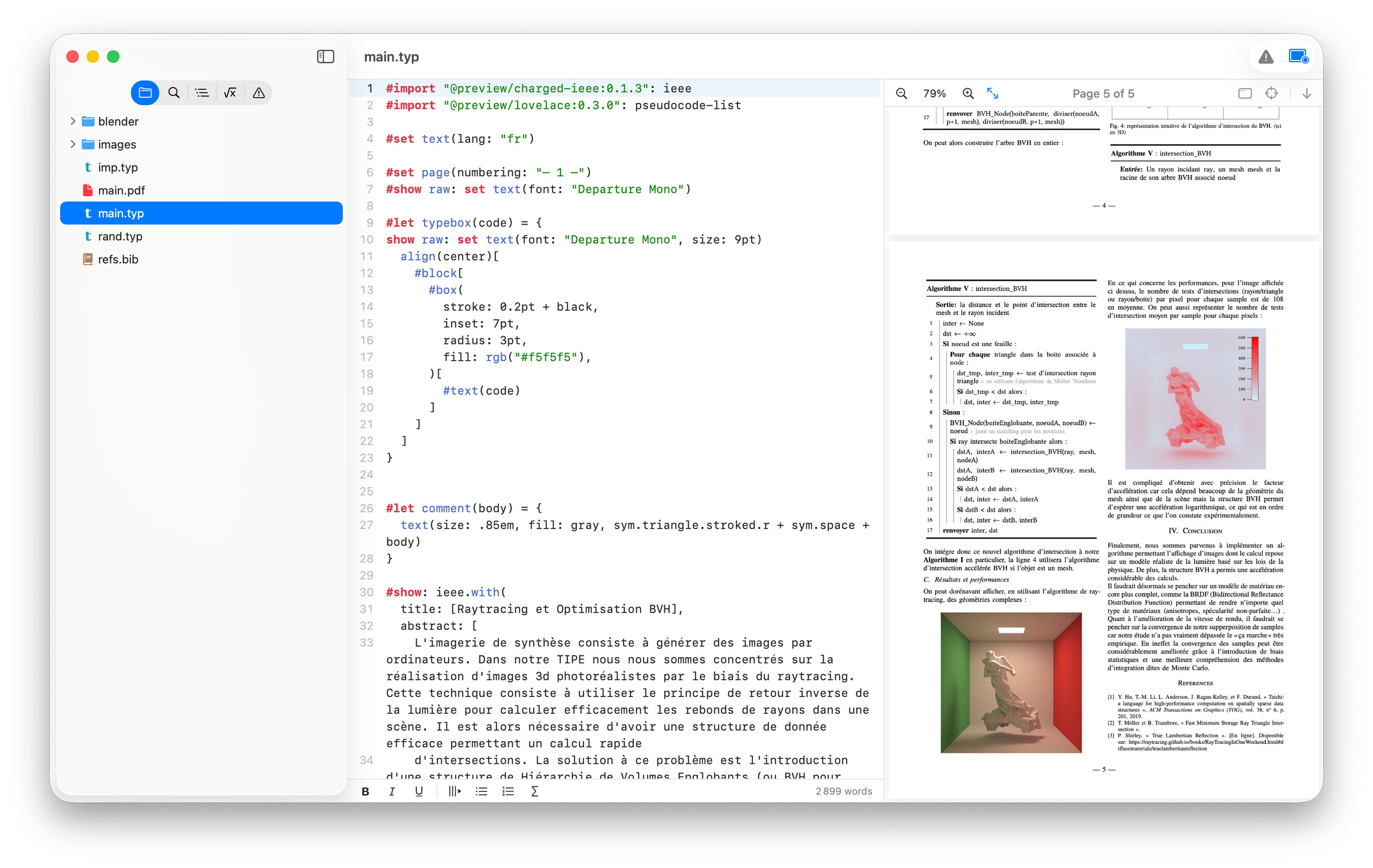
During the last weeks, I developed Edist, a native macOS Typst editor that bundles all the Typst tools (compiler, live preview, completion, …). I dont like using vsCode, and I very much like using native apps. The idea is not to replace the official webapp but to have a native-feeling macOS Typst editor to edit offline, without collaborative features. I hope the “bundled in one app” approach and a beautiful app will help Typst adoption.
Features
Beautiful and native editor with syntax highlighting, useful shortcuts (for bold, italic, …), good performances, find and replace, animated caret…
live preview (as fast as the Typst website, feels native) with automatic resizing, quick export to PDF, self-window mode (perfect for multi-screen)
Jump between editor & preview by clicking in the preview to go to matching text in the editor. Editing in the editor jumps to the corresponding part in the preview.
Automatic online package imports (no setup just import packages in your typst file) / local library imports (import local libraries, add local libraries)
Errors handling (error panel in the sidebar + inline error indicators)
Machine fonts can be used without any setup
Layout in the sidebar
Handwritten math symbols recognition (draw symbol and it gives the Typst markup)
Typst preview lock : lock the preview on a Typst file, very useful if you are using multiple documents (ex: one per chapter)
And more…
Pricing
This software is not free. There is a 7-day no-login trial for testing, and then you must pay 10€ (release price, 20€ in some weeks) for lifetime upgrades. This is always a hard decision to make software paying, especially when backed by an open-source community. Here is why I took this decision:
I am still a student, and developing Mac apps comes at a cost (i.e the 100€ to notarize apps )
It is better for long-term support
There are alternatives like tinymist + VSCode which are very good. I am not gatekeeping
I hope it can help fellow reasearchers / students! You can download it on edist.app. Suggestions and feedbacks are welcomed, the idea is to make this app a standard.
Edist is pretty solid and well put together. All of its features are easily discovered. The app is even signed with the developer’s signature. Very professional indeed.
A fine feature is the symbols pane. I do a lot of math typesetting and I kept having to visit the Typst Documention web site to figure out the name of the symbol I needed. No more! With Edist I can look it up and also just draw the symbol and it tries to figure out what I need. Freaking awesome.
Especially welcome is when you click on a parenthesis, Edist blinks the one it matches.
Students these days are making amazing things. Back when I was in school we had to type up our FORTRAN programs on punched cards! Haw!
I have only explored a little, so far, and very much like what I see. In case it helps, I am using an M2Pro Mac Mini, running MacOS 26.5.1
I have three initial comments:
Although the app launches fine with the welcome screen coming up, the only way I have found to open an existing .typ is by navigating from the welcome screen. Even with Edist already running in the background opening a .typ from Finder by right-clicking and choosing Open with doesn’t show Edist as one of the apps that can open it; even choosing Other and setting it to All Applications and choosing Edist brings up a warning on the dialog saying: It’s not known if this application can open “main.typ”.
Given the above, it would be great if when one wants to switch projects, closing a single open window would automatically launch the welcome screen, rather than just revealing the desktop, thereby requiring you to go the menu bar and choosing New Welcome Window or calling it up by keystroke (I have my menu bar hidden).
As for “… Editing in the editor jumps to the corresponding part in the preview”, I am having difficulty getting it to work smoothly on a project built as a main.typ which basically contains layout code and #include "Chapter n" calls, for example, with all the text in the chapter files… a typical structure for a book project. Clearly, I need to experiment more with the combination of settings in the Preview menu.
Anyway, those are thoughts after a first couple of hours of trying it. Point 1 is the most important I think; 2 would be nice; 3 is probably just getting the required settings clear.
I am not sure the app should follow this behavior. When an app is closed it is not for a new window to pop. You can just click on the application in the dock to reopen the welcome menu.
I tested on my side and it should work, you must right click on your main file, Lock Preview and then activate the target button for editor / preview sync in the top right of the preview window. Not very convenient indeed, I will give it a thought.
On this one, I’m not closing the app, just the window. To see what I mean: open a project/file; close the window using the red traffic-light button. Edist is still open (if you have the menubar visible, it is still the Edist menubar, but otherwise you see just the desktop). There are plenty of apps which, when you close all files but are still “in” the app, their splash screen or equivalent of your welcome screen, or a Finder window is displayed.
I managed to get it working through the menu. I have to say that I failed entirely to notice your target button… it is very discrete and its function is not visually obvious. It’s very early days for you, so when you have time to create a “Quick start” help document, that would be resolved.
Another small comment in terms of button symbols (and the need to wait for the tooltip to find out what the button does): would using the share icon rather than down arrow for Export to PDF be more in keeping with current Apple practice? I just wondered, as it makes it immediately clear what the function of that button is.
I see that you have switched to the Share icon in the latest version. Thank you. I have bought my licence and am enjoying using Edist. Although I really like the web app, it is really good to finally be able to continue learning and developing locally on my machine rather than having to go to the web. I do have VSCodium + Tinymist, but I have never really got on with it.
So thank you very much. Anything else that I encounter, I will pass on to you.
Can you please add the option (or use it as default) to remember the window size and position when closing the app (and restore it when opening the app) ?
The app is very solid. I’d appreciate the option to share data via iCloud + maybe something like Sign in with Apple? Imho I don’t get why one license is bound to a single machine. This actually kills the app for me because I’m using a Mac mini at home + 2 MacBooks for traveling and work. There is no way I’m paying for 3 licenses because it’s not “worth” in that sense. Not to insult you and the work you put into the app, just because it’s not economical in that way.
Thank you for your feedback. I agree that iCloud features would be a great addition. Regarding the price, it’s actually 10€ per Mac, which I find quite affordable for such a tool. I plan to add batch pricing once the release offer ends!
Best,
Jules
 )
)