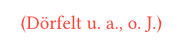
Again I need your help. Here is an excerpt from a bib file.
@article{Dörfel_et_al_2002,
	title = {Die {Geschichte} der {Mykologie} des 20. {Jahrhunderts} in {Sachsen}-{Anhalt}.-{Boletus} 25, 1-157},
	number = {25},
	journal = {Boletus},
	author = {Dörfelt, H. and Richter, U. and Saupe, G. and Scholz, Ü.},
	year = {2000},
	pages = {1--157},
}
The result is listed in the bibliography and in the text, the year is suppressed:
elsevier-harvard, elsevier-vancouver, biologia, biological-reviews, sylwan …
May be its a problem for Typsetter or Katvan.
Let me first try this way. Thanks.
Typesetter functionality isn’t going to be covered in the typst language documentation.
Open the Navigator to the Files tab (the default view), click “New File” → “New Bibliography File”, name it, and use that. No need to mess with .bib files or Zotero exports, the built-in GUI manager handles all of this.