I’ve recently discovered Typst, immediately fell in love, and as a way of learning it, I’ve put together a little library. I called it Erna. You can check it out here:
So I want to show and tell, but I also have a few questions.
Am I re-inventing the wheel?
It would be ok, since it was a learning project and a brain-teaser for me, but after cursory research I couldn’t find anything that does what I want. The closest I could find is tessera – Typst Universe, but I don’t think it can keep the cells in a row equally high. Also, because it’s more general-purpose, its API seems more complicated. With Erna I aim for simplicity and non-tech-user friendliness, even at the expense of flexibility.
Code review
I’d appreciate any pointers regarding my implementation. Esp. around the solve function. What I’m currently doing is representing the problem of finding the height and width of every cell as a set of linear equations. I think there is a straight-forward way to solve them, but I haven’t figured it out yet. So instead Erna is recursively dividing the range of possible heights until it reaches approximately right result. It seems performant enough. See the playground.pdf document in the repository to follow my somewhat convoluted thought process.
If there is a better approach, how could I benchmark it against the current one?
Is Erna a promising material for a package?
If it’s not re-inventing the wheel, and the code is not entirely rubbish, should I try to publish it as an @preview package? Any tips on that?
Naming things is difficult, esp in a way that is intuitive to lay people or beginners, for whom Erna is addressed. Being exact is not always the best method.
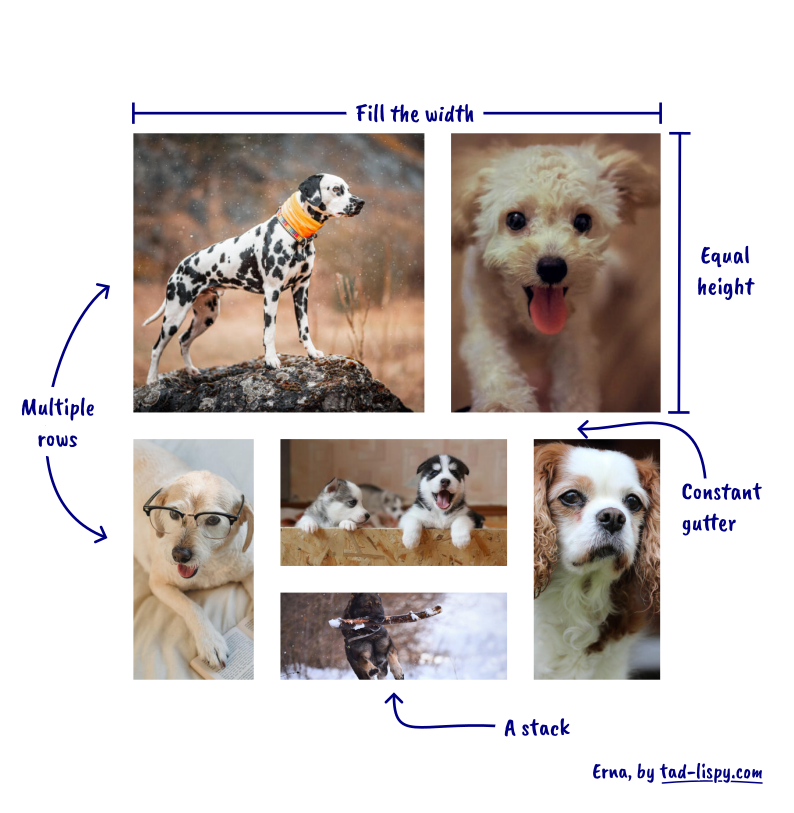
In the docs I don’t call those things “columns” but “stacks”. So technically the image_row function produces a row of stacks, but that wouldn’t make a good name. The simplest use case is a row of singletons i.e. one image per stack. I hope that by calling it image_row I make this use case easy to understand for beginners, while advanced users like you can hopefully figure out the stacks feature.
Actually, I am one of the “beginners” you refer to, and I have to say that
had me totally confused. I had to read what follows very carefully and think about it for quite some time. As a comparative beginner I was looking at it in the way I read. It was only when I realised what was in essence a cell in a row contained a “stack” of two elements that I finally understood what image_row referred to.
As for the name, naming is difficult, and while I have no problem with it as a name, someone like me looking for a package to lay out images who came across a package called Erna would not immediately relate it to what they wanted.
However, if I may, what I still did not understand is the syntax for defining multiple rows. Even after going through the documentation and its final example, this part remains unclear to me.
Thank you for this project. I think it will be very useful.
Hey, David! Thank you for your kind words, and sorry for the late response.
Yes, the description of multiple rows feature is a bit sparse. I think I was tired and short on time when writing it. Let me try to improve. So the image_rows (plural) is essentially like calling image_row (singular) multiple times. You could write it like this:
#image_row(a, b, c)
#image_row(d, e)
or like this:
#image_rows(
  (a, b, c),
  (d, e)
)
To get from a series of image_row to one image_rows, just copy the arguments list (together with the parens) of every row and paste it together as arguments of image_rows.
The use case for this is setting the same gutter size everywhere, without having to repeat yourself. In the future there might also be other shared features, like rounded corners, or borders. With image_rows (plural) you can configure them once and apply them to every row.
Please let me know if it makes sense, so I can include it in the docs.
I think my confusion comes from the fact that the same syntax seems to be used for two different purposes in the documentation.
On the one hand, parentheses are used to define a stack within a row. On the other hand, they also seem to be used to define separate rows in image_rows.
For example, why does
#image_rows(
(a, b, c),
(d, e)
)
produce multiple rows, while (d, e) is interpreted as a single row containing a stack of two elements?
More generally, how does Typst distinguish between “this is a row” and “this is a stack” when the syntax looks identical?
After publishing, I discovered a bug. Turns out, that passing paths to images as strings does not work well when a function is defined in a package. Let me illustrate:
error: file not found (searched at /home/tad/.cache/typst/packages/preview/erna/0.1.0/ninja-opossum.jpg)
  ┌─ @preview/erna:0.1.0/erna.typ:8:41
  │
8 │     let images = paths.map(path => image(path))
  │                                          ^^^^

  while calling `cell` at @preview/erna:0.1.0/erna.typ:47:12
    cell(gutter: gutter, paths)
  while calling `map` at @preview/erna:0.1.0/erna.typ:43:16
    args.pos().map(paths => {…)
As you can see, it looks for the image in ~/.cache/. Basically the path is resolved relatively to the package location, not the document that calls the function.
The workaround is to pass a path instead of a bare string, like that:
Sorry for the inconvenience. I’m working on a better solution. Most likely Erna will take content, for example produced with image(), instead of paths. It has a potential to allow other objects than just images. Initial experiments are promising, but I need a bit more time to iron out the details and write docs.


 Thank you for your feedback.
 Erna 0.1.0 is now published on Typst Universe: