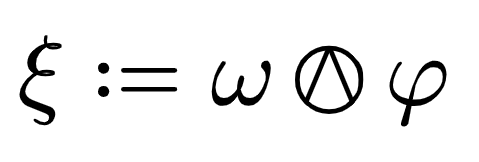
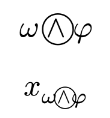
There seems to be no shorthand symbol to typeset a Kulkarni-Nomizu product currently in Typst. The Kulkarni-Nomizu product is used extensively in differential geometry for example to create algebraic Riemann curvature tensors. A possible workaround right now could be realised by the following:
In my opinion, such a widely used symbol should have its own command in Typst. My suggestion is the symbol “and.o” in analogy to already implemented symbols such as “times.o”, which are typographically similar.
Hi, welcome to the Typst forum! The named symbols in Typst are just nice names for Unicode symbols (this naming scheme is a work in progress, see the codex subproject). For example times.o is the name for Unicode symbol U+2297.
It seems there is currently no Unicode symbol for a circled wedge operator. Unicode does have “combining enclosing circle” U+20DD which you can theoretically append to the wedge character to enclose it, but fonts generally don’t have good support for that. To use this, in Typst 0.15 you will be able to write symbol("∧\u{20dd}") but right now this doesn’t work. What kind of works now is to make a binary operator from a simple string:
As you can see it looks bad with the default font, and even worse when subscripted.
I think the best step long term is to advocate for including this symbol in a future Unicode version. And in the meantime, “draw” it yourself like you did. You could make a small package for this so it’s available to everyone (I think that’s also how it’s done in LaTeX: you either use custom code, or a third-party package like stmaryrd?)
This doesn’t seem to be a typst specific issue as the guys over in the tex forums are having the same issues.
The way you did it is probably the best way of writing it and it visually looks pretty good as well and feels very typsty written out in math mode like that.