I recently used Typst to write my dissertation.
Before this, I had only used LaTeX to write scientific texts, and using Typst was a nice experience overall. I enjoyed the more imperative approach for declaring custom commands, that it often worked just as expected, and the overall compile speed (<12 seconds for an unoptimized long document seems fair). However, it wasn’t all perfect. In the following, I’ll outline hurdles I encountered and hope that some of them are addressed.
I am unsure whether this is the best way to give feedback. I still chose to do one long forum post rather than many smaller posts or issues, because it is condensed into one unit and does not clutter the issue tracker. On the downside, this way it is a mess to discuss single points. Feel free to branch this post into multiple posts or issues where you (as a reader wanting to discuss something) see fit.
Other than that, thanks for developing Typst.
Layouting
Inside/Outside Margins
Typst supports book-style pages by specifying inside and outside margins.
This then lays out pages so that a left page has the outside margins on the left, and a right page has the outside margins on the right.
Now I also want the page numbers on the outside of the page; however, determining the correct alignment isn’t trivial: on a left page, it should be on the left, and on a right page, it should be on the right. But Typst does not expose which pages it considers “left” and “right”. This is determined by the page.binding property. If it is auto, then it is determined by text.dir. If that is auto, it is determined by text.lang. I did not find a mapping from text.lang to text.dir.
I would like to see the following changes:
- Add an
insideandoutsidealignment (if margins are set to left/right, a fallback should be used; e.g.insideis right, this should be settable somehow) - Expose properties embedded in different text languages
- Expose what
autotranslates to. It would be nice if I could resolvepage.bindingto a concrete value, even if is set toauto.
Parsing Margins
Page margins can take many forms. Similarly, the value of page.margin may have many forms, and not all code can properly handle all:
auto0% + 1pt(all four margins are the same)(left: 0% + 1pt)(left: 0% + 1pt, right: 0% + 1pt)(inside: 0% + 1pt, outside: 0% + 1pt)
I would like to see a function to normalize the forms into a common explicit form which always contains top, bottom, left/inside, right/outside.
Preventing Line/Pagebreaks
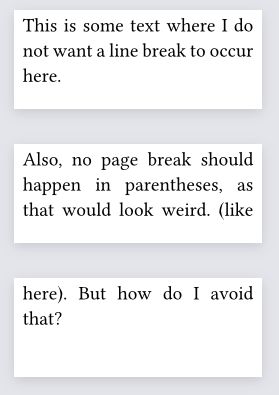
I did not find a good way to prevent line breaks or page breaks at specific places in the text.
- I tried using
boxto prevent linebreaks, but this sometimes caused weird spacing at the beginning of lines after a box.- This mostly causes issues for me at places where I could not replace the space with a non-breaking space (~), for example in the native bibliography.
- I tried using
blockto prevent page breaks, but this causes a line break before and after (as it causes a new paragraph).
I would like to see some command like #nolinebreak[body] or #nopagebreak[body].
Widow/Orphan Lines not Adjustable
While widow/oprhan lines are technically just a single line, I also try to avoid having just two or three lines on a single page. I would like to be able to specify that I want to avoid N lines on a single page. (cf LaTeX nowidow)
Positioning of Floating Figures
Floats are mostly placed on the same page. This often caused them to be placed above the heading they were specified under, which I often found weird.
It also caused multiple figures to be placed directly under each other, instead of moving the second one to the next page.
I would like to see improvements in the automatic placement, and something like a “float barrier” (as in LaTeX placeins) could be introduced.
Coding
Accessing internal functions
Sometimes, I wanted to access internal functions of imported modules. I had to resort to copy+pasting them. It would be nice if I could import even non-exposed functions from other modules.
I understand that this is rather hacky and probably should not be endorsed as a use case. Still, I feel like it could allow for more powerful usages of existing libraries.
I would like to see an import syntax where I can specify a file from the package source to import an arbitrary symbol from.
Conditional Show/Set Rules
Show/Set rules are limited to the current code scope.
#if cond {
  set text(red)
}
text
Does not work.
Instead, I have to write
#let args = (black,)
#if cond {
  args = (red,)
}
#set text(..args)
text
Which is way more verbose.
Edit: Seems I missed conditional set rules (set ... if cond). However, show rules are still non-conditional, other than including the if inside the body, which feels a bit odd.
I understand why rules are limited to the current scope, but sometimes it would be useful to escape the current scope. I don’t know what the better approach would be here.
Parameters
Parameters seem quite limited: Either they are positional and required, or optional and keyword. (Apart from parsing ..args manually)
I like Python’s approach of allowing parameters to be
- positional only (any parameters before the
/“parameter”) - keyword only (any parameters after the
*“parameter”) - required (no default value given)
- optional (default value given)
For me, it was quite frustrating to trial-and-error which parameters are positional, and which are keywords.
I would like to see that all parameters can be used as keyword parameters.
Data Types
No Data Structures, Just Dicts and Arrays
Dynamic typing is all great and stuff, but can be a pain to debug.
I would like to see
-
sets (instead of having to rely on array.dedup)
-
custom types (at least structs)
-
type annotations (see issue 317)
Dictionaries are limited
I found dictionaries to be limited. I found myself regularly typing
d["foo"], oh no, we don’t have a bracket operator- (sometimes)
d.get("foo")oh no, it isat d.at("foo"), I want to specify a defaultd.at("foo", 42), wait this breaksd.at("foo", default: 42), finally
I also had trouble with nested subdictionaries, and that they are not directly mutable (see below).
I would like to see
- operator overloading (or at least specifying
[]for dicts) - support for keys other than strings
- numbers are useful
- sometimes even tuples/arrays
- mutable subdictionaries
- in python I can do
d1["a"]["b"] = 3. In typst I have to dod2 = d1.at("a"); d2.insert("b", 3); d1.insert("a", d2) - this is annoying when nesting dicts (maybe custom types would be the solution to this)
- Edit My troubles seem to stem from storing the subdictionary in a variable, which then seems to store a copy instead of a reference. This seems a bit odd to me.
- in python I can do
Misc
Collapsing Multiple References
When writing multiple cites after another, typst can properly collapse them @foo@bar can turn into [1, 2] (ACM style).
However, I did not figure out how to do this manually. This would be interesting when writing a custom bibliography.
This could also be interesting for referencing figures, sections, … As discussed in @secA@secB / shown in @figA@figB could turn into As discussed in sections A and B / shown in figures 1 and 2.
I would like to see a way to implement this behavior.
Figure Numbering
Figure numbering is rather limited.
- There is no native support for subfigures. The subpar package does a decent job, but also seems rather hacky in how the counter is implemented. It would be nice if the figure counter could be used for this (but stepping a level deeper, such that a figure could have the counter value
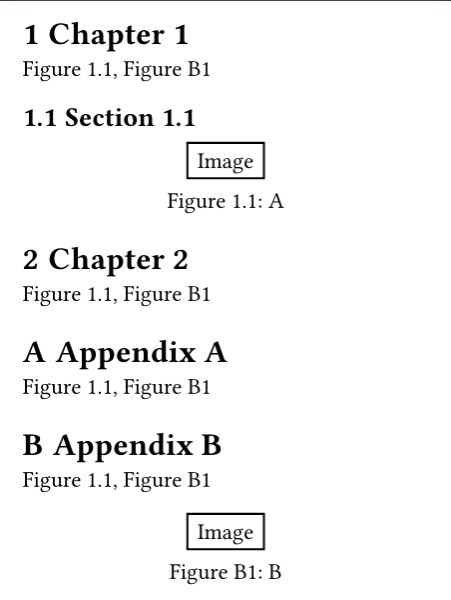
(2, 3)). I did not find a way to consistently add the chapter number to the figure counter.Edit used the wrong functionality to format the counter/numbering.- For example, a figure in the Appendix
Amight beFigure A1. Or in Chapter 3 it could beFigure 3.1.Accessing the chapter counter within the numbering function does not work properly. While the figure itself gets the correct number prepended, any references from another chapter use the wrong chapter then (as the function is reevaluated at the position of the reference).
- For example, a figure in the Appendix
I would like to see the following changes:
- Support subfigures natively
- Either add a “counter-level” property to figures
- Or add a “subcounter” function to a counter that returns a subcounter:
figure(kind: image, counter: counter(figure.where(kind:image)).subcounter(offset: 1))- The subcounter would only step based on the specified offset
- This would also require that the caption does not display the full supplement+numbering (cf. subpar)
Support more complex numberingsEither evaluate the numbering function always at the position of the figure, not at the position of the referenceOr allow ashow headingrule to override the numbering for figures contained in this chapter (setrule withinshow headingwould need to affect the whole section…)
“Suplement Space Numbering”
I used custom figures to implement a research question box. I wanted them to be referenced as “RQ1” without any space between the supplement and counter. I had to overwrite this using a show ref rule. It would be nice if this was possible by specifying a property on the figure to remove/replace the space.
Bibliography
I feel like the current state of the bibliography is too limited:
-
As outlined in a previous forum post, I wanted multiple bibliographies to have distinct prefixes (own publications
[O1], websites[W2], …). This is achievable with custom CSLs, but cumbersome. -
As outlined in a previous forum post, I wanted cites of multiple bibliographies to be properly joined
[1, 2]in ACM style ([O1, W2]with prefixes), but the native bibliography as of now would render them separately[1][2]. Covered by issue 8501 (and re-reported by me in 8582). -
Backrefs are not possible (I noticed that in the bibliography, the label on the left actually links to the first usage. Still, it might be interesting to link to all usages)
-
#cite(form: "author")gives a mediocre result. I guess this is due to the underlying CSL, but I would prefer it if it was more adjustable. I would expect it to show up to two last names or 1 last name + “et al.” Instead, I got the full list of authors without specifying a custom CSL.
All of this caused me to write my own bibliography wrapper (where I ran into some of the other limitations) with the following features:
-
Each bibliography can specify a prefix/suffix for the label
-
Multiple cites are co-joined (in a custom cite command), even if they stem from different bibliographies
-
Backreferences are printed in the bibliography as "Referenced on pages X, Y`
-
Can cite using the custom cite command or using
@references -
The
@syntax supports several macros:@foo:ycites the year offoo,@foo:acites the authors offoo -
Aliases: Biblatex supports specifying
ids, which can be used as aliases when citing. I also support these aliases.
I used alexandria.hayagriva to render entries and citegeist.load-bibliography to parse entries for internal use (I did not want o put too much effort into this, so the code is not the cleanest :S ). hayagriva does add a hyperlink to the prefix of a DOI (which ACM specifies as https://doi.org/), so I patched that, such that the whole visible link is clickable.
I would like to see some of these features be native to Typst.
Strict Limit on 5 compile iterations
I understand that allowing the iterations to increase will just cause people to write worse code, but sometimes I don’t want to spend the time to write good code (esp. when I am under time pressure).
I would like to see a compiler flag that allows increasing the iterations. To limit this from being requested by published packages, I’d consider that packages uploaded to the universe must work properly without changing the iterations (however, that is enforceable; maybe the documentation must provide demos and those have to compile in the default limits).
No Plaintext Export for Spellchecking
I used Grammarly for my spell checking. To get copy-and-pasteable text, I extracted it from the PDF, which was okay, but annoying. It would be nice to have a plaintext export (issue 2401).
My solution to this was to set the page height to auto, width to 5 meters, and use mutool to convert from PDF to text. This left me with one paragraph per line, which I could paste into Grammarly without worrying about linebreaks/pagebreaks. I was pleasantly surprised that it compiled this well.
Bugs
Referencing Floating Figures Links to Wrong Place
This is already covered by issue 4359 from June 2024. Referencing a floating figure causes the link to point to the wrong location: The reference points to the location in the text instead of the location where the figure is placed. This also sometimes causes the outline to contain incorrect page numbers.
I am surprised that this bug causing wrong output to be generated (in the outline) still persists after two years.
Memory Usage
When using typst watch and/or tinymist for a long time, RAM usage increases, sometimes causing me to run out of memory (on a 32G machine with 32G swap).
This only occurred when running these tools for a day or longer. While I see that restarting these tools is not hard, it is annoying that I have to keep track of it.

 thanks for adding your workaround to the issue!