So I have everything I need:
#let dt = datetime(hour: 8, minute: 0, second: 0)
#let ad = duration(minutes: 30)
#let dt = dt+ad
#show table.cell.where(y: 0): strong
#table(columns:2, "Time", "Tasks", [#dt.display("[hour]:[minute]")-])
Only I’m struggling to get the loop going to have ranges like 8:00-8:30, 8:30-9:00 etc. - any suggestions for this final step?
I worked around this by combining typst code with a csv file generated in bash:
#show table.cell.where(y: 0): strong
#table(columns:(auto, 1fr), "Time", "Task", ..csv("t.csv").flatten())
{
for i in {0..26}; do
date --date "@$(($(date --date 08:00 +%s)+1800*i))" +%R,
done
} > t.csv
but 100% native Typst solution would also be possible (somehow)
Here is a solution that loops over an array of hours and uses the duration ad to get a time range. Is this what you were looking for?
#let hours = range(8, 12)
#let ad = duration(minutes: 30)
#let date-format = "[hour]:[minute]"

#let cells = hours.enumerate().map(((i, hour)) => {
  let t0 = datetime(hour: hour, minute: 0, second: 0)
  let t1 = t0 + ad
  table.cell(x: 0, y: i+1)[#t0.display(date-format)-#t1.display(date-format)]
})

#show table.cell.where(y: 0): strong
#table(columns: 2, "Time", "Tasks", ..cells)
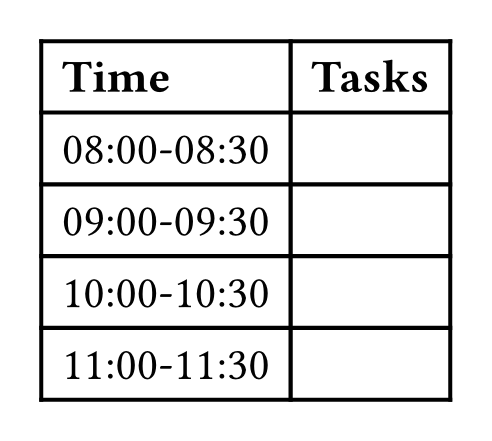
Since the time ranges occupy all the cells with x = 0, additional arguments of the table will automatically be put into the “Tasks” column. The resulting table looks like this
bluss
May 30, 2026, 2:15pm
5
I’d do it this way which I think is slightly more satisfying
#let morning = datetime(hour: 8, minute: 0, second: 0)
#let interval = duration(minutes: 30)
#let format = "[hour]:[minute]"
#show table.cell.where(y: 0): strong
#table(columns: 2, "Time", "Tasks",
  ..for i in range(0, 6) {
    let start = interval * i;
    let end = interval * (i + 1)
    ((morning + start).display(format) + sym.dash.en + (morning + end).display(format), "")
  }
)
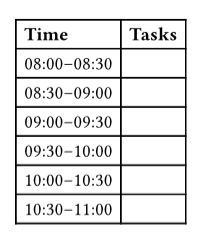
It covers every half hour interval, and is in a form that should be easy to edit and modify. Use arithmetic with the durations to easily do time ranges - we have an interval of 30 minutes and can do (i + 1) * interval and so on, as demonstrated.