I want to show a graph of multipart nodes (akin to TikZ multipart nodes) with start and end labels.
Something like this, which I fudged together:
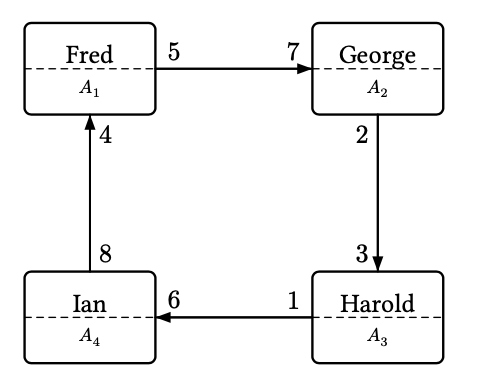
#import "@preview/fletcher:0.5.8" as fletcher: diagram, node, edge

#let mynode(pos, text1, text2, name) = {
  node(pos, [#text1 \ #text(size:0.7em, text2)], name:name, stroke: 1pt, corner-radius: 1mm,
       height: 3.5em, width:5em)
  /* Dashed separator from east to west */
  edge(label(str(name)+".west"), label(str(name)+".east"),"-", stroke: 0.2mm, dash:(1mm, 0.8mm))
}
#let myedge(start, end, type, startlabel, endlabel,
            startpos:0.12, endpos:0.88) = {
  let sep = 0.15em
  edge(start, end, type, label: startlabel, label-pos: startpos, label-sep:sep)
  edge(start, end, label: endlabel, label-pos: endpos, label-sep:sep)
}

#diagram(
  edge-stroke: 0.3mm,
  mark-scale: 80%,
  mynode((0,0), [Fred], $A_1$, <A1>),
  mynode((2,0), [George], $A_2$, <A2>),
  mynode((2,2), [Harold], $A_3$, <A3>),
  mynode((0,2), [Ian], $A_4$, <A4>),
  myedge(<A1.east>,<A2.west>,"-|>", $5$, $7$),
  myedge(<A2.south>,<A3.north>,"-|>", $2$, $3$),
  myedge(<A3.west>,<A4.east>,"-|>", $1$, $6$),
  myedge(<A4.north>,<A1.south>,"-|>", $8$, $4$),
)
It looks more or less the way I want, but feels wrong, because:
- I’d really like the upper and lower labels to be centered in each part
- If the node is filled, the dash separator is hidden behind the fill
- This creates two edges per logical edge (one for each edge label, with only the stroke applied to the start-label edge)
Is there a more idiomatic way to do these things in Fletcher?