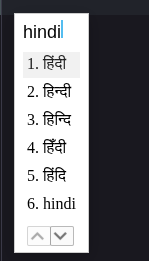
After typing a phonetic English word, when I press enter/space, no Hindi text is input/written (whereas Hindi words are input at other places like overleaf etc.)
I don’t use Google Chrome nor Google Input Tool, so I’m afraid I can’t offer any specific advice.
But for your information, I’m able to use IMEs with Firefox and Safari on typst.app.
Note: IMEs (input method editors) are system applications similar to Google Input Tool. Refer to unicode.org/faq if you want further info.
Besides, you might want to report it to typst/webapp-issues. Issues there are monitored by the official staffs more regularly, and there isn’t any issue related to Hindi so far.
To report it on GitHub you need to create a GitHub account, then visit the link given by @Y.D.X and press the green “New issue” button and follow the instructions there.
(As the person experiencing this issue, you’re in the best position to describe it clearly on GitHub and to follow up if the developers have any questions.)
Alternatively, you can leave feedback on the web app and staff can message you back. Though that would be on a per-user level problem/discussion. But most issues can concern more than one user, hence the priority of the public issue tracker.