I´m learning with grids in the forum Grid - Typst Documentation
There is an example with tiger.
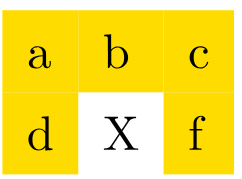
Is there a way to turn off the color setting for a single cell?
You can use the grid.cell function or specify the fill color using a lambda.
#grid(
  fill: (x, y) => {
    if x == 1 and y == 1 {
       return none
    } else {
      return yellow
    }

  },
  columns: 3,
  inset: 0.5em,
  [a], [b], [c],
  [d], [X], [f]
)

#grid(
  fill: yellow,
  columns: 3,
  inset: 0.5em,
  [a], [b], [c],
  [d], grid.cell(fill: none)[X], [f]
)
The example uses rect elements inside the cells and not the fill of grid directly, so you have to set the property of the rect element.
rect(fill: none)[Fixed width, auto height],
(potentially you also want to add stroke: none for the rect as by default an unfilled rect has a black stroke)
If you work with grid.cell directly the solution from @backo with grid.cell(fill: none)[...] needs to be used.
With both of your help, I’ve understood the basic principle of Grid—thank you.
But now I’d like to insert two images and set their proportions.
#grid(
  fill: luma(245),
  columns: 2,
  inset: 1em,
  [#align(center)[#text(16pt)[*Lastname*, Firstname]\
            Teacher
            #v(1.5cm)
            *born* 11. 09.1910 at town1\
    *died* 11.09.1991 at town2]], [image1],
  grid.cell(fill: none)[ ],[image2]
)
[#image(abc.jpg), ?]
It would probably be a better idea to read the table guide to get most of your answers in one shot but to adjust the size of your columns (or rows), you either have to adjust the content (image() has size options: heightand width) or adjust the sizes of the columns by giving an array of sizes (which can be columns: (1fr, 2fr) for instance if you want the first column to occupy 1/3 of the available space and the second 2/3).