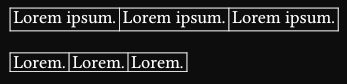
First row is a grid.
second row is a table.
6
I would like to be able to change the stroke appearence with its width/height according to text, so that it won’t be as tight as it is now.
I know that stroke is somewhat defined as a rectangle around the text, but i’m not good in typst-coding and don’t know how to access the right parameter to change this.
I would like to have a bit more spacing with the
Example Code:
#grid(columns: 3, stroke: 0.5pt,
column-gutter: 2pt,
[1. Lorem Ipsum],[2. Lorem Ipsum],[3. Lorem Ipsum],
)

#table(columns: 3, stroke: 0.5pt,
column-gutter: 2pt,
[1. Lorem Ipsum],[2. Lorem Ipsum],[3. Lorem Ipsum],
)