I would like to reproduce the image below, including some perspective (a projection where distant elements are drawn smaller to create a sense of depth).
Is it possible with CeTZ? Maybe by properly setting the transformation matrix?
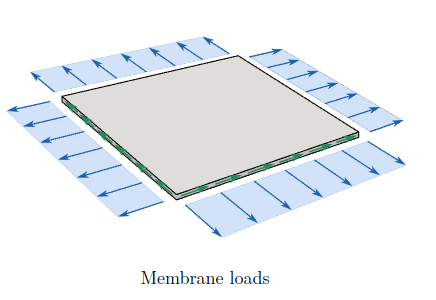
Thanks!
I would like to reproduce the image below, including some perspective (a projection where distant elements are drawn smaller to create a sense of depth).
Is it possible with CeTZ? Maybe by properly setting the transformation matrix?
Thanks!
It sure is possible. You can use 3D coordinates inside functions like line.
You can choose your projection matrix with draw.set-transform . For example, for the Cabinet projection, with z-axis vertical, I use
draw.set-transform((
    (-calc.sqrt(1/8),1,0,0),
    (calc.sqrt(1/8),0,-1,0),
    (0,0,0,0),
    (0,0,0,1)
))```

What can't be done in my understanding is to render a 3D object (computing which face is hiding which part of the figure behind it). You have to decide what face must be drawn by hand.Thanks, @gblot, for your answer. The cabinet projection is actually an oblique projection, but I’m interested in a perspective projection where distant elements are drawn smaller to create a sense of depth. I believe this should be possible using a transformation matrix, but I don’t know how to implement it in CeTZ.
I’ve edited the question to make it clearer.
I’m really not familiar enough with transformation matrices. I found this : Coding Labs :: World, View and Projection Transformation Matrices At the end, they give the matrix for a projection. Maybe you could give it a try.
If your question is more about which transformation matrix to apply, maybe you would have more chance in a 3D (render and gaming) community ?
EDIT :
I tried it and it works flawlessly :
#let perspective() = {
    let FOVx = 90deg // field of view
    let FOVy = 70deg
    let near = 0.1
    let far = 1000
    draw.set-transform((
        (1 / calc.tan(FOVx / 2), 0, 0, 0),
        (0, 1 / calc.tan(FOVy / 2), 0, 0),
        (0, 0, -(far + near) / (far - near), -2 * (near * far) / (far - near)),
        (0, 0, -1, 0),
    ))
}
you can then draw.rotate(x:45deg) for example or anything you want to look from the right angle.
Actually it is a missing feature in CeTZ: