How can I animate the page fore- and background in Touying?

Hey everyone! I’m fairly new to Typst and am currently building my first slide deck with Touying.

I would like to make page fore- and backgrounds part of the animations/subslides, i.e. only show a foreground element on particular animation steps. Is there a good way to accomplish this? I tried to add only() to the page’s foreground, but this only yields errors (see Error [1] below).

Below is a small example with animations and a foreground overlay, but the overlay is present on all steps, not just the last:

#import "@preview/touying:0.7.4": *
#import themes.metropolis: *
#show: metropolis-theme.with(aspect-ratio: "16-9")

== Example Slide
#slide(
  config: config-page(
    margin: (bottom: 0em),
    foreground: block(
      height: 100%,
      width: 100%,
      fill: color.rgb(0, 0, 0, 140),
      text(red, 3em)[Overlay],
    ),
  ),
)[
  - First bullet point 
  #pause
  - Second bullet point 
  #pause
  - Third bullet point 
  #pause
  - Only now, the overlay should be rendered.
]

https://typst.app/project/rxeebNb6Y02ud9iZulbG7R

Thank you for your help!

Error [1]
== Broken Example
#slide(
  config: config-page(
    margin: (bottom: 0em),
    foreground: only(2, block(
      height: 100%,
      width: 100%,
      fill: color.rgb(0, 0, 0, 140),
      text(red, 3em)[Overlay]
    )),
  ),
)[
  - First bullet point 
  #pause
  - Second bullet point 
  #pause
  - Third bullet point 
  #pause
  - Only now, the overlay should be rendered.
]

Panicked with: Unsupported mark touying-fn-wrapper from only at page 1 in section ‘Example’. You can’t use it inside some functions like context . You may want to use the callback-style utils.only function instead.

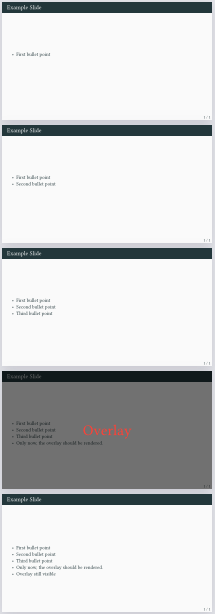
One option is to use a state to selectively display the foreground. Then the state can be set with a call to only().

Here’s it’s the show-overlay variable:

#import "@preview/touying:0.7.4": *
#import themes.metropolis: *
#show: metropolis-theme.with(aspect-ratio: "16-9")

#let show-overlay = state("show-overlay", false)

== Example Slide
#slide(
  config: config-page(
    margin: (bottom: 0em),
    foreground: context if show-overlay.get() {
      block(
        height: 100%,
        width: 100%,
        fill: color.rgb(0, 0, 0, 140),
        text(red, 3em)[Overlay],
      )
    },
  ),
)[
  
  
  - First bullet point 
  #pause
  - Second bullet point 
  #pause
  - Third bullet point 
  #pause
  #only("4", show-overlay.update(true))
  - Only now, the overlay should be rendered.
  #pause
  #only("5-", show-overlay.update(false))
  - Overlay no longer visible
]
Output

1 Like

This does the trick. Thank you very much for the quick help!

through some tomfoolery it’s also possible to set the overlay with only one state update call:

#let overlay = state("overlay", false)

#slide(
  config: config-page(
    margin: (bottom: 0em),
    foreground: context {
      let overlay = overlay.get()
      if overlay == none {
        return
      }
      if overlay.func() == metadata {
        let overlay = overlay.value.fn
        overlay()
      } 
      else {
        overlay
      }
    },
  ),
  self => [
  #let (only,) = utils.methods(self)
  
  #overlay.update(only(2, block(
    height: 100%,
    width: 100%,
    fill: color.rgb(0, 0, 0, 140),
    text(red, 3em, "Overlay"),
  )))
  
  - First bullet point 
  #pause
  - Second bullet point 
  #pause
  - Third bullet point 
  #pause
  - Only now, the overlay should be rendered.
])

The syntax unintuitive at best, but touying internals are a bit weird so it is what it is