So, I have been using Typst lately for very basic documents that do not require advanced layout settings. And it has done its work perfectly so far!
Now I want to create a more advanced template that allows me to generate a print-ready PDF with the recovery codes for all the accounts I have 2FA enabled for. I have been considering the following aspects:
Layout
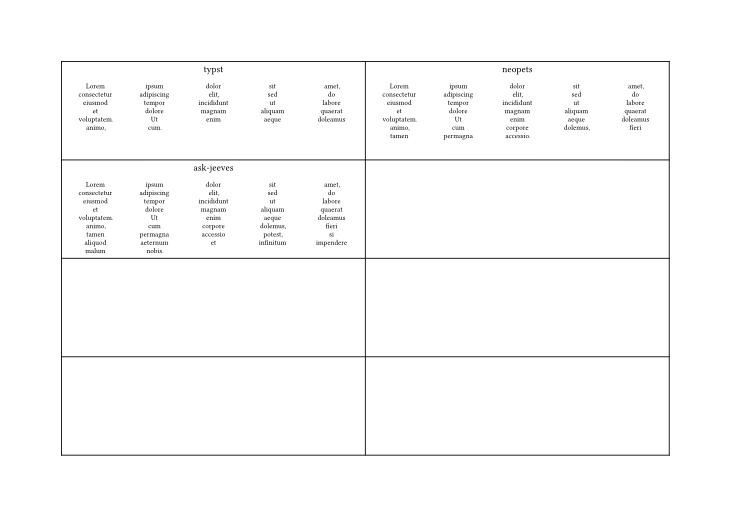
The layout of the page should be something like a 2x4 grid. In each grid, then, the recovery code for one account.
Format of the exports
They are normally exported as a TXT file. However, the content and alignment may vary a lot depending on the service. So, I was thinking of parsing most or all of them to a CSV externally before delivering them to Typst.
Dynamic subgrid adjustment
Once parsed to CSV, I would like a function within Typst that automatically recognizes which layout is the best for the inner grid. This has to do with how many columns and rows should be used in relation to the available space (within the cell of the 2x4 grid). This should also be dependent on the quantity of entries of each file.
Does someone have experience working with the elements required for this layout and could give me some ideas on how to implement it? Or even if it is currently a good idea to do this with Typst (since it is a project still in development, so it might not yet have the required tools for this)?
Broken down into the different parts you will need:
A function to load the data from your CSV files. It may be very useful to create an array of dictionaries so that the name of the service and its recovery code can be a single dictionary item within the large list of services.
A function that displays a single recovery code. This would be a good place to place the logic for deciding how best to display a code. You will need to think about what counts as the “best” way to layout this information
Here’s something to get you started. The loading of codes (1) needs to be created to fit your exact situation. The 2x4 grid (2) works but you may want to make big changes to it. And the displaying of codes (3) will also need work to fit it to what you have in mind.
#set page(flipped: true)

#let recovery-csv-files = (
  "typst.csv",
  "neopets.csv",
  "ask-jeeves.csv",
  //etc...
)

//Some things to simulate loading recovery data
#import "@preview/t4t:0.4.3": get
#let generate-recovery-words(n) = get.text(lorem(n)).split(" ")
#let services = recovery-csv-files.map(fn => (name: fn.split(".").at(0), words: generate-recovery-words(fn.len() * 3)))

//Some way to load the data from the files
#let loaded-recovery-words = range(8).map(i => generate-recovery-words(15 + i))

#let display-recovery-code(service-name, array-of-words) = {
  set align(center)
  service-name
  set text(.75em)  //My examples don't fit well in the page
  grid(
    columns: (1fr, ) * 5,
    align: center,
    row-gutter: .5em,

    ..array-of-words
  )
}

//Group the loaded data into
#let groups-of-eight = services.chunks(8)

//Create a 2x4 table per page for every 8 codes
#for group in groups-of-eight {
  pagebreak(weak: true)
  table(
    columns: (1fr, 1fr),
    rows: (1fr, ) * 4,

    ..group.map(g => display-recovery-code(g.name, g.words))
  )
}
As for whether this is a good idea or not: I think it’s a fine idea. As with any secrets, however, be careful where these recovery codes go or are backed up to.
Hello gezepi, thank you for sharing your insights on my questions!
Unfortunately, I haven’t yet been able to test your solution and adapt it to my use case since I’ve been having a lot to do these last weeks. So, I would mark this as done. If I have further questions about these, I might reply here or open a new discussion thread.