Hello,
I’m building a quick example rendering system for a document and wanted to use a example raw-environment to print the contents as a typst raw code and then render the result of it. But for whatever reason, Typst makes the raw code a teeny wheeny tiny bit smaller…
#set page(height: auto, width: auto, margin: 2mm)
#show raw: block.with(stroke: gray, inset: 0.6em, radius: 0.5em)

#show raw.where(block: true, lang: "example"): it => {
  eval(it.text, mode: "markup")
  it
  raw(it.text, lang: "typst")
}

```example
#text(blue,[Hello World])
```
Results in the silly thing below
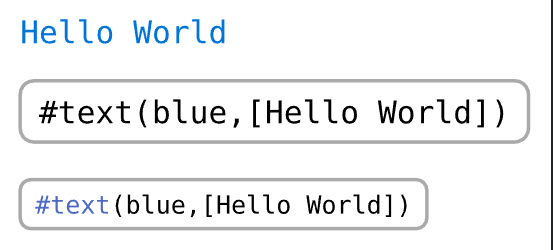
I expected no font changes, since I have to explicitly set the raw blocks font size. Is this intended? Am I doing something wrong? (setting the second raw block’s block to true doesn’t change anything…).
I would be happy if anybody could help me :)