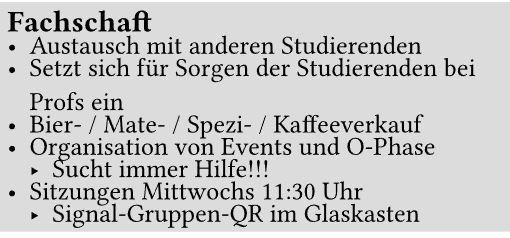
Still, when I wrap lines (because of length), a spacing shows within the list item.
(Same thing occurs with a list item with multiple lines in one bullet point.)
Hi @Proliecan, welcome to the Typst forum! Note that lists/enums come in two kinds: tight lists and wide lists. A list will be wide if you put an empty line between two list items.
The spacing between lines of a paragraph is controlled by “paragraph leading”. This leading is also used for the spacing between list items in a tight list.
For wide lists, you can control the spacing between items by setting the paragraph spacing.
You can use a show rule on list or enum (not on list items!) to change the paragraph settings for lists. Example:
// Change item spacing for wide lists
#show selector.or(list, enum): set par(spacing: 0.2em)

// Change line spacing for all lists (and item spacing for tight lists)
#show selector.or(list, enum): set par(leading: 0.2em)

- This list

- is wide.


+ This enum
+ is tight.
The two show rules could be merged into one rule that does set par(leading: 0.2em, spacing: 0.2em).