How can I create a fancy chapter title style in Typst (similar to LaTeX)

Hi everyone,

I’m trying to customize my chapter titles in Typst to look more stylish — something similar to what’s possible in LaTeX using packages like titlesec or fncychap.

I have only basic Typst skills, so I’d appreciate a simple example or a snippet that:

  • Shows a large chapter number with a custom color or background
  • Displays the chapter title beside or below it
  • Optionally adds a line or small decoration

Are there any existing templates, examples, or best practices for designing fancy chapter headings in Typst?

Thanks in advance!

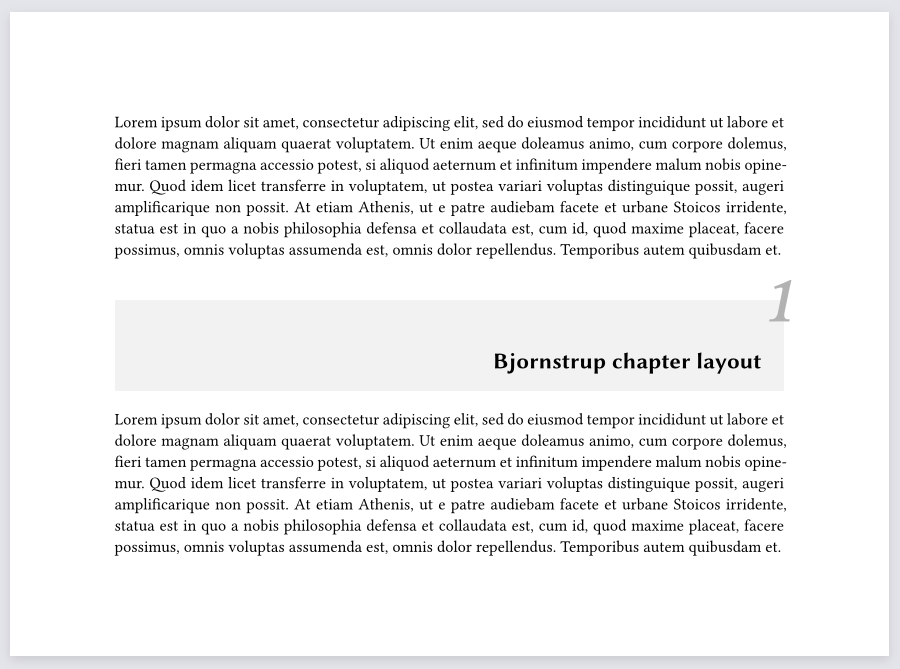
I somehow can’t think of any packages or templates which would style only the level one headings.

However, that might be because it’s a manageable challenge:

#set par(justify: true)
#set heading(numbering: "1.1")

#show heading: it => {
	block(
		width: 100%,
		height: 4em,
		above: 2em,
		below: 1em,
		inset: 1em,
		fill: luma(95%),
		place(
			dx: 1.5em,
			dy: -2em,
			top + right,
			text(
				size: 3em,
				weight: "semibold",
				style: "italic",
				fill: luma(70%),
				counter(heading).display(),
			)
		)
		+
		place(
			bottom + right,
			text(
				font: "Libertinus Sans",
				it.body,
			)
		)
	)
}

#lorem(100)

= Bjornstrup chapter layout

#lorem(100)
Output of Bjornstrup

#set par(justify: true)
#set heading(numbering: "1.1")

#show heading: it => {
	block(
		width: 100%,
		height: 3em,
		above: 3em,
		below: 1em,
		inset: 1em,
		stroke: (x: 2pt, y: 1pt),
		place(
			dx: -1em,
			dy: -2.3em,
			top + left,
			text(
				size: 2em,
				weight: "regular",
				box(
					fill: white,
					outset: (x: 0.1em, bottom: 0.3em),
					text(
						size: 0.6em,
						tracking: 0.01em,
						font: "Libertinus Sans",
						upper("Chapter"),
					)
					+ sym.space.med +
					counter(heading).display()
				),
			)
		)
		+
		place(
			dx: 1.1em,
			dy: 1em,
			bottom + right,
			text(
				weight: "regular",
				tracking: 0.05em,
				box(
					fill: white,
					outset: (x: 0.2em, y: 0.3em),
					upper(it.body)
				),
			)
		)
	)
}

#lorem(100)

= Glenn chapter layout

#lorem(100)
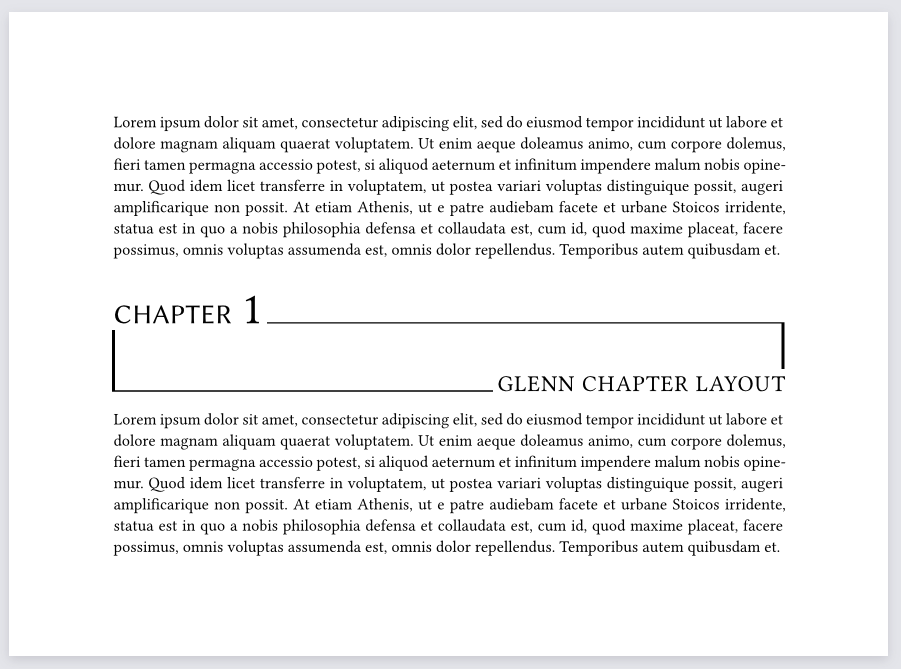
Output of Glenn

Don’t get overwhelmed by the amount of indentation, it’s there so that you don’t get lost in the nesting.

As you can tell, using a show rule the heading element is taken apart, and then it’s only a matter of positioning those parts.


4 Likes

My high school thesis template has a chapter show rule: typst-diploma-thesis/src/structure.typ at 1d378a162b09937baf1e33a7079df8e6d12b3268 · TGM-HIT/typst-diploma-thesis · GitHub. A proper chapter using this rule can be seen in page 11 of this document, for example—it looks differently from what is in the op, though.

That’s why I like show rules for stuff like this: instead of wrapping a lot of code in block(...), you can add show: block.with(...) before and avoid the nesting. Applied to the second example, it looks like this:

#show heading: it => {
  show: block.with(
		width: 100%,
		height: 3em,
		above: 3em,
		below: 1em,
		inset: 1em,
		stroke: (x: 2pt, y: 1pt),
  )
 
  place(dx: -1em, dy: -2.3em, top + left, {
    set text(size: 2em, weight: "regular")
    show: box.with(
      fill: white,
      outset: (x: 0.1em, bottom: 0.3em),
    )
    text(
      size: 0.6em,
      tracking: 0.01em,
      font: "Libertinus Sans",
      upper[Chapter],
    )
    sym.space.med
    counter(heading).display()
  })
  place(dx: 1.1em, dy: 1em, bottom + right, {
    set text(weight: "regular", tracking: 0.05em)
    show: box.with(
      fill: white,
      outset: (x: 0.2em, y: 0.3em),
    )
    upper(it.body)
  })
}

(I also used set text where it seemed to make more sense)

2 Likes

Thanks for sharing, but I couldn’t find the ones whose sole purpose is to style those headings. I would expect that to be named something along the lines of fncychap. Turns out that’s the exact package name in LaTeX.

Using show rules inside that scope is indeed useful. If you added more indentation spaces and put every argument on a new line, then the amount of code is still comparable to having no show rules. I guess the difference is more apparent with more repetitive code.

Referring to the code you highlighted on that GitHub link of yours, the answers here should also all use show heading.where(level: 1): ... since only the level one headings are intended to appear like that.

1 Like