I want to create writing guidelines on the model of the French Séyès grid. The easy part is the main grid lines, which this post has covered. The part I’m struggling with is the finer lines inside the squares: if I need those lines to repeat every 2mm for the height of the block, is tilingthe way to do it? Or is there a better way?
Here’s my stab at it using the linked post as a starting point. It draws a grid but changes what strokes are used based on the x and y position of each cell. This is done by passing a function ((x, y) => ...) to the stroke parameter of grid.
Things got pretty messy so I made some simple helper functions to keep it a bit cleaner. These functions require context to work but that’s ok because where they are called already knows its context.
#let width-first-cell = 5cm
#let width-cell = 2cm
#let height-cell = 1em
#let stroke-light = 0.1mm + blue.lighten(50%)
#let stroke-heavy = 0.5mm + red.darken(30%)

#let real-width() = if page.flipped {page.height} else {page.width - page.margin.x}
#let real-height() = if page.flipped {page.width} else {page.height}
#let num-cols() = {
  let width-remaining = (real-width() - width-first-cell).cm()
  let value = calc.ceil(width-remaining / width-cell.cm())
  return value
}
#let num-rows() = calc.ceil(real-height().cm() / height-cell.to-absolute().cm())

#set page(
  width: 10cm,
  height: 20cm,
  flipped: true
)
#set page(background: context grid(
  columns: (width-first-cell, ) + (width-cell,) * num-cols(),
  rows: (height-cell,) * num-rows(),
  stroke: (x, y) => {
    (
      top: if y == 0 {none} else if calc.rem(y, 4) == 1 {stroke-heavy} else {stroke-light},
      left: if x == 0 {none} else {stroke-heavy}
    )
  }
))
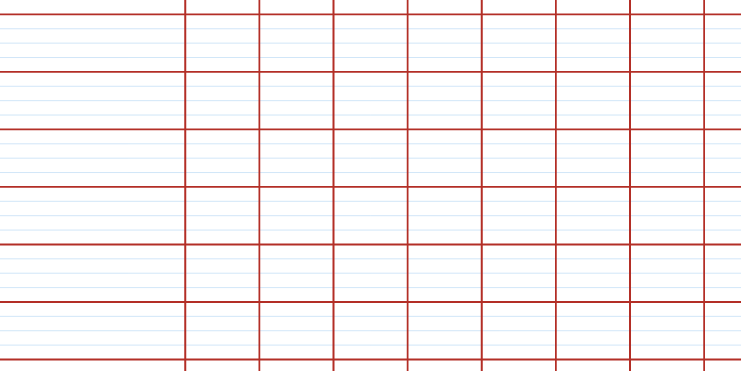

Ways it doesn’t match your linked image (thanks for including that!):
- No margins
- I tried to make sure that no cell has a stroke that borders the edge of a page (not sure how to describe this)
1 Like