How can I create interlinear text with Typst?

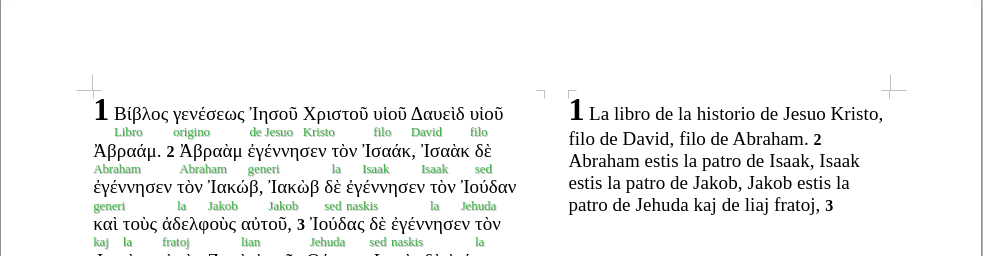
I am creating a Greek–Esperanto Interlinear Bible.

So far, I have been using LaTeX to build the Interlinear Bible.

I’m attaching an image to show the idea of what I want to achieve using Typst.

In short:
A page with two independent columns. The left column should have two lines per row: the top line for the original Greek text, and the bottom line for the word-for-word Esperanto translation. It is important that each Greek word matches perfectly with the corresponding Esperanto word.
The right column should contain the flowing Esperanto text.

I want to use Typst to create the Interlinear Bible. I see that it is simpler to maintain the book’s content (since less code is required).

Is there a way to do this with Typst?

I’ve tried using ‘Grid’. With it, I was able to place the Greek text on the left and the flowing Esperanto translation on the right. But I haven’t been able to (I’ve been trying for a month) place the corresponding Esperanto word directly under each Greek word.

I would greatly appreciate any suggestions, comments, or guidance you could give me.

Best regards.
2 Likes

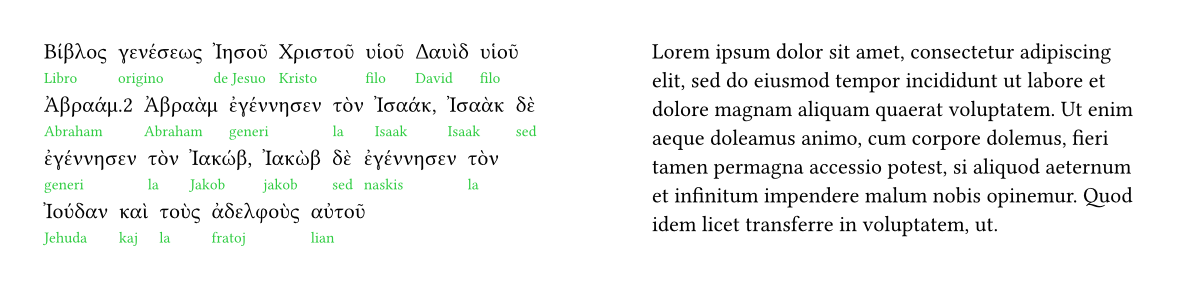
Do you care about what the API is like? One simple solution would be to create an array with the greek/esperanto words and for each pair, create a box with the words:

#let words = (
  ("Βίβλος", "Libro"), ("γενέσεως", "origino"), ("Ἰησοῦ", "de Jesuo"), ("Χριστοῦ", "Kristo"), ("υἱοῦ", "filo"), ("Δαυὶδ", "David"), ("υἱοῦ", "filo"), ("Ἀβραάμ.2", "Abraham"), ("Ἀβραὰμ", "Abraham"), ("ἐγέννησεν", "generi"), ("τὸν", "la"), ("Ἰσαάκ,", "Isaak"), ("Ἰσαὰκ", "Isaak"), ("δὲ", "sed"), ("ἐγέννησεν", "generi"), ("τὸν", "la"), ("Ἰακώβ,", "Jakob"), ("Ἰακὼβ", "jakob"), ("δὲ", "sed"), ("ἐγέννησεν", "naskis"), ("τὸν", "la"), ("Ἰούδαν", "Jehuda"), ("καὶ", "kaj"), ("τοὺς", "la"), ("ἀδελφοὺς", "fratoj"), ("αὐτοῦ", "lian")
)

#grid(
  columns: (1fr, 1fr), 
  column-gutter: 2cm, 
  words.map(((greek, esperanto)) => {
    box()[#greek\ #text(fill: green, size: 0.7em, esperanto)] + "  "
  }).join(),
  lorem(50)
)

There is probably an easier way to do this if you can be certain that each greek word maps to exactly one esperanto word.

3 Likes

I can think of two different ways to approach it in Typst:

Writing it all in Typst

With this solution the whole source text will be written out in a .typ file

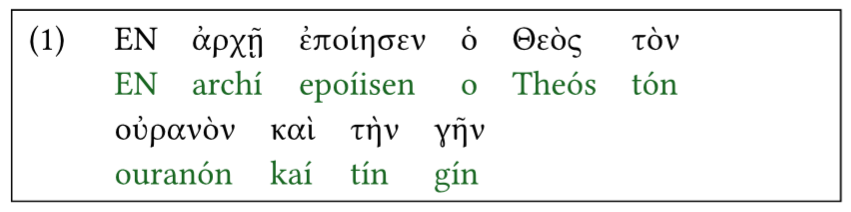
There’s a package eggs for interlinear glossing. It’s made for examples but it could potentially be adapted or changed to fit your use case. Maybe it’s a good fit because its syntax seems to be simple, but it requires double spaces between each word.

Here’s an example of what that looks like, with some other example text:

#import "@preview/eggs:0.1.0": eggs, example, judge
#show: eggs
// the 9cm block just to show that line breaking of the example works
#show: block.with(width: 9cm, stroke: 0.5pt, outset: 0.5em)
#example[
  #show grid.cell.where(y: 1): set text(green.darken(50%))
  - ΕΝ  ἀρχῇ  ἐποίησεν  ὁ  Θεὸς  τὸν  οὐρανὸν  καὶ  τὴν  γῆν
  - EN  archí  epoíisen  o  Theós  tón  ouranón  kaí  tín  gín
]

Separating Text and Presentation

Use Typst for layout/presentation but use the source text (greek, word for word translation and flowing translation) as data. You’ll read in those texts from suitable data formats, with some structure so that you can treat each verse separately and match the greek source text to the translation word for word. Then you just need to do the layout in typst, which you can do with a grid, in a similar way to how the package eggs does it above.

Benefits I would see with this are

  • Possibility to re-use existing data files (?)
  • Easier to do large scale changes to layout and presentation

What @aarnent said above is one good way to get started with this approach. Since the book is long (I presume) I would first work on creating a data format where you can conveniently input the text or translation pairs in a way you enjoy (or convert/use an existing data file).

6 Likes

I like this approach for my project.

This is a large work, and your suggestion allows me to scale the project. Having to manually synchronize word by word (Greek – Esperanto) would become very tedious. In LaTeX, I use three glosses (gla: here I write the original Greek text; glb: here I write the word-for-word Esperanto translation of the Greek; glc: the flowing text translated into Esperanto, which is the text that goes in the right column).

I’m new to Typst, so I need to study how to do what you suggest. I need to know what is required to import and synchronize the data. I’ll have to read more of the documentation and look in the forum to see if someone has done something similar.

1 Like

Thank you for your reply.

It’s simple to apply, but I see it as a bit difficult to scale if I want to translate longer texts (in this case, the Bible).

1 Like

Saluton! :wave:

When you separate input and presentation is that having a machine-readable structured input¹ you handle multiple versions of your project easily. For example, if you want to add linguistic information beyond² simple lexical glosses you can still produce the basic version along with he more complex version with a simple change and some basic Typst code (a conditional basically). This might save time aligning words*.

I see you want to gloss word by word. Another approach that can be taken is not to gloss individual occurrences but to translate the lexemes (using Strong’s Numbers or a more modern version like the one used in OSHB), disconnected from concrete verses, and use Typst scripting abilities to ‘populate’ the glosses by reading the lexeme_number-Esperanto ‘dictionary’ you made; the glosses can be automatically linked to the dictionary, and backlinks can also be made available (using existing databases that link lexemes and verses, or using Typst for this, with basalt-backlinks or otherwise). The downside of this is that the translations of the lexemes are not context-dependent (you can of course split one source lexeme into several translations in E-o, but this means you will have to match each one individually in the Biblical text, which kinda defeats the purpose of this approach…).


¹ YAML or JSON files structured book > chapter > verse > (tiers), for example. Such file formats are well-supported in Typst and can be easily automated when converting data from other sources.

² You don’t have to reinvent the wheel for that, of course. Machine-readable grammatical analysis of the Hebrew Bible is available in the OSHB project (as easily usable XML files) and both the Greek and Hebrew Bibles are covered by the Clear Bible project*.

* I’m not familiar with this project, so I can’t testify regarding the validity of the data it provides.

3 Likes