How can I draw an angle when my points come from an on-yz projection in CeTZ?

Hi everyone,

I’m trying to recreate an electron diffraction tube diagram with CeTZ in Typst. To get some perspective, I’m using on-yz for projections.
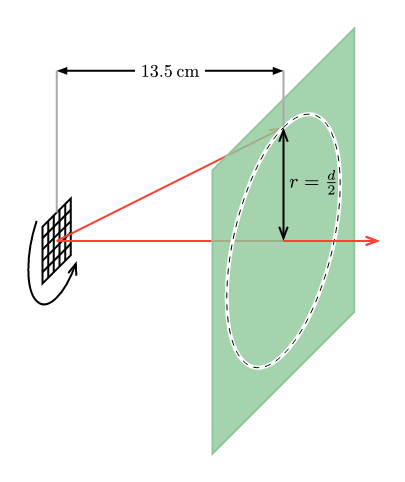
Now I’d like to draw an angle (α) between two lines. But whenever I use angle(…), I get the error that all points must have the same z-coordinate — which seems to happen because some of my points come from the on-yz projection.

Here’s a minimal code snippet:

#canvas(length: 1cm, {
  import draw: *
  on-yz({
    arc((0, 0), radius: 1, start: 45deg, stop: -135deg)
  })

  line((0, 0), (5.7, 0), name: "lower-line")
  on-yz(x: 4, {
    circle((0, 0), radius: 2, name: "circle")
  })
  line((0, 0), "circle.north", name: "upper-line")

  // This causes the error:
  // angle.angle((0, 0), "upper-line.end", "lower-line.end")
})

How can I correctly draw the angle between these lines in such a mixed 2D/3D setup? Is there a way to “flatten” or project the points so angle accepts them?

Here is a copy of the complete project:
https://typst.app/project/rj4rkyfUxx77BTyfejsQhS

Thanks a lot!

It seems to be an internal rounding error. You can workaround it by using the following code:

let discard-z((x, y, z)) = (x, y, 0)
angle.angle((0, 0), (discard-z, "upper-line.end"), (discard-z, "lower-line.end"))

This example with a radius of 0.75 work :cry:, but as soon as I change the radius, it fails with the same rounding error.
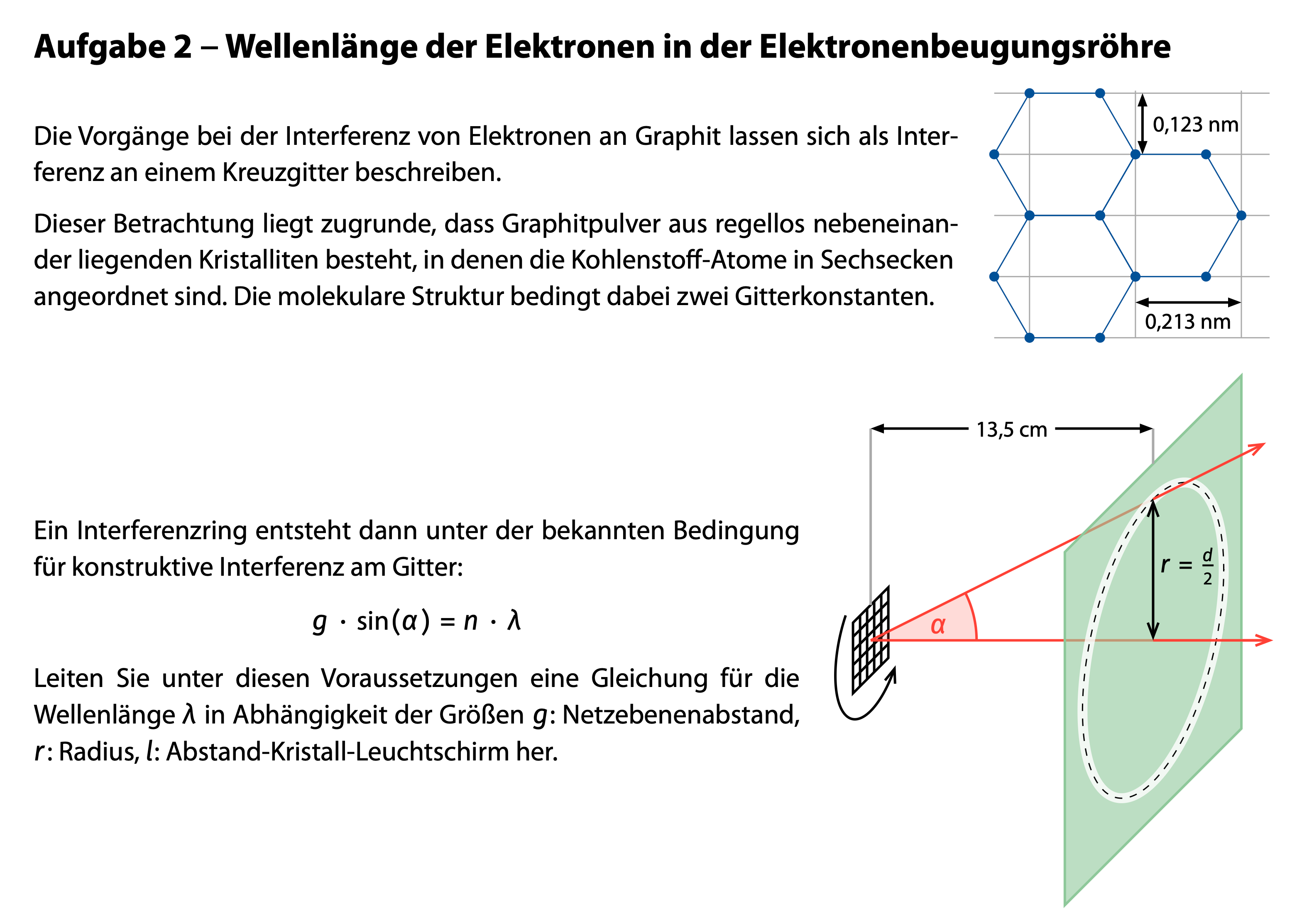
#import "@preview/cetz:0.4.2": canvas, draw, angle

#canvas({
  import draw: *

  let screen-distance = 4
  
  on-yz({
    // Draw the grid
    grid((-1, -1), (1, 1), name: "grid", step: 0.5)

    // Draw the arc + arrow
    arc((0, 0), radius: 2, start: 45deg, stop: -135deg, anchor: "origin", mark: (end: ">>", fill: black))

    // Draw the screen
    translate((0, 0, -screen-distance))
    scale(3)
    rect((-1, -1), (1, 1))
    circle((0, 0), radius: 0.75, name: "circle")
  })

  line("grid.center", ("grid.center", 150%, "circle.center"), stroke: red, fill: red, mark: (end: ">>"), name: "x-ray")
  line("grid.center", "circle.north", stroke: red, name: "upper-ray")
  
  line("circle.north", ("circle.north", "_|_", "x-ray.start", "x-ray.end"), mark: (start: ">>", end: ">>", fill: black))

  // Draw the angle
  angle.angle((0,0), "upper-ray.end", "x-ray.end", direction: "cw", radius: 1.2, label: $ alpha $, fill: red.transparentize(75%))
})
1 Like

Hi,
I am not helping with the rounding error of the angle. But for this particular case, it looks like you could do it simply in 2D only. The circle could be drawn as a rotated ellipse and so on.
Of course, it is not as satisfying as doing it in 3D, but it could do the job.

1 Like

Yes, that would be possible, but then I would also need to calculate the skew of the screen and the grid myself, which seems like a rather tricky task.

That workaround does the trick, thank you very much! It really seems to be some kind of internal rounding bug, because it works fine for one radius but fails again as soon as I change it.

Nevertheless, I’m very happy with the result (I’ve attached the file with the two final diagrams). Many thanks for such a powerful and well-designed CeTZ package, and also for your quick and helpful support — it really makes working with Typst a lot of fun!

Do you think this rounding issue comes from CeTZ itself, or is it something internal to Typst?

2 Likes

That looks awesome! We had a lot of bugs because of rounding errors happening when multiplying the transformation matrix. I am sure I can fix this in cetz – we are already rounding the transformation matrix – but I have not yet looked into it.

1 Like