as the title says, I would like to iterate over all cells of a table in a show rule. That is:
#show table: it => {
  for child in it.children {
    if (WHAT DO I NEED TO WRITE HERE TO CHECK IF CHILD IS A CELL?) {
      /* Read the text from the body of the cell and do something with it. */
    }
  }
}

#table(
  columns: (auto, auto, 1fr, auto, auto),
  align: horizon,
  table.header(
    repeat: true
  )[Head 1][Head 2][Head 3][Head 4][Head 5]
)[1][2][3][4][5]
What if condition should I use to check whether the child is a cell?
A few additional remarks:
I am aware that I actually need to go recursively through all children to iterate over all cells. But that’s not my problem. My problem is that for the life of me I can’t find out how to check whether or not a child is a cell. Once I know that, implementing the recursion should be easy.
Of course, I would be open to other solutions. For example, I tried to select all cells with a selector, but without avail. Either that’s not possible, or I have been too silly to find out the correct way. With other selectors, I had no problems, though. I’ll be happy with every method that enables me to iterate over all cells of a table in a #show rule. It doesn’t need to be a recursive scan through all children.
There are some questions (along with answers) in this forum and elsewhere about how to automatically fill table cells with content (for example, from a CSV file). But I’d like to have it the other way around. I’d like to read the content of the cells.
#show table: it => {
  // Prevent infinite recursion
  if (it.has("label") and it.label == <table-style-done>) {
    it
  } else {
    let fields = it.fields()
    let children = fields.remove("children")
    let new-children = ()

    for child in children {
      if child.func() == table.cell {
        // Table cell
        new-children.push([_Modified_ #child])
      } else {
        // Table headers (array)
        new-children.push(child)
      }
    }
    // Recreate and return the table
    [#table(..fields, ..new-children)<table-style-done>]
  }
}
The answer given there is interesting, but does not solve the problem. That’s my fault; I surely should have attached more screenshots. So here we go:
I would like to wrap the text in the first header cell of a table dependent on how much horizontal space the other cells in the first column take, as shown in the following pictures.
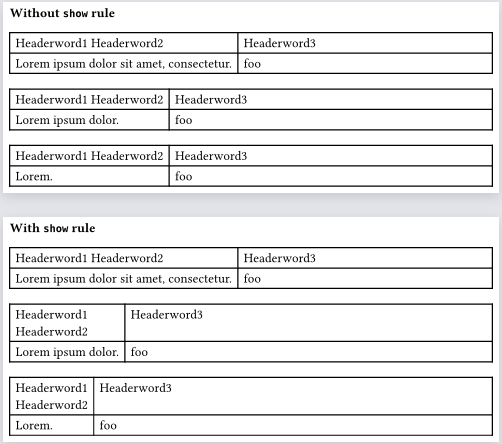
In the following first picture, the first header cell contains the two words “Headerword1” and “Headerword2” on one line. This makes sense because the text in the first data cell takes more horizontal space than the two words in the first header cell together, and because the text in the first data cell cannot be wrapped because there is no word boundary.
In the following second picture, the situation is different. The text in the first data cell takes much less horizontal space than the two words in the first header cell. Actually, it even takes less horizontal space than each single word in the first header cell. Under such circumstances, I would like the text in the first header cell to be line-wrapped.
[ Side note: The line break between “Headerword1” and “Headerword2” in the second picture has been inserted manually to demonstrate the goal. ]
In that sense, I would like to make the first column as small as possible. In other words, the second column should be as wide as possible.
This is easy in HTML, but I couldn’t find an easy way to achieve it in typst. To solve the problem, we eventually could do the following in a table #show rule:
Iterate over all cells in the table
For each cell, check if it is in column 1
If yes, split the text in the cell at word boundaries (e.g., space characters)
For each single word, compute the horizontal space it takes
Remember the maximum horizontal extent that has been encountered so far
Finally, set the first element of the columns: array to that maximum
Leaving aside the gory details of the implementation, this would make the table behave as desired, wouldn’t it?
Then it would be convenient to access the column number of a cell in in an easy way, because we want to include only cells in column 1 into the calculations.
Alternatively (as you have proposed), we could note the number of columns, increase a counter whenever we find a cell, and use these two values in a modulo calculation to determine if the cell is in the first column. This should work under the condition that we encounter the cells in the expected, natural order when we walk down the tree of children.
I am also aware that a full implementation of the desired feature probably will take very high effort, because of situations like cells in cells, block / box content besides text in header cells (what rule for line breaks would then apply?), and so on.
However, for now, I am seeking a solution for simple cases (nothing else than text in cell bodies).
Find the maximum width of non-header first row cells
Find the minimum width of the first row header (spaces → linebreaks)
Create a new table with as much info from the original but with redefined first column width
#show table: tbl => {
  //Protect against infinite recursion
  if tbl.has("label") and tbl.label == <already-processed> { return tbl }

  //Save arguments from original table
  let other-fields = tbl.fields()
  let all-cells = other-fields.remove("children")
  let columns = other-fields.remove("columns")
  let non-header-cells = all-cells.filter(c => repr(c.func()) != "header")
  let first-column-cells = non-header-cells.enumerate().filter(p => p.at(0) == 0).map(p => p.at(1))

  //Get the max width of all non-header first column cells
  let cell-widths = first-column-cells.map(c => measure(c).width)
  let max-non-header-cell-width = calc.max(..cell-widths)

  //Get narrowest width of first column header
  let first-column-header = all-cells.first().children.first()
  let minimum-first-header-width = measure({
    show regex(`\s`.text): linebreak()
    first-column-header.body
  }).width

  //Choose a new width of the first column
  let new-first-col-width = calc.max(max-non-header-cell-width, minimum-first-header-width)
  new-first-col-width += 2 * other-fields.at("inset")
  let new-columns = (new-first-col-width, ) + columns.slice(1,)

  //Return a new table with the modified widths
  [#table(
    ..arguments(
      ..other-fields,
      columns: new-columns
    ),
    ..all-cells,
  )<already-processed>]
}
#set page("a6")
#set page(flipped: true)
#set page(width: auto)
#set page(margin: 2mm)

#let example-wide = table(
  columns: (auto, 1fr),
  table.header[Headerword1 Headerword2][Headerword3],
  lorem(6), [foo]
)
#let example-narrow = table(
  columns: (auto, 1fr),
  table.header[Headerword1 Headerword2][Headerword3],
  lorem(3), [foo]
)
#let example-narrower = table(
  columns: (auto, 1fr),
  table.header[Headerword1 Headerword2][Headerword3],
  lorem(1), [foo]
)

*Without `show` rule*
#example-wide
#example-narrow
#example-narrower

#pagebreak()

#show table: tbl => {
  //Protect against infinite recursion
  if tbl.has("label") and tbl.label == <already-processed> { return tbl }

  //Save arguments from original table
  let other-fields = tbl.fields()
  let all-cells = other-fields.remove("children")
  let columns = other-fields.remove("columns")
  let non-header-cells = all-cells.filter(c => repr(c.func()) != "header")
  let first-column-cells = non-header-cells.enumerate().filter(p => p.at(0) == 0).map(p => p.at(1))

  //Get the max width of all non-header first column cells
  let cell-widths = first-column-cells.map(c => measure(c).width)
  let max-non-header-cell-width = calc.max(..cell-widths)

  //Get narrowest width of first column header
  let first-column-header = all-cells.first().children.first()
  let minimum-first-header-width = measure({
    show regex(`\s`.text): linebreak()
    first-column-header.body
  }).width

  //Choose a new width of the first column
  let new-first-col-width = calc.max(max-non-header-cell-width, minimum-first-header-width)
  new-first-col-width += 2 * other-fields.at("inset")
  let new-columns = (new-first-col-width, ) + columns.slice(1,)

  //Return a new table with the modified widths
  [#table(
    ..arguments(
      ..other-fields,
      columns: new-columns
    ),
    ..all-cells,
  )<already-processed>]
}

*With `show` rule*
#example-wide
#example-narrow
#example-narrower
Known issues
If one of the cells in the first column is too wide, it will break the result. This is because measuring the widths of cells assumes an infinite width. I can’t think of a simple way to fix it.
If cells span rows or columns this will fail. It uses a very naïve method of finding what is in the first column. A show rule matching table.cell includes column/row information but the children of table do not unfortunately.
Thank you very, very much, and please excuse the delay.
I have learned so much from your code (among others, about repr() and enumerate()), and I guess I have understood most of it.
However, there’s one thing I don’t understand. After having studied how enumerate() works, it is not clear to me why the line
let first-column-cells = non-header-cells.enumerate().filter(p => p.at(0) == 0).map(p => p.at(1))
works as intended. enumerate() here returns an array (that in turn consists of 2-element arrays), and the following filter() selects the first element of that array. Doesn’t that mean that first-column-cells contains only one element afterwards in every case?
I have added some debug code to investigate the situation (placed [ #first-column-cells.len() ] after the above line). The output of this code was always 1, regardless of how much rows the table had.
I then extended the table by a second row and put a very short text in the first two cells in the first column. The text was so short that the text in the first header cell was wrapped (as intended). Then I made the text in the second first cell in the second row much longer. This should have made the first column wider, it didn’t; the longer text overflowed the cell and extended into the second column. Eventually the sample code takes only the first cell in the first non-header row into account.
The fix was easy, though. In the filter in the above line, we should select not only the first array element that ènumerate() returns, but instead the first, the sixth, the eleventh (and so on) element (given that the table has 5 columns).
This can be achieved by a modulus calculation (using typst’s rem() function). I changed the line above as follows:
Here, 5 is the number of columns in the table (having that number hardcoded was only for testing).
The changed line fixed the problem. I’ll now try to extend the sample code so that text in non-header cells in the first column gets wrapped, too, if possible, and so that also the other columns except the middle column behave the same. This will take a while , and it will be interesting how much the computational effort increases.


 , and it will be interesting how much the computational effort increases.