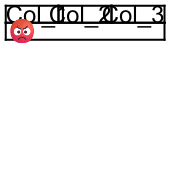
I am currently developing a tool for the automated creation of technical documents and I use typst for rendering the documents. The documents using tables containing text, pictures and QR/DMC codes. Sometime it happens that the content of a table cell overlaps with another cell.
The following typst code renders successfully, but the texts and the symbol overlaps. Is there a way to detect such overlapping content or that the cell content doesn’t fit the cell size and let the rendering fail in such case?
Hi, welcome to the Typst forum! Your example shows different causes of overlap:
Vertical overlap of text: Typst uses values given by the font to decide on the “top-edge” and “bottom-edge” for the text.
By default the top-edge is “cap-height” (approximate height of uppercase letters) and the bottom-edge is “baseline” (line on wich the letters should rest). The fonts are free to make capital letters that reach above the capital height and below the baseline. Fonts often do that for aesthetic reasons: the big C looks more “on the base line” if the bottom curve reaches a bit below, and it also looks better if the top curve reaches above the limit of a big H for example.
You can use #set text(top-edge: "bounds", bottom-edge: "bounds") to use vertical bounds closer to the true glyph bounding box. I think that’s the best information you can get from the font file, but it’s still not exactly the visual bounding box. So this will decrease overlap but not eliminate it.
To eliminate this kind of overlap I think you need to use a cell inset larger than 0.
Horizontal overlap: this happens when the cells are too small to fit their content. In your case the page width is just too small to show those three cells side by side. For simple cases, you can use a rule like the following to detect the issue:
#set page(width: 30mm, height: 30mm, margin: 1mm)

// Raises an error with 12pt, but not with 11pt
#set text(12pt)

#show table: it => layout(size => {
  if size.width < measure(it).width {
    panic("Table too wide")
  }
  it
})

#table(
  columns: 3,
  column-gutter: 0mm,
  row-gutter: 0mm,
  inset: 0mm,
  "Col_1", "Col_2", "Col_3",
  emoji.face.angry.red,
)
However this won’t work if you have tables with columns of size 1fr or similar: in that case the column will be measured as requiring 0pt. I don’t know if this can be worked around.
Overlap of the emoji: I think that’s just the glyph spilling significantly beyond the bounding box recorded in the font file. Again to avoid that I can only think of setting a sufficiently large cell inset.
For the second point, I think it would make sense to have Typst detect this automatically and raise an error (maybe as an option). I couldn’t find an existing issue on GitHub, maybe you can file one.
For the general issue of glyphs being larger than the bounding box recorded in the font file, I guess theoretically it could be possible for Typst to compute the true bounding box manually (e.g. by rasterizing the glyphs) but that would be rather expensive. Maybe a plugin could be implemented to do that for people who have this issue and don’t mind the hit in compilation time.
thank you for your quick response. bottom-edge option works great and help for vertical text overlapping. Thank you.
For 2nd point I will file an issue. In my files the tables are used to place the texts and pictures in a specific layout. It is not a real table. Therefore inset must be 0 and cell size must be auto. I was hoping that there is an option to enforce the table cell to have the size of it’s content. Whatever the content will be. This would also address the 3rd point.