How can I measure an angle in cetz?

So far I can draw and label an angle just fine, but I can’t figure out how to put in the points/vectors and get cetz to return to me the size of the angle.

The documentation indicates this should be possible here

“angle2(
a: vector,
b: vector,
) → angle
Calculates the angle between two vectors and the x-axis in 2d space”

But I cannot get this command to work.

Can someone please provide a minimal working example of how to use this, ideally with the two vectors typed in and the angle that it measures between them printed somewhere.

Thanks.
Hey @Chris1 ,

while we can do your homework, it helps us very much if you show your attempts. It gives us insight and improves our bug searching skills.

Anyway, cetz’s angle2 accepts so called vectors → so not a Typst type. Clicking on the vector label at Vector | CeTZ Documentation redirects you to the vector section and you’ll see:

vector

An array of any number of floats.

So you need to provide arrays of numbers, which represents position vectors. Example:

#import "@preview/cetz:0.4.2"

#cetz.vector.angle2(
  (1,1,1),
  (1,2,2)
)

Leads to 90deg

Hi Chris1, I’m also initially confused by this API (that I’ve never used before).

It seems like it doesn’t measure the angle between two vectors, instead it measures the angle between the x-axis and a resulting vector. The resulting vector is c = b - a here, which is like saying that a is the origin and we’re measuring the angle that lies between b - a and the x-axis.

That’s my understanding from a few experiments.

There’s a picture of it here in this issue: Rotations about the Z-axis · Issue #274 · cetz-package/cetz · GitHub (not a perfect picture to explain it.)


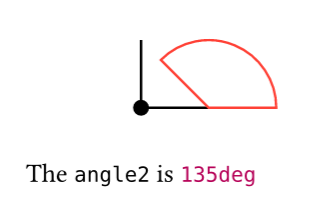
Here’s some code and a picture. Starting from how I got to know the function, “what’s the angle2 of (1, 0) and (0, 1)”?

#import "@preview/cetz:0.4.2"
#cetz.canvas({
  import cetz.draw: *
  // example: Measuring the angle2 of (1, 0) and (0, 1) results in 135 degrees.
  let angle = cetz.vector.angle2((1, 0), (0, 1))
  circle((0, 0), radius: 0.1, fill: black)
  line((0, 0), (1, 0))
  line((0, 0), (0, 1))

  // draw an arc that shows the angle we just measured.
  arc((2, 0), start: 0deg, stop: 135deg, mode: "PIE", stroke: red)
  content((0, -1), [The `angle2` is #angle])
})

As explained above, the angle2 of those vectors seems to be 135 degrees.

A bit more context for what I’m trying to do:

The code below draws a triangle

#cetz.canvas(
  {
    import cetz.draw: * 
    import cetz.angle: angle 
    let (a,b,c) = ((0,0), (1,2), (4,-1)) 
    line(a,b,c, close : true) 
    set-style(angle: (radius:1.5, label-radius:1.1)) 
    angle(c,b, a, label: $theta degree$)  
    }
)

I have just labelled one of the angles as theta.

I would like to be able to label that angle with it’s correct measurement (rather that doing the cosine rule myself so that if I where to change one of the points the correct measure of the angle would also update with it).

Thanks.

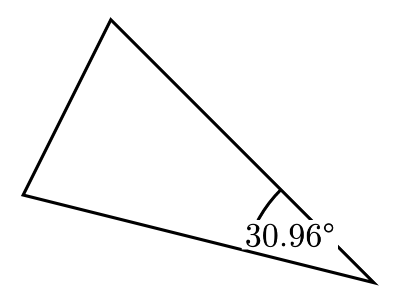
If I understood you correclty, you want the angle value inside the angle element instead of the theta symbol, correct?

If yes, note the parameter entry for label:

image

You’ve given content and not a function. Here’s what it would look like if you gave a function:

#cetz.canvas(
  {
    import cetz.draw: * 
    import cetz.angle: angle 
    let (a,b,c) = ((0,0), (1,2), (4,-1)) 
    line(a,b,c, close : true) 
    set-style(angle: (radius:1.5, label-radius:1.1)) 


    angle(c,b, a, label: angle => { box(fill: white, inset: 1pt, $#calc.round(angle.deg(),digits: 2) degree$)})  
    }
)

The inline/anonymous function angle => ... is equivalent to:

#let format-angle(angle) = {
  box(fill: white, inset: 1pt, $#calc.round(angle.deg(),digits: 2) degree$)
}

#cetz.canvas(
  {
    import cetz.draw: * 
    import cetz.angle: angle 
    let (a,b,c) = ((0,0), (1,2), (4,-1)) 
    line(a,b,c, close : true) 
    set-style(angle: (radius:1.5, label-radius:1.1)) 


    angle(c,b, a, label: format-angle)  
  }
)
2 Likes

Yes.
Thank you.
That is what I wanted. I had (erroneously) assumed angle2 was for 2 dimensional vectors while angle was for 3 dimensional vectors.

Here is the finished product

#let format-angle(angle) = {
   $#calc.round(angle.deg(),digits: 0) degree$
}
#cetz.canvas({
  import cetz.draw: *
  import cetz.angle: angle

  let (a,b,c) = ((0,0), (1,2), (4,-1))
    
 line(a,b,c, close : true) 
    set-style(angle: (label-radius:1.1)) 
    angle(c,b, a, label: format-angle)    
    angle(b,a, c, label: format-angle)
    angle(a,c, b, label: format-angle)  
})

#cetz.canvas({
  import cetz.draw: *
  import cetz.angle: angle
  let (a,b,c) = ((0,0), (1,2), (4,-1))
  
 line(a,b,c, close : true) 
    set-style(angle: (label-radius:1.1)) 
    angle(a,b, c, label: format-angle)    
    angle(c,a, b, label: format-angle)
    angle(b,c, a, label: format-angle)  
})