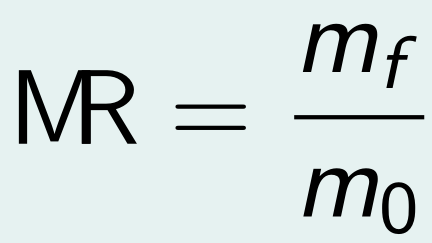
How can I merge two letters like the MR in this image?
1 Like
It is called a ligature. I am sure it is doable. Perhaps look this way for hints on how to do it?
You will certainly need to select an appropriate font for that.
Also some Typst parameters in the documentation for Text Function – Typst Documentation.
3 Likes
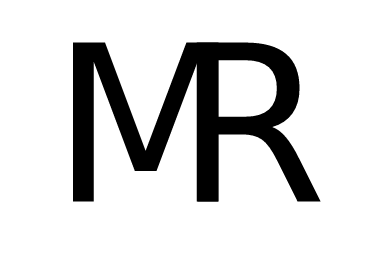
For a one-off you could use the tracking setting, which adds extra space between letters. Needs adjustment per font and letter combination.
#set text(font: "DejaVu Sans", size: 40pt, tracking: -0.295em)
MR
3 Likes
I ended up combining this approach with a regex show rule.
#set text(font: "New Computer Modern", size: 100pt)
#show regex("\bMR\b"): set text(tracking: -0.365em)

MR
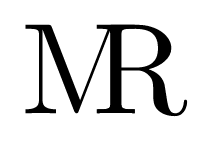
(thanks to @bdr for pointing out, that the original regex was also matching “MR” when it was part of a word)
1 Like
I’m sorry, but that regex doesn’t do anything different than show "MR":, aside from wasting cpu cycles to setup the regex. If want to match just the word “MR”, not everything containing “MR”, you can use regex("\bMR\b"). \b means word boundary.
But IMHO, the best thing to do is limiting the scope of the show rule, for instance by delimiting it by a content block. This
#[
#show regex("\bMR\b"): set text(tracking: -0.365em)

MR
]

MR
will act on the first MR but not on the second, there the show rule is out of scope.
1 Like
Furthermore, it’s best to always escape the backslash in strings. See Fix and improve regex documentation by Andrew15-5 · Pull Request #7211 · typst/typst · GitHub.