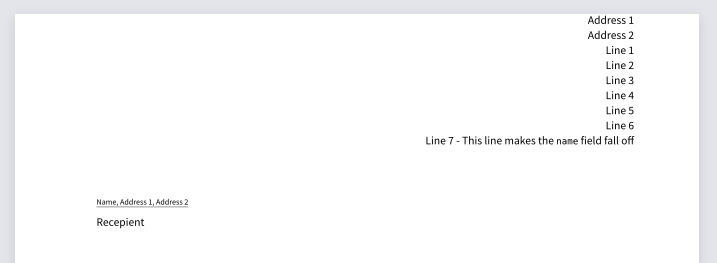
It would be very useful if you could provide a minimum working example (MWE) that demonstrates the problem you are having.
I think this is such a MWE but please correct me if there is something else going on.
#import "@preview/letter-pro:3.0.0": letter-simple
#show: letter-simple.with(
  sender: (
    name: "Name",
    address: "Address 1, Address 2",
    extra: [
      Line 1\
      Line 2\
      Line 3\
      Line 4\
      Line 5\
      Line 6\
      Line 7 - This line makes the `name` field fall off
    ],
  ),

  recipient: [Recepient],
)
After looking at the source code it seems like adjusting the margin may be the fix but I wasn’t able to get any improvement by including margin details in the letter-simple.with( call. This might be due to this:
// Reverse the margin for the header, the address box and the information box
  pad(top: -margin.top, left: -margin.left, right: -margin.right, {
Hi @gezepi - thanks a lot for your quick reply and sorry for not posting a MWE. The one you posted is spot on, though.
I think I have to modify the template directly in this case. Not a problem, of course, but not very nice. I would have hoped that there is a way to influence spacing/margins etc “externally”.
(Instead of a footer – and header – you could also use the page.foreground/page.background)
If that isn’t enough, I’d recommend posting a separate question though, so that others properly notice it and so that you can separately mark both questions as solved.