I’m using a smart solution for achieve a grid of images (a group of images in colums).
Here the Solution of @nleanba: Grid - how display picture on 2 columns programmatically - #8 by nleanba
But How can I put captions to the grid of images?
I’m using a smart solution for achieve a grid of images (a group of images in colums).
Here the Solution of @nleanba: Grid - how display picture on 2 columns programmatically - #8 by nleanba
But How can I put captions to the grid of images?
Can you give a minimal working example of your grid (replacing the images with #rect(...) or similar)?
Here the parameters I’m using:
#let portrait_landscape(content) = {
  // we set an explicit width to make 100% width = 100pt
  let dimensions = measure(content, width: 100pt)
  if dimensions.width > dimensions.height {
    grid.cell(colspan: 2, content)
  } else {
    grid.cell(colspan: 1, content)
  }
}

#set image(fit: "contain", width: 100%) // you must not set the height here, as this will make all images to have the same aspect ratio, as it is measured _after_ it is fit to the set width/height
#context grid(
  columns: 3,
  rows: 140pt,
  gutter: 15pt,
  // align: top,
  // fill: red, // to show cell sizes
  portrait_landscape(image("img/doc-1.webp",)),
  portrait_landscape(image("img/doc-2.webp",)),
  portrait_landscape(image("img/doc-3.webp",)),
  portrait_landscape(image("img/doc-4.webp",)),
  portrait_landscape(image("img/doc-5.webp",)),
  portrait_landscape(image("img/doc-6.webp",)),
)
I want to add one only caption for all the group of images
I cannot compile this example without the pictures… If you make a working example using rect(...) instead of image(...) it would help.
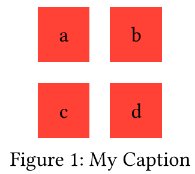
In any case, if you just want one caption for the whole grid, you can put the grid in a figure:
#figure(
  caption: [My Caption],
  grid(columns: 2, fill: red, gutter: 1em, inset: 1em, [a], [b], [c], [d]),
)
Well, finally I use you snippet, more clean and easy to deploy. Thanks @sijo