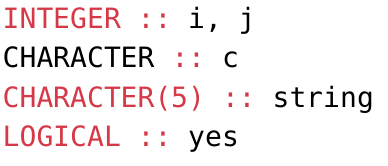
I’ll take my problem as an example, but I welcome more generic solutions for fixing syntax highlighting grammar because this is not an isolated problem.
With this typst document:
```f95
INTEGER :: i, j
CHARACTER :: c
CHARACTER(5) :: string
LOGICAL :: yes
```
how can I patch the raw or define a custom command that would use exactly what the syntax highlighter already does, but add an exceptional rule to add CHARACTER to a list of detected keywords? Quick-and-dirty is acceptable.
For a quick and dirty solution, you can manually color specific keywords by setting the text fill, e.g. in your example:
#show raw.where(lang: "f95", block: true): it => {
  show "CHARACTER": set text(fill: rgb("D73948"))
  it
}
Since this seems(?) like a compiler bug, this may be the only way to do it before it gets patched. There are some packages like pleast which claim to give you better control, but I haven’t looked into it.
Yes, this should be quite easy (just specify the keyword and desired color), you can even use regex. Though if you find yourself writing regular expressions for matching keywords it’s probably time to look into more “proper” solutions
For potentially interested users I ended up using regex anyway, now it does the job nicely. I put this in an independent file that might receive other ad hoc fixes.
// Fortran syntax highlighting CHARACTER (case insensitive) fix.
#let f95_character_fix(body) = {
  show raw.where(lang: "f95"): it => {
    show regex("(?i)character"): set text(fill: rgb("#d73948"))
    it
  }
  body
}