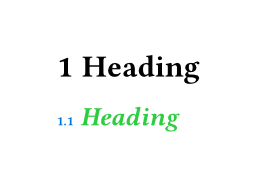
If I have a heading like this:
== intro
It might auto-style like this:
2.3 intro
How could I (for example) style the 2.3 as 0.5em + blue while the intro is italic + green ?
Thanks!
If I have a heading like this:
== intro
It might auto-style like this:
2.3 intro
How could I (for example) style the 2.3 as 0.5em + blue while the intro is italic + green ?
Thanks!
Hi @terasa that’s currently a bit cumbersome, you have to manually rebuild the heading.
#set heading(numbering: "1.1")
#show heading.where(level: 2): it => block[
  #text(size: .5em, fill: blue, counter(heading).display(it.numbering))
  #text(fill: green, emph(it.body))
]
= Heading
== Heading
Alternatively, you can style the numbering and heading separately:
#show heading: set text(fill: green, style: "italic")

#set heading(numbering: (..nums) => {
  set text(fill: blue, size: 0.5em, style: "normal")
  numbering("1.1", ..nums)
})
With more complex rules it gets a bit tricky as the numbering is also a part of the heading, so you should prioritize using show-set rules instead of show rules with functions (i.e. transformational show rules) so that you can override them when necessary.
The solution by @aarnent affects the numbering generally, so the style is also applied for the entry in the outline and when referencing it.
Thanks for that - that works for me.
Just one anomaly - don’t know if this is a Typst 0.15.0 bug, or a flaw in my understanding.
In the code below (which is a slightly tweaked version of yours), there’s a compile error if the OUTLINE is below the SHOW. Works fine for me if the OUTLINE is above the SHOW.
#set document(title: [For PDF/UA-1 compliance])
#set heading(numbering: "A.1.a")

// #outline(title: [Contents])
#show heading: it => block[
  #text(size: .5em, fill: green, counter(heading).display(it.numbering))
  #text(fill: blue, emph(it.body))
]
#outline(title: [Contents])


= Heading A
== Heading A.1
=== Heading A.1.a
= Heading B
== Heading B.1
=== Heading B.1.a
=== Heading B.1.b
error: expected string, function, or auto, found none
6 │   #text(size: .5em, fill: green, counter(heading).display(it.numbering))
  │                                                           ^^^^^^^^^^^^
help: error occurred while applying show rule to this heading
9 │ #outline(title: [Contents])
Sorry … Spotted another problem. It seems to break in-dexter, the indexing package:
#import "@preview/in-dexter:0.7.2": *

#set heading(numbering: "A.1.a")
#show heading: it => block[
  #text(size: .5em, fill: blue, counter(heading).display(it.numbering))
  #text(fill: green, emph(it.body))
]

#index(index: "Main")[word]
#make-index(title: "Main index", indexes: "Main")
error: expected string, function, or auto, found none
  │
7 │   #text(size: .5em, fill: blue, counter(heading).display(it.numbering))
  │                                                          ^^^^^^^^^^^^

help: error occurred while applying show rule to this heading
    ┌─ @preview/in-dexter:0.7.2\in-dexter.typ:422:8
    │
422 │ ╭         heading(
423 │ │           outlined: outlined,
424 │ │           numbering: none,
425 │ │           title,
426 │ │         )
    │ ╰─────────^
There’s a fairly easy work-around that works for me - have another SHOW HEADING immediately before the MAKE-INDEX that does not do the styling. May not be a universal solution for everyone :)
This is not a flaw in Typst, simply an oversight from me for cases where a heading has no heading numbering:
#show heading: it => block({
  if it.numbering != none {
    text(size: .5em, fill: blue, counter(heading).display(it.numbering))
    sym.space
  }
  text(fill: green, emph(it.body))
})
Cool - thanks!